Nano Banana 2 Lite vs 2: Which One Should You Use on Pixomi?
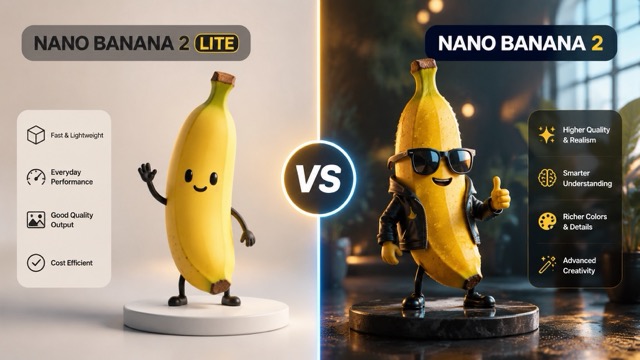
Pixomi Just Added Google's New Image Model — Nano Banana 2 Lite. For Nano Banana 2 Lite vs 2, two models, one price — which one is right for you?
Google just dropped a new image model Nano Banana 2 Lite— and it's the fastest one yet. If you've been creating on Pixomi, you now have a new option sitting right alongside the Nano Banana 2 you already know.
Both models are available at the same price. So what's actually different, and does it matter for your work?
First, a Quick Intro to Pixomi
Pixomi is an all-in-one AI creative platform that brings together the best image and video generation models in one place — Google, OpenAI, Midjourney, Grok, and more.
You generate, edit, and iterate without switching between a dozen different tools. Images you create come with commercial usage rights included, and there's a free tier to get started.
The platform has always been model-agnostic: the goal is to give creators access to what's best, not lock you into one provider.
Meet the Nano Banana Family
Before comparing the two, it helps to know where they fit in Google's model lineup.
Google's image generation models go by the nickname Nano Banana — a codename that stuck after the original model went viral for its strikingly photorealistic outputs. There are now three active tiers:
- Nano Banana 2 Lite (Gemini 3.1 Flash-Lite Image) — the newest addition; optimized for speed
- Nano Banana 2 (Gemini 3.1 Flash Image) — the generalist workhorse; balances quality and performance
- Nano Banana Pro (Gemini 3 Pro Image) — the premium tier for complex, high-fidelity work
This article focuses on the first two, which are the ones most creators will be choosing between day-to-day on Pixomi.
The One Thing That Separates Them: Speed vs. Quality
Since Pixomi prices both models the same, there's no cost calculation to do. The only real question is: do you need your image faster, or do you need it better?
Nano Banana 2 Lite: When Speed Is the Creative Tool
Nano Banana 2 Lite generates images in roughly 20 seconds. That might sound like a small win, but at that speed, something fundamentally shifts: waiting stops being a part of your workflow.
When generation is near-instant, you can treat prompts more like sketches. Throw out an idea, see it, tweak the wording, see it again. You stop being precious about each generation because the cost — in time — is almost nothing. This is especially valuable in early ideation, when you're still figuring out the direction of a piece rather than refining a near-final result.
Google designed this model specifically for that kind of high-velocity creative exploration. And despite the speed focus, Nano Banana 2 Lite doesn't cut obvious corners: it retains strong character consistency, reliable prompt following, and legible text rendering in images.
Nano Banana 2: When the Details Matter
Nano Banana 2 takes around 50 seconds — longer than Lite. In exchange, you get noticeably stronger handling of complex prompts: multi-element scenes, intricate compositions, layered lighting, and situations where you need the model to hold more information in mind at once.
If you're working toward a piece you actually want to publish or deliver, Nano Banana 2 is the more dependable choice for getting it right in fewer generations. It also supports more advanced multi-turn editing, making it better suited to iterative refinement rather than rapid-fire exploration.
How to Think About Which One to Reach For
Rather than a rigid rule, think of these two models as serving different moments in the creative process:
Reach for Nano Banana 2 Lite when:
- You're in the idea phase and want to rapidly explore visual directions
- You need to generate many variations quickly — thumbnails, ad concepts, mood board options
- You're doing storyboarding or working in sequences where consistency across many frames matters more than perfection in any single one
- You want real-time-feeling interaction with the model
Reach for Nano Banana 2 when:
- You have a clear concept and are working toward a finished image
- Your prompt involves multiple characters, complex scene elements, or specific compositional requirements
- You're creating something that will be scrutinized — a client deliverable, a portfolio piece, a cover image
- You want to do multi-turn edits to gradually refine a result
In practice, many creators will find themselves using both within a single project: Lite to explore and lock in a direction, Nano Banana 2 to execute the final version at full quality.
One More Thing: The Image-to-Video Pipeline
Google launched Nano Banana 2 Lite alongside Gemini Omni Flash — a new video generation and editing model. The intended workflow is elegant: generate an image quickly with Nano Banana 2 Lite, then pass it directly to Gemini Omni Flash to animate it.
Pixomi supports Gemini Omni as part of its video generation tools, which means this pipeline is available to you right on the platform. Generate a still, animate it, refine the video with natural language — all without leaving your workspace. It's worth experimenting with if you've been curious about adding motion to your image work.