PixVerse V6 Review: The Next Generation of AI Video Generators
PixVerse V6 is an advanced AI video generation model that enables creators to generate, transform, and extend videos through Text To Video, Image To Video, Transition, Reference To Video, and Extend workflows. This guide explores PixVerse V6 features, API capabilities, use cases, and how it helps creators and developers build AI-powered video experiences.
What Is PixVerse V6?
PixVerse V6 is PixVerse's next-generation AI video generation model, designed to create, transform, and extend videos through advanced AI workflows.
Unlike earlier AI video tools that focused mainly on a single generation method, PixVerse V6 introduces a more complete video creation system that supports multiple input types, including text prompts, images, reference materials, and existing videos.
The model provides five core generation modes:
- Text To Video
- Image To Video
- Transition
- Reference To Video
- Extend
This multi-workflow architecture delivers significant improvements in:
- More flexible video creation
- Better control over characters, objects, and visual styles
- More consistent reference-based generation
- Easier video transformation and extension
With these capabilities, PixVerse V6 is designed not only for AI video creation, but also for practical workflows across content creation, marketing, e-commerce, and AI-powered applications.
PixVerse V6 Core Features
1. A More Complete AI Video Generation Architecture
The biggest improvement of PixVerse V6 is not a single feature upgrade, but the creation of a more complete AI video generation workflow.
Previously, AI video generation tools were often focused on only one generation method, such as: Text-to-video generation or Image-to-video animation.
This limited the level of control users had over generated videos.
PixVerse V6 integrates multiple video creation methods into a unified AI video workflow.
It supports:
- Text-driven video generation
- Image animation
- Reference-based video creation
- Video extension
- AI-powered scene transformation
This multi-workflow architecture offers a more flexible video production process and a wider range of production methods to better accommodate different creative scenarios.
2. Stronger Control Over Video Content
One of the biggest challenges in AI video generation is whether the user's creative ideas can be accurately transformed into the final video.
PixVerse V6 improves user control over generated results through multiple input methods.
Users can define scenes、character actions and visual styles.
They can also provide image references、character references and visual materials to influence the final output.
This gives PixVerse V6 stronger control over:
- Character performance
- Scene appearance
- Visual style
- Video transformation process
Compared with AI video models that rely only on text prompts, PixVerse V6 is better suited for creative workflows that require more precise visual control.
3. More Stable Character and Visual Consistency
One of the biggest challenges in AI video generation is maintaining consistency.
For example, during different generations, the same character may experience:
- Facial changes
- Appearance variations
- Style drift
- Identity inconsistency
PixVerse V6 improves visual consistency through Reference To Video, allowing users to guide video generation with reference images.
Reference materials help the model better understand character features、object details and overall visual style
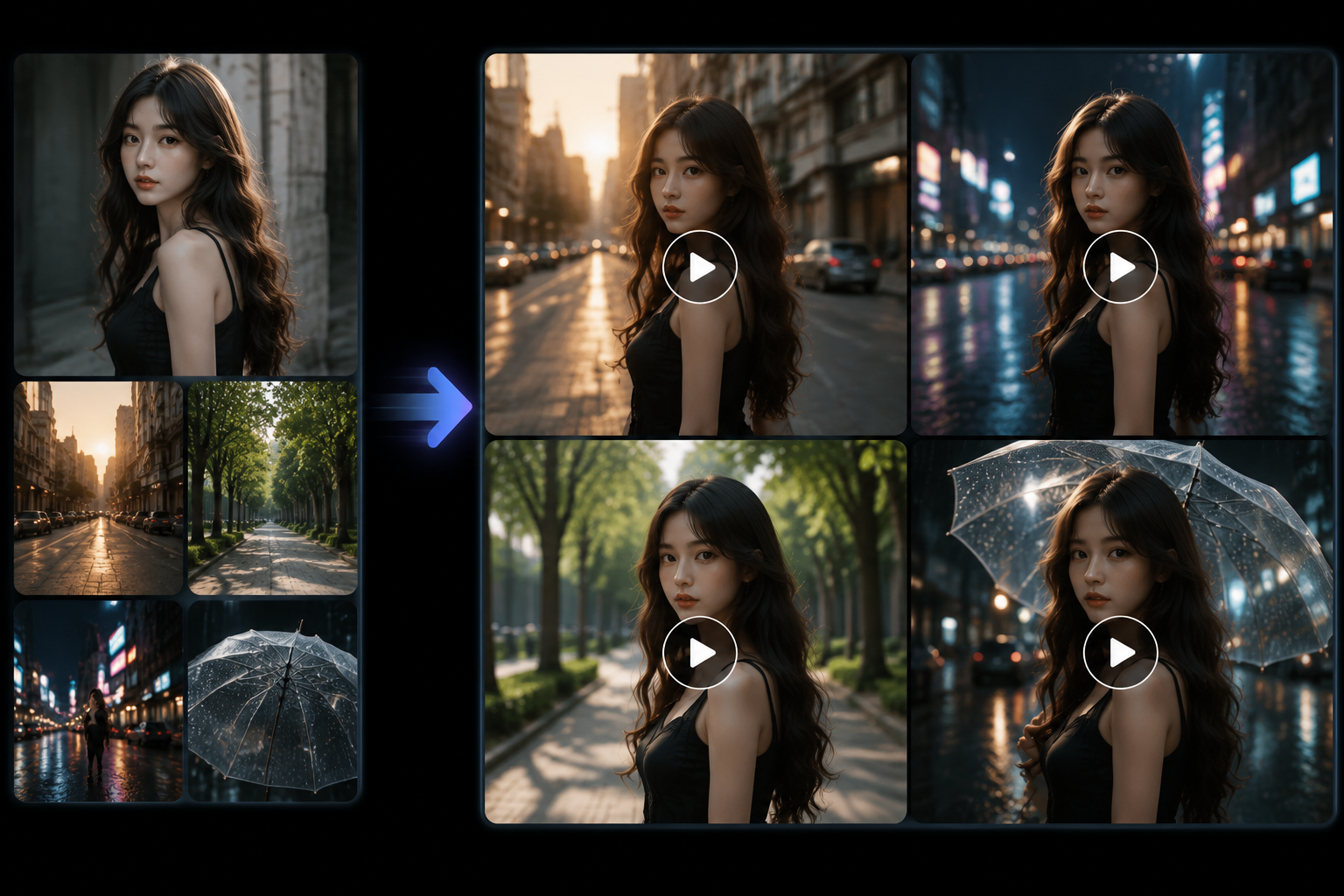 This improves consistency across multiple generated videos.
This capability is especially valuable for:
- AI virtual characters
- Brand mascots
- E-commerce models
- Story-based video creation
4. More Natural AI Video Transformation
Traditional video transitions usually require visual effects templates、manual editing and keyframe adjustments
PixVerse V6 uses AI generation to create smoother transformations between different visual states.
For example:
From casual clothing to formal clothing
From a daytime city to a nighttime city
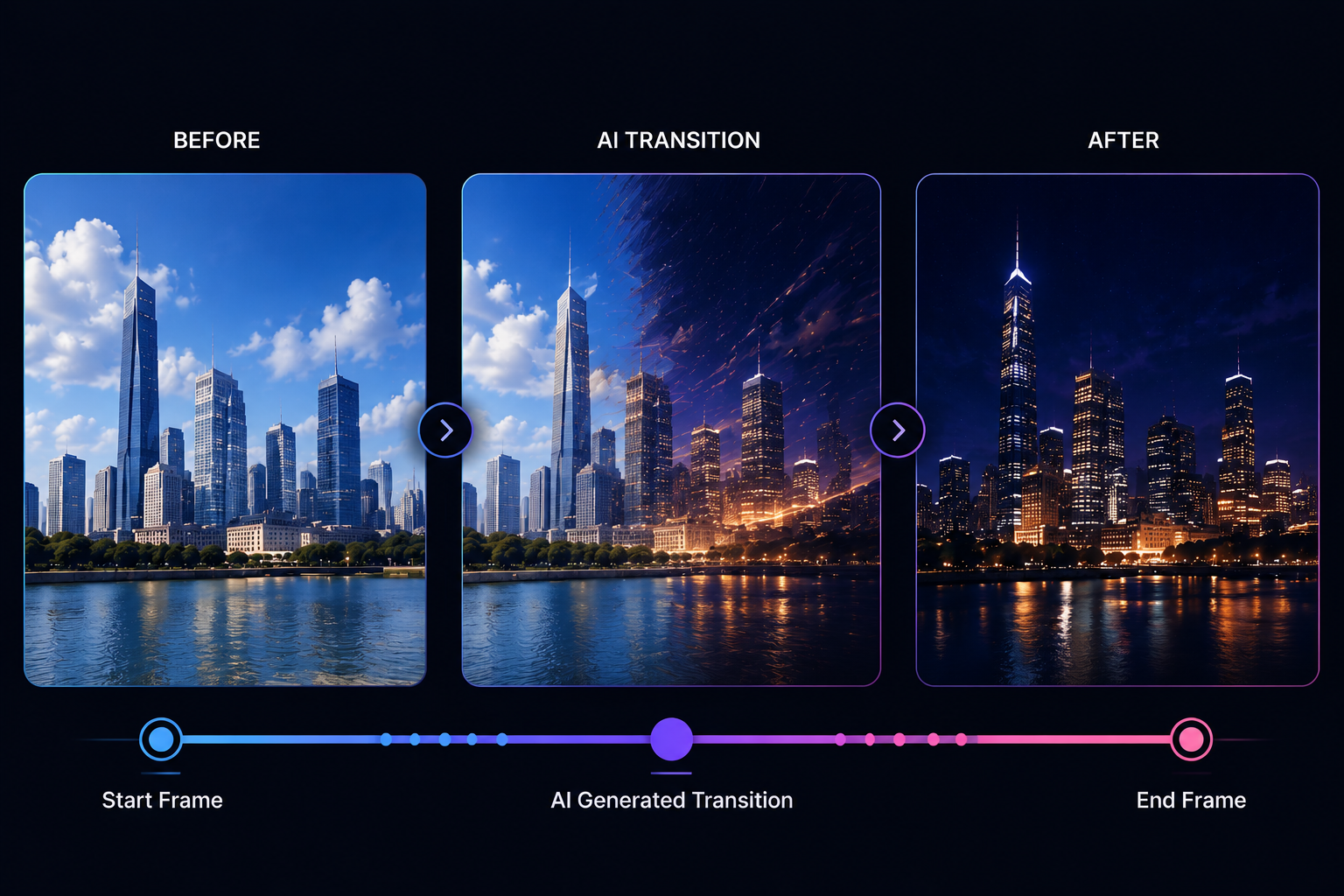 The AI can generate the transition process between two scenes.
This capability is useful for:
- AI outfit transformation videos
- Scene transitions
- Before-and-after content
- Creative advertising effects
5. More Flexible Video Extension Capability
AI video generation still faces a common issue: generated videos are often limited by duration.
PixVerse V6 addresses this through the Extend capability, allowing users to continue existing video content.
Instead of creating a completely new video, Extend can analyze the existing content and generate additional scenes based on it.
This helps maintain: scene continuity、motion consistency and story progression
It is suitable for:
- AI storytelling
- Short video expansion
- Continuous scene creation
How To Use PixVerse V6?
PixVerse V6 is designed for creators who want to transform ideas and visual assets into AI-generated videos.
Unlike traditional video production workflows that require filming, editing, and post-production, PixVerse V6 allows users to create and modify video content through different creative inputs, including text prompts, images, reference materials, and existing video clips. :contentReference[oaicite:1]{index=1}
For Content Creators
For social media creators, PixVerse V6 provides a faster way to produce engaging video content.
It can be used for:
- TikTok videos
- YouTube Shorts
- Instagram Reels
- AI storytelling videos
- Creative visual content
Creators can use different generation methods to produce short-form videos、character-based content、visual effects and cinematic scenes
For Designers and Visual Creators
PixVerse V6 helps designers transform static concepts into dynamic visual content.
Common applications include:
- Animating artwork
- Creating motion effects from images
- Turning design concepts into video previews
- Producing cinematic visual experiments
Features such as Image To Video and Reference To Video provide additional control over visual style, characters, and objects.
For Brands and Marketing Teams
Businesses can use PixVerse V6 to create promotional and advertising content more efficiently.
Common applications include:
- Product showcase videos
- Fashion content
- Brand campaigns
- Social media advertisements
The ability to animate images and maintain visual references makes it suitable for creating consistent marketing visuals across different video projects.
PixVerse V6 can also support more advanced creative workflows by combining multiple generation methods.
Creators can use it for:
- Concept visualization
- Pre-production previews
- AI-generated storytelling
- Short cinematic sequences
Instead of replacing traditional editing tools, PixVerse V6 works as an AI-assisted creation tool that helps speed up the early stages of video production.
How It Compares to the Competition
AI video generation models are improving rapidly, with each model focusing on different strengths.
| Model | Developer | Core Strengths |
|---|---|---|
| PixVerse V6 | PixVerse | Flexible video workflows, reference-based control, character consistency, image-to-video transformation, video extension |
| PixVerse V5.6 | PixVerse | Improved frame control, stronger transformations, better image-to-video generation |
| Kling AI 2.0 | Kuaishou | Realistic motion, physics simulation, cinematic camera movement |
| Runway Gen-4 | Runway | Professional creative workflows, consistent characters, advanced video production tools |
| Google Veo 3 | Google DeepMind | High-quality cinematic generation, realistic scenes, advanced prompt understanding |
| OpenAI Sora | OpenAI | Complex scene generation, world simulation, storytelling capabilities |
| Luma Dream Machine | Luma AI | Fast generation, smooth motion, rapid creative exploration |
| Pika | Pika Labs | Easy AI video effects, quick editing, social media content creation |
PixVerse V6 has a distinctive advantage in combining multiple AI video creation workflows into one system.
Unlike models that mainly focus on a single strength, such as cinematic realism or advanced simulation, PixVerse V6 emphasizes creative flexibility through:
- Text To Video
- Image To Video
- Reference To Video
- Transition
- Extend
This makes it suitable for creators who need more control over how videos are generated, transformed, and expanded.
PixVerse V6 Pricing and Access
The availability of PixVerse V6 depends on the platform and service provider.
Users can access PixVerse V6 through:
- Official PixVerse products
- AI model platforms such as Pixomi.ai, where users can select PixVerse V6 as a generation model
For users, access methods and pricing may vary depending on the platform.
What are the advantages of PixVerse V6?
Multiple AI Video Generation Modes
PixVerse V6 supports multiple video creation workflows instead of focusing on only one generation method.
Users can create videos through:
- Text To Video
- Image To Video
- Reference To Video
- Transition
- Extend
This allows creators to choose different approaches depending on their creative goals.
Flexible Input Methods
PixVerse V6 supports multiple types of creative inputs.
Users can start video creation from:
- Text prompts
- Images
- Reference materials
- Existing video clips
This flexibility makes it suitable for different content creation scenarios, from generating new ideas to transforming existing visual assets.
Strong Creative Control
Compared with simple AI video generators, PixVerse V6 provides more control over generated content.
Through reference-based generation and different video workflows, users can better control characters、objects、visual styles and video transformations
This helps creators produce more consistent and customized video content.
Suitable for Commercial Content
PixVerse V6 can be used for practical content production across different industries.
Common applications include:
- Marketing videos
- E-commerce product videos
- Social media content
- Brand visual campaigns
Its flexible generation methods make it useful for businesses and creators who need to produce video content more efficiently.
Frequently Asked Questions
Is PixVerse V6 free to use?
PixVerse V6 availability depends on the platform and subscription plan.
Users can access it through:
- PixVerse official products
- AI platforms such as Pixomi.ai
Usage limits, credits, and pricing may vary depending on the platform.
Is PixVerse V6 better than previous PixVerse versions?
Yes.
Compared with previous PixVerse models, PixVerse V6 provides improvements in:
✅ More flexible video generation workflows
✅ Stronger visual control
✅ Better character and style consistency
✅ More advanced video transformation capabilities
For creators who need more control over AI video production, PixVerse V6 provides a more complete solution.
Previous versions may still be suitable for users with simpler video generation needs.
What generation modes does PixVerse V6 support?
PixVerse V6 supports multiple AI video creation modes, including Text To Video、Image To Video、Transition、Reference To Video、Extend
These modes allow users to create videos from different types of inputs, including: Text prompts、Images、Reference materials、Existing videos
What is the difference between PixVerse V6 Image To Video and Reference To Video?
Image To Video focuses on animating a single image.
It is mainly used for Bringing photos to life、creating product animations and adding motion to artwork
Reference To Video uses additional reference materials to provide stronger control over Characters、Objects and Visual styles
It is more suitable for maintaining consistency across multiple generated videos.
Can PixVerse V6 extend existing videos?
Yes.
PixVerse V6 Extend allows users to continue existing video clips.
It can help create Longer video sequences、Continuous story scenes and Expanded social media content
while using the original video as a reference.
Is PixVerse V6 suitable for commercial use?
Yes.
PixVerse V6 can be used for:
- Marketing videos
- Product demonstrations
- E-commerce content
- Social media campaigns
Users should always review the latest usage policies of the platform they use before commercial publishing.
Final Thoughts
PixVerse V6 improves AI video creation by giving users more control, flexibility, and creative options throughout the video generation process.
Compared with earlier AI video tools that mainly focused on generating short clips from text prompts, PixVerse V6 provides a more complete video creation workflow.
These capabilities allow creators to not only generate videos, but also transform, refine, and expand existing visual content.
The biggest improvement of PixVerse V6 is not simply generating videos faster. Its value comes from helping users better control over the video effects.
For content creators, designers, and brands, PixVerse V6 provides a more practical way to produce AI-generated video content without relying entirely on traditional production workflows.
While AI video generation still has challenges, especially with long-form consistency and professional-level editing control, PixVerse V6 represents a meaningful step toward making AI video creation more flexible and accessible.
Overall, PixVerse V6 can improve AI video creation by turning AI from a simple generation tool into a more complete creative assistant.