Krea 2: A New AI Image Model Built for Creative Control
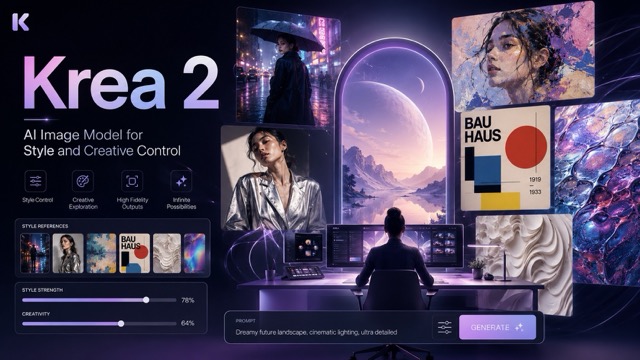
Krea 2 is an AI image model designed around aesthetic diversity, style control, and creative exploration. With Style References, Moodboards, Generative Sliders, LoRA training, and RAW and Turbo model variants, it gives creators more control over visual direction while supporting fast experimentation and repeatable creative workflows.
AI image generation has reached a point where producing a technically impressive image is no longer the hardest part. Many leading models can create realistic portraits, cinematic scenes, illustrations, product shots, and complex compositions from a few lines of text. The bigger challenge is often getting an image to look exactly the way a creator wants rather than falling back to a familiar, polished "AI aesthetic."
Krea 2 approaches that problem from a different direction. Released by Krea AI on May 12, 2026, Krea 2 is the company's first image foundation model trained completely from scratch. Instead of focusing only on prompt accuracy or photorealism, the model was designed around aesthetic diversity, style control, and creative exploration.
That makes Krea 2 particularly interesting for designers, artists, creative teams, marketers, and anyone who needs more control over how an AI-generated image feels.
What Is Krea 2?
Krea 2, sometimes referred to as K2, is a text-to-image foundation model developed internally by Krea AI.
The central idea behind the model is simple: creating an image involves answering two different questions.
What should appear in the image?
and
How should the image look?
Most modern image generators are already strong at the first question. Detailed prompts can specify subjects, objects, environments, lighting, camera angles, clothing, materials, and other visual details.
Krea believes the second question remains more difficult.
Many AI image models naturally move toward safe, highly polished outputs even when users want something rougher, stranger, more experimental, or stylistically specific. Krea 2 was designed to expose a broader visual space rather than forcing generations toward one default aesthetic.
As a result, the model can move between styles such as grainy film photography, clean commercial photography, cinematic imagery, illustration, digital painting, graphic design, and more experimental visual directions.
Creative Exploration Is at the Center of Krea 2
One of the most important differences between Krea 2 and many conventional image generators is how it handles ambiguity.
In some AI systems, generating four images from the same simple prompt may produce four relatively similar compositions. The subject changes slightly, but the basic interpretation remains stable.
Krea 2 intentionally allows more variation.
Krea describes the model as being designed for exploratory generation, where even relatively simple prompts can produce noticeably different creative interpretations. Instead of treating variation as a failure, Krea sees it as part of the creative process.
This makes Krea 2 useful during the early stages of a project.
A designer working on a campaign, for example, may not know the exact visual direction they want when they begin. Generating several distinct interpretations can help reveal possible compositions, color palettes, photographic treatments, or illustration styles before the creator commits to one direction.
Krea 2 therefore feels less like a system built only to execute instructions and more like a tool for exploring visual ideas.
Style References Give Creators More Precise Control
One of Krea 2's strongest features is its Style Reference, or S-Ref, system.
Users can provide an existing image as a visual reference. Krea 2 analyzes characteristics such as:
- Color palette
- Line work
- Texture
- Lighting
- Composition language
- Overall visual treatment
The model can then apply those stylistic characteristics to a completely different subject.
For example, a creator could provide a vintage illustration as a reference and then generate a completely new scene while maintaining a similar visual language.
The important distinction is that the reference image is not simply being copied. Its stylistic characteristics are being used to guide a new generation.
Krea 2 currently allows creators to combine up to four style references, and each one can be assigned its own strength.
Lower strength allows the written prompt to influence more of the result, while higher strength pushes the generated image closer to the visual language of the reference.
This makes style control much more flexible than repeatedly trying to describe a visual aesthetic with increasingly complicated prompts.
Moodboards Turn References Into a Visual Direction
Style References are useful when creators already have a specific image or style they want to reproduce.
Moodboards address a broader problem.
Rather than limiting users to four reference images, Krea's Moodboard system can work with a much larger collection. The system analyzes not only style but also recurring concepts, characters, expressions, compositions, atmosphere, and other patterns across the images.
After analyzing a moodboard, Krea can generate information such as a:
Taste Profile describing the overall aesthetic,
Keywords representing important visual characteristics,
and
Avoids representing directions the system should move away from.
This creates an interesting workflow for creative teams.
Instead of attempting to explain an entire brand identity, campaign concept, or artistic universe through a long text prompt, the creator can show the model a collection of visual references.
The distinction can be summarized simply:
Style References help reproduce a particular visual style.
Moodboards help define a broader visual world.
That makes Moodboards particularly useful for branding, editorial projects, fashion concepts, campaign development, game design, and other projects where many images need to feel related without looking identical.
Generative Sliders Make Prompting More Visual
Krea expanded the Krea 2 workflow further in June 2026 with Generative Sliders.
Instead of constantly rewriting a prompt to make an image "more dramatic," "simpler," or "more dynamic," users can change several visual characteristics directly through controls.
Krea currently provides four major controls:
Intensity
Intensity changes how strongly stylized an image feels.
Reducing it can create quieter and more restrained results, while increasing it pushes generations toward stronger visual expression.
Complexity
Complexity controls how much visual information appears in the composition.
Lower settings favor simpler, more minimal images. Higher settings introduce denser compositions and additional visual detail.
Movement
Movement controls how static or dynamic an image feels.
Higher values can influence pose, camera angle, composition, and overall motion energy.
Creativity
Creativity determines how freely Krea interprets or expands the original prompt.
Creators can use Raw when the prompt already contains precise instructions, while higher Creativity settings allow the system to add more visual interpretation around a basic idea.
Together, these controls move the workflow away from pure prompt engineering.
Instead of describing every visual property in text, creators can begin to direct the generation more like they would adjust creative parameters in a design tool.
Krea 2 RAW and Turbo Serve Different Purposes
Krea has also released model weights for two important versions of Krea 2:
Krea 2 RAW
and
Krea 2 Turbo.
The two versions are designed to work together rather than compete with each other.
Krea 2 RAW
RAW is the undistilled base model.
Because it has not undergone the same distillation process as Turbo, it retains greater flexibility and is intended for tasks such as:
- Fine-tuning
- Post-training
- Research
- LoRA training
Krea's official repository recommends RAW when developers want a highly adaptable foundation for customization.
Krea 2 Turbo
Turbo focuses on speed.
It is an eight-step distilled checkpoint designed to generate high-quality images much faster than the base model. Krea introduced the platform version of Turbo as capable of producing images in roughly two seconds while remaining compatible with Style References, Moodboards, and LoRAs.
The recommended workflow is therefore easy to understand:
Train on RAW, run on Turbo.
A team can build a custom LoRA using RAW and then use that LoRA with Turbo for faster production.
Custom LoRAs Extend Krea 2 Beyond Prompting
For projects requiring repeatability, Krea 2 also supports LoRA training.
A LoRA is a lightweight model customization that teaches the system a more specific visual concept.
Krea currently positions its LoRA system around three particularly useful categories:
- Styles
- Characters
- Objects
A creator could train Krea 2 on a particular illustration style, for example, and reuse that visual language across many future generations.
A brand could train a specific product so that it remains recognizable across multiple advertising concepts.
A creative team working with a recurring fictional character could use a character-focused LoRA to improve consistency across different scenes.
This moves Krea 2 beyond one-off image generation.
Style References can guide a single generation or creative session, while LoRAs can turn a repeated visual requirement into a reusable part of a production workflow.
What Is Krea 2 Best Used For?
Krea 2 makes the most sense when visual direction matters as much as the subject itself.
Potential applications include:
Concept Art
Artists can quickly explore different interpretations of characters, environments, objects, and worlds before refining a final direction.
Brand Visual Development
Moodboards, Style References, and LoRAs can help teams establish and reuse a recognizable visual language.
Fashion and Editorial Imagery
Movement, intensity, photography styles, composition, and reference-driven aesthetics make the model particularly relevant for editorial experimentation.
Advertising Concepts
Creative teams can explore multiple campaign directions before investing time in production.
Illustration
Krea 2's emphasis on aesthetic diversity makes it useful when creators want something beyond the highly polished visual style commonly associated with AI generation.
Rapid Creative Ideation
Turbo makes it possible to generate and compare many ideas quickly before committing to a stronger direction.
Where Krea 2 Still Has Room to Grow
Krea 2 should not be interpreted as the best model for every image-generation task.
Its emphasis on exploration means that users who require extremely deterministic outputs may sometimes prefer models optimized more heavily for strict instruction following.
Krea itself also identifies areas it wants to improve, including more robust editing, image-reference capabilities, and native higher-resolution generation such as 2K and 4K in future development.
It is also worth making an important distinction around its open release.
Krea provides downloadable RAW and Turbo weights and official inference code, but the models are distributed under the Krea 2 Community License rather than a standard unrestricted license such as Apache 2.0.
For developers and businesses, checking the current licensing terms before deploying the model commercially is therefore important.
Why Krea 2 Matters
Krea 2 represents an interesting shift in how image-generation models are being designed.
The first generation of AI image tools largely revolved around the prompt:
Describe the image correctly and the model will generate it.
Krea 2 adds another layer:
Define the aesthetic, explore variations, control the visual language, and then refine the direction.
Style References let users show the model how something should look.
Moodboards communicate a larger creative universe.
Generative Sliders let users adjust visual properties without constantly rebuilding prompts.
LoRAs turn successful styles, characters, and objects into reusable assets.
RAW gives developers a customizable foundation, while Turbo provides a faster production model.
Together, these features make Krea 2 feel less like a conventional text-to-image generator and more like a system built around AI-assisted art direction.
For creators who simply need one accurate image from a detailed prompt, there are many strong models available. But for users who want to explore different visual identities and gain more control over how AI interprets style, Krea 2 offers a particularly distinctive approach.
The model's biggest contribution may therefore not be another increase in raw image quality.
It is giving creators more ways to decide what "good" should actually look like.