
More AI Image Generators
Explore our collection of specialized AI image generators designed for different creative needs and styles























AI Rotate Image Online for Fast Photo Orientation Changes
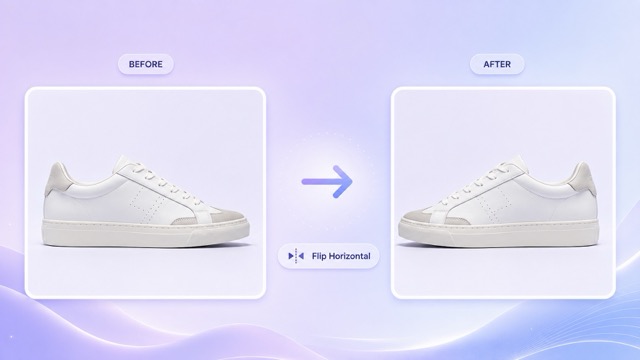
Upload a photo, choose Rotate Right 90°, Rotate Left 90°, or Flip Horizontal, then let AI rotate image content in one click without writing a prompt.
Use AI rotate image when a photo, product visual, scanned document, social graphic, or design asset appears in the wrong direction. This focused image rotator gives you three clear choices: Rotate Right 90°, Rotate Left 90°, and Flip Horizontal. Upload the original file, select the direction, and click generate. You do not need to describe the edit or write a technical prompt. The AI rotate image workflow is designed to preserve the people, faces, objects, lighting, colors, background, text, and overall visual details while changing only the selected orientation. For users searching to rotate image online free, the page offers a direct image-to-image process that avoids complicated controls. Choose the image rotator for quick corrections, creative mirrored layouts, landscape and portrait adjustments, or files imported with the wrong orientation. AI rotate image makes a small but important edit feel simple, predictable, and ready for everyday use.
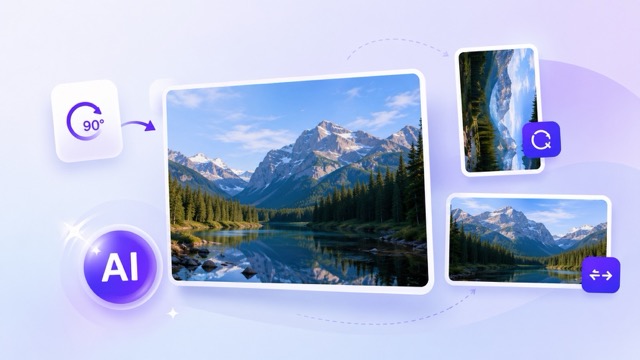
How to Use AI Rotate Image in Three Steps
The AI rotate image workflow has only three steps: upload, select a direction, and generate. The image rotator removes the need for sliders, angle calculations, or written prompts. Anyone who wants to rotate image online free can correct orientation or mirror a picture through one focused tool.

Upload the Image You Want to Rotate
Upload a JPG, JPEG, PNG, or other supported picture to start. The AI rotate image tool uses your uploaded file as the complete visual reference. A clear source helps the image rotator keep faces, products, text, scenery, lighting, and composition stable. You can rotate image online free for personal photos, ecommerce assets, documents, screenshots, posters, and social content.

Choose the Rotation Direction
Select Rotate Right 90°, Rotate Left 90°, or Flip Horizontal. The AI rotate image process follows the option you choose, so no prompt box is required. Use the image rotator to correct a sideways file or create a mirrored version for a new visual arrangement. The rotate image online free workflow keeps the direction choice visible and easy to understand.

Click Generate and Save the Result
Click generate after choosing the direction. AI rotate image applies the selected orientation to the entire uploaded picture and prepares a clean result. The image rotator is designed to avoid unrelated edits, additions, or style changes. After processing, review the output and download it for your project. This is a simple way to rotate image online free without manual editing software.
Best AI Image Tools for Creative Projects
Explore creative tools for image, learn tips and tricks, and see how AI can be your assistant in turning concepts into finished projects.
AI Rotate Image Features for Simple Direction Control
AI rotate image combines two standard 90-degree rotations with a horizontal mirror option. The image rotator keeps the interface focused, automatically converts your selected control into the required edit, and helps you rotate image online free without learning design software. AI rotate image keeps each choice clear for beginners and frequent content teams.
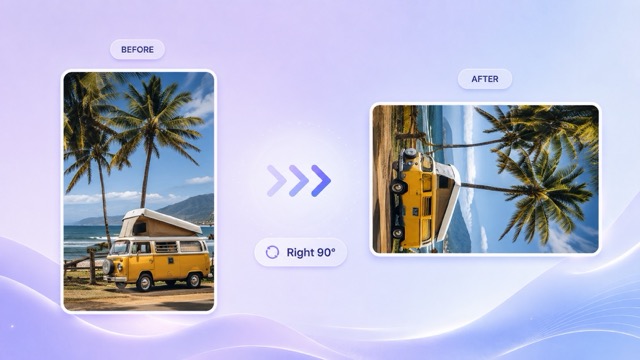
Rotate Right 90° for Sideways Images
- Choose Rotate Right 90° when the top of the image should move toward the right side. The AI rotate image tool turns the complete canvas clockwise in one controlled action.
- This image rotator is useful for phone photos, camera imports, scanned pages, graphics, and product images saved sideways.
- The AI rotate image process is designed to preserve the original subject, facial identity, object details, lighting, colors, shadows, text, and background.
- Use rotate image online free when you need a standard clockwise correction without cropping, repainting, or rewriting the visual.
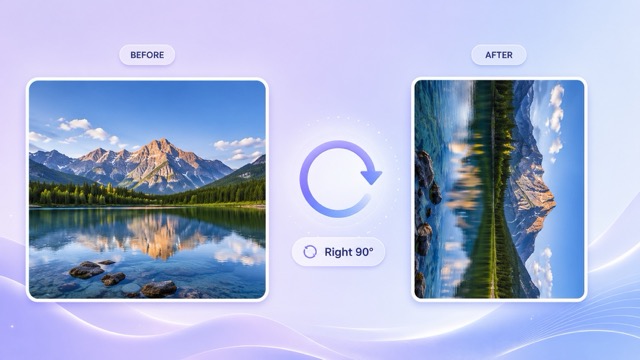
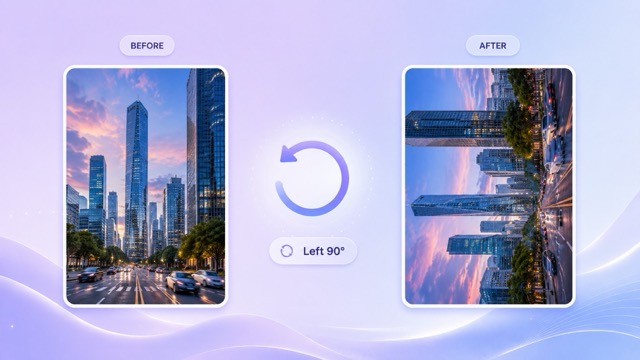
Rotate Left 90° with One Selection
- Choose Rotate Left 90° when the top of the picture should move toward the left side. AI rotate image turns the entire canvas counterclockwise.
- The image rotator provides a direct left-rotation option, so users do not need to rotate right three times or calculate a 270-degree change.
- AI rotate image keeps the uploaded picture as the visual source and focuses on orientation rather than redesign.
- The rotate image online free option works well for portraits, travel photos, scanned receipts, artwork, presentation graphics, and website assets.
Flip Horizontal for a Mirrored Layout
- Select Flip Horizontal to reverse the uploaded picture from left to right. The AI rotate image page includes this practical mirror option beside the two 90-degree directions.
- Use the image rotator when a person, product, vehicle, object, or composition should face the opposite side without changing its visual style.
- AI rotate image applies the horizontal flip to the complete canvas rather than editing individual elements independently.
- Choose rotate image online free for mirrored profile photos, design balance, layout testing, before-and-after comparisons, and creative content variants.
Preserve the Original Picture While Changing Direction
- AI rotate image is configured for a narrow task: change the selected direction while keeping the image content visually consistent.
- The image rotator aims to retain people, facial features, poses, clothes, products, objects, logos, readable text, backgrounds, lighting, shadows, colors, textures, and style.
- No additional prompt is needed because the chosen direction supplies the editing instruction automatically.
- When you rotate image online free, the tool avoids intentional beautification, recoloring, background replacement, object removal, or unrelated creative generation.
Why Choose AI Rotate Image
Choose AI rotate image for orientation changes that should not become full redesign projects. The image rotator offers three recognizable controls, requires no prompt, and supports common personal, ecommerce, document, marketing, and creative workflows. It gives users a direct way to rotate image online free from the browser.

Correct Sideways Phone Photos
Phone images sometimes upload sideways because of camera metadata or export settings. Use AI rotate image to turn the complete photo left or right by 90 degrees. The image rotator gives you a visible direction control, making it easier to correct portraits, group photos, food shots, and travel memories. Choose rotate image online free when you need a clean orientation fix before sharing or saving.

Prepare Ecommerce Product Images
Marketplace and store images need consistent orientation. AI rotate image can correct product photos that appear sideways or face the wrong layout direction. The image rotator also supports Flip Horizontal for testing left-facing and right-facing product compositions. Sellers can rotate image online free before adding visuals to listings, landing pages, comparison blocks, or promotional campaigns.

Fix Scans, Receipts, and Documents
Scanners and mobile capture apps can save pages in an inconvenient direction. Use AI rotate image to correct a receipt, form, worksheet, menu, letter, certificate, or document scan. The image rotator performs a full-canvas orientation change instead of rewriting the page. rotate scanned images online for free to make the content easier to review, organize, present, or archive.

Adjust Social Media Visual Direction
Creators often need a subject to face toward captions, buttons, or empty space in a layout. AI rotate image includes Flip Horizontal for a fast mirrored version. The image rotator can also correct an incorrectly oriented post before publishing. Use rotate image online free for profile images, thumbnails, story graphics, promotional posts, and creator content.

Rotate Design and Presentation Assets
Slides, mood boards, posters, and web designs may contain assets imported in the wrong direction. AI rotate image provides a fast correction before you place them into a composition. The image rotator avoids unnecessary creative controls and keeps the task straightforward. rotate visual assets online for free to prepare charts, illustrations, screenshots, photos, and visual references for presentation work.

Create Mirrored Creative Variations
A mirrored image can change visual balance without requiring a completely new design. AI rotate image lets you select Flip Horizontal and create a reversed composition. The image rotator is helpful for campaign testing, collage planning, facing-direction adjustments, and side-by-side variants. Choose create a mirrored image online for free to explore a mirrored layout while retaining the original visual character.
What Users Say About AI Rotate Image
Users choose AI rotate image for fast orientation corrections, mirrored layouts, and a no-prompt workflow. The image rotator supports everyday files and helps teams rotate image online free without turning a simple adjustment into a complicated editing task.
I use AI rotate image when product photos arrive sideways from different suppliers. The image rotator makes the correction clear because I can choose the exact direction instead of guessing. It is also useful to rotate pictures online for free before I upload new listing assets.
The AI rotate image page is simple enough for quick document cleanup. I upload a scan, select left or right, and generate the corrected version. This image rotator saves me from opening a larger editor just to correct an image online for free.
I like using AI rotate image for social layouts because Flip Horizontal helps me test where a person should face. The image rotator creates a practical variant without asking for a written prompt. I can make the rotation online for free and move directly into the final design.
AI rotate image handles the exact kind of small correction that often interrupts my workflow. The image rotator gives me the three controls I need, and the result is ready to place into a presentation. It is convenient to rotate a picture online at no cost from one page.
Our scanned menus and signs are not always saved upright. AI rotate image helps me correct them with one selection. The image rotator is easy for the whole team to understand, and we can correct image direction online for free without installing professional software.
I use AI rotate image to prepare client assets before they enter our campaign templates. The image rotator is especially helpful when a subject needs to face the opposite side through Flip Horizontal. Being able to handle image rotation online for free keeps minor revisions moving.



Frequently Asked Questions About AI Rotate Image
Learn how AI rotate image works, what each direction means, and how the image rotator helps you rotate image online free without a prompt or complicated editing controls.
AI rotate image is an image-to-image tool for changing the direction of an uploaded picture. The available controls are Rotate Right 90°, Rotate Left 90°, and Flip Horizontal. This image rotator does not require a written prompt. Upload the file, select the direction, and generate. It is designed for anyone who wants to rotate a picture online for free through a focused browser workflow.
Upload your picture, choose Rotate Right 90°, Rotate Left 90°, or Flip Horizontal, and click generate. AI rotate image converts the selected option into the editing instruction automatically. The image rotator removes the need to enter an angle or write a prompt, so you can rotate images online at no cost in three straightforward steps.
Rotate Right 90° turns the entire picture clockwise. Rotate Left 90° turns it counterclockwise. AI rotate image applies the direction to the full canvas, not to separate people or objects. Use the image rotator to correct sideways files and correct image orientation online for free without repeated manual adjustments.
Flip Horizontal creates a left-to-right mirror of the uploaded picture. The AI rotate image page includes it for users who need a subject or composition to face the opposite direction. This image rotator option is helpful for layouts, profile pictures, product visuals, and creative variants. You can rotate image online free or select the mirror control from the same interface.
AI rotate image is configured to focus on the selected orientation change. The image rotator aims to preserve people, faces, objects, lighting, colors, text, background, and style rather than generating a new scene. For the best result when you rotate image online free, upload a clear source and select only the direction you need.
You can use AI rotate image for phone photos, product images, scanned documents, posters, screenshots, social graphics, artwork, and many other visual files. The image rotator is best for standard 90-degree corrections and horizontal mirroring. Choose rotate image online free when the original content is correct but its direction needs adjustment.
Rotate Your Image in One Click
Upload a picture, select Rotate Right 90°, Rotate Left 90°, or Flip Horizontal, and generate the result. AI rotate image keeps the workflow focused, the image rotator makes direction selection simple, and you can rotate image online free without writing a prompt. Start with AI rotate image and finish the direction change in one focused workflow.
