
More AI Image Generators
Explore our collection of specialized AI image generators designed for different creative needs and styles























AI Image Brightener for Clear, Naturally Lit Photos
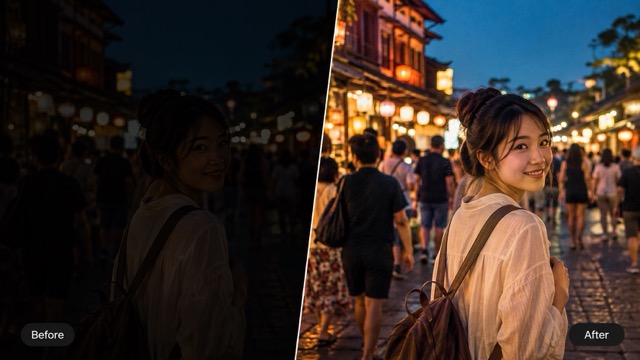
Upload a dim photo and reveal clearer faces, products, rooms, and memories with balanced AI lighting correction.
AI image brightener lifts weak exposure, reveals shadow detail, and keeps highlights controlled. Upload a portrait, product shot, indoor scene, or travel photo, then brighten image content naturally without learning curves, masks, or complex editing software.
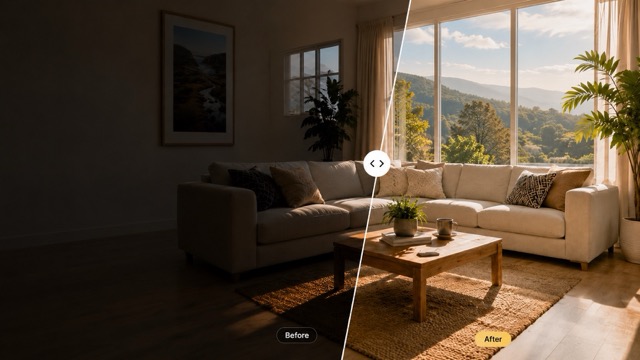
How to Use AI Image Brightener
Brighten a dark photo in three simple steps. Upload your image, choose the preferred resolution and aspect ratio, then generate a clearer photo with naturally balanced lighting.

Upload a Dark Photo
Upload a dim portrait, product photo, indoor scene, travel shot, or old image. The AI image brightener works with photos affected by weak lighting, heavy shadows, backlighting, or low exposure.

Choose Your Image Settings
Select the output resolution and aspect ratio that fit your needs. Prepare a clear image for social media, ecommerce listings, presentations, wallpapers, or personal photo collections.

Generate Your Brighter Image
Click generate and let the AI image brightener recover shadow detail, improve visibility, and create more natural lighting. Preview the result, then download the brighter image when it looks right.
Best AI Image Tools for Creative Projects
Explore creative tools for image, learn tips and tricks, and see how AI can be your assistant in turning concepts into finished projects.
AI Image Brightener Features for Better-Lit Photos
Use practical controls to brighten image content while protecting the details that make the original photo feel authentic. Choose AI image brightener when weak exposure hides useful detail. Brighten image shadows while preserving important highlights. Lighten dark photos online free when an important subject needs clearer light.
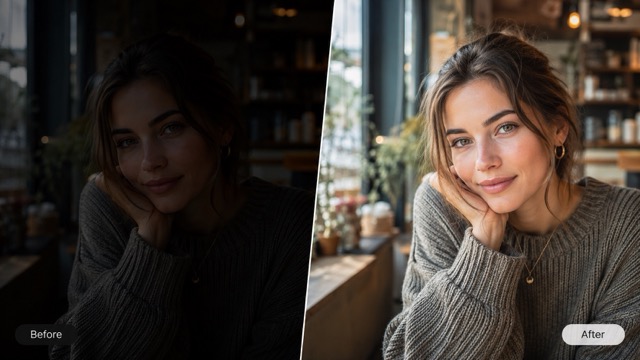
Intelligent Exposure Recovery
AI image brightener reads bright and dark regions together, then raises weak exposure where it matters. It can reveal clothing texture, room details, scenery, and facial features while reducing the washed-out look caused by a basic global brightness slider. AI image brightener creates a faster path to a clearer, balanced edit. Brighten image content with a clear instruction for the subject. Lighten dark photos online free before preparing a visual for sharing.
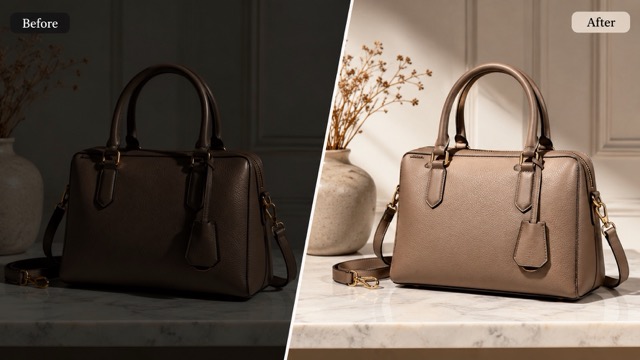
Natural Shadow and Highlight Balance
A good edit should open shadows without destroying the sky, lamps, windows, or reflective surfaces. Use AI image brightener to brighten image shadows while maintaining useful highlight detail and a realistic sense of depth. Use AI image brightener for a focused lighting correction workflow. Brighten image details before publishing, presenting, or sharing. Lighten dark photos online free to create a cleaner first editing pass.
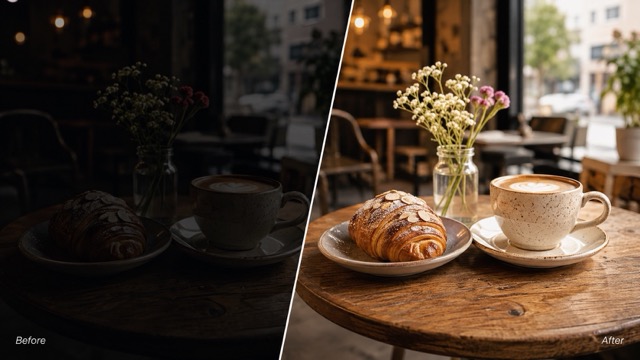
Clearer Portraits and Selfies
Backlit faces and evening portraits often look dull even when the composition is strong. AI image brightener can improve face visibility, skin-tone clarity, and eye detail. It helps lighten dark photos online free while keeping the person recognizable. AI image brightener can improve visibility while protecting the original mood. Brighten image areas according to the mood you want to retain. Lighten dark photos online free for portraits, products, rooms, and memories.
Product Photos That Look Ready to Sell
Weak lighting can make materials, labels, and colors difficult to judge. AI image brightener helps brighten image assets for listings, catalogs, ads, and shop updates, giving products a cleaner presentation without rebuilding the shoot. Choose AI image brightener when weak exposure hides useful detail. Brighten image shadows while preserving important highlights. Lighten dark photos online free when an important subject needs clearer light.
Where AI Image Brightener Makes a Difference
Choose AI image brightener when weak exposure hides the subject but the composition is worth keeping. Creators, sellers, families, and teams can brighten image assets for clearer communication without rebuilding the photo. AI image brightener creates a faster path to a clearer, balanced edit. Brighten image content with a clear instruction for the subject. Lighten dark photos online free before preparing a visual for sharing.

Portraits and Social Posts
Use AI image brightener when faces disappear in shade, selfies look flat, or an evening portrait needs clearer expression. You can lighten dark photos online free before preparing profile images, stories, reels, and personal posts. Use AI image brightener for a focused lighting correction workflow. Brighten image details before publishing, presenting, or sharing.

Ecommerce and Marketing
AI image brightener can improve the visibility of packaging, texture, color, and product form. Teams can brighten image assets before using them in listings, newsletters, landing pages, pitch decks, or advertising tests. AI image brightener can improve visibility while protecting the original mood. Brighten image areas according to the mood you want to retain.

Travel and Event Memories
Indoor celebrations, concerts, restaurants, and sunset scenes often produce underexposed files. Use AI image brightener to recover a more readable moment and lighten dark photos online free without rebuilding the scene. Choose AI image brightener when weak exposure hides useful detail. Brighten image shadows while preserving important highlights.

Design and Creative References
Designers can use AI image brightener to reveal composition and detail in reference photos. A cleaner source makes it easier to brighten image material for mood boards, layouts, thumbnails, and visual concepts. AI image brightener creates a faster path to a clearer, balanced edit. Brighten image content with a clear instruction for the subject.

Interior and Property Photos
Use AI image brightener to reveal furniture, materials, and room depth in dim property photos. The guided workflow can brighten image interiors while preserving windows, lamps, and the atmosphere of the original space. Use AI image brightener for a focused lighting correction workflow. Brighten image details before publishing, presenting, or sharing.

Food and Small Business Content
AI image brightener helps cafés, makers, and local shops improve menus, product posts, and venue photos. Lighten dark photos online free to make important details easier to see before publishing. AI image brightener can improve visibility while protecting the original mood. Brighten image areas according to the mood you want to retain.
What Users Say About AI Image Brightener
Creators, shop owners, and everyday photographers use AI image brightener to turn dim files into clearer, more useful visuals. Choose AI image brightener when weak exposure hides useful detail. Brighten image shadows while preserving important highlights.
A café portrait had great expression but almost no face detail. AI image brightener opened the shadows without flattening the atmosphere. I could brighten image areas naturally and deliver a photo that still felt warm and intentional. AI image brightener creates a faster path to a clearer, balanced edit. Brighten image content with a clear instruction for the subject.
Our supplier images arrived with inconsistent exposure. AI image brightener helped the darker products look clear and comparable. Being able to lighten dark photos online free made the first cleanup pass much faster for our small team.
I used AI image brightener on a night-market shot that looked nearly unusable on my phone. It revealed signs, food, and faces while keeping the evening color. The result was bright enough for my article and still looked believable.
The tool lets me brighten image content quickly before scheduling posts. AI image brightener is especially useful for event photos where the lighting changes from one frame to the next and the feed needs a more consistent finish.
Room photos often have dark corners and bright windows. AI image brightener balanced both areas better than a simple exposure slider. I can lighten dark photos online free and present layouts with clearer materials and furniture details.
I wanted to brighten image scans from an old album without making them look modern or artificial. AI image brightener brought back clothing and background detail gently, which made the memories much easier for relatives to view.





Frequently Asked Questions About AI Image Brightener
Find quick answers about how AI image brightener improves exposure, what files work well, and how to get a natural result.
AI image brightener is an online editing tool that analyzes exposure, shadows, highlights, colors, and subject detail before improving a dark photo. It offers a guided way to brighten image content without manually adjusting several professional controls.
Upload a clear source image, select the image size and resolution you want, and generate a new version. The workflow lets you lighten dark photos online free, review the result, and regenerate by different image models if the face, background, or product still needs more light.
AI image brightener is designed to consider shadows and highlights together, but every source is different. Ask it to preserve windows, lamps, skies, and reflective details when you brighten image content, then review the preview before saving.
You can use AI image brightener for portraits, selfies, products, rooms, food, pets, landscapes, events, travel shots, and old scans. It is useful whenever you need to lighten dark photos online free and improve visibility without a full manual retouch.
Start with a clear source, request gentle exposure recovery, and mention any highlights that should stay controlled. AI image brightener performs best when the prompt explains whether you want neutral daylight, warm indoor light, soft portrait light, or another specific feel.
Make Your Dark Photo Clearer Today
Upload your photo and let AI image brightener recover useful light, clearer color, and visible subject detail. Start now to brighten image content for sharing, selling, presenting, or preserving.
