logo
0

ChatGPT Photo Prompt Ideas to Copy & Customize

Explore ChatGPT photo prompts for portraits, cinematic shots, vintage looks, and creative edits. Browse visual examples, copy a prompt, and make it your own.

Generate Prompt with AI
3 uses left today

Describe your idea and let AI create the perfect prompt for you

Featured ChatGPT Photo Prompt Ideas

Start with a look you love. Explore selected photo prompt examples, read the instructions behind each image, and copy a starting point for your own creation. Replace the details to make each idea feel personal.

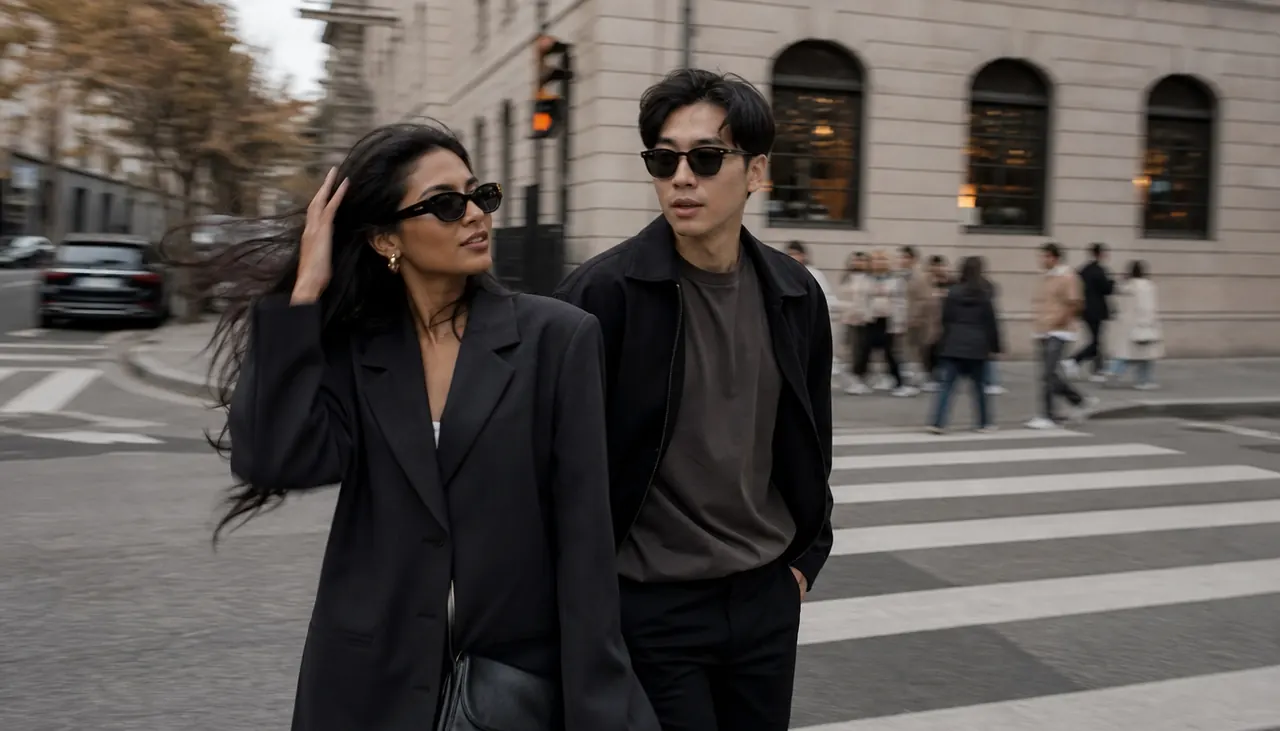
Influencer Couple Lifestyle Photo Dump

Influencer Couple Lifestyle Photo Dump

Create a realistic influencer-style couple photo dump cover from the uploaded adult couple image. Keep both identities natural. Make it one polished wide image, not a bordered collage. Show the couple walking through `[TRENDY CITY LOCATION]` after brunch, wearing `[STREET STYLE OUTFITS]`, with candid framing, slight motion blur, lifestyle creator energy, soft overcast light, no brand logos, no text, no watermark, horizontal 16:9 crop.
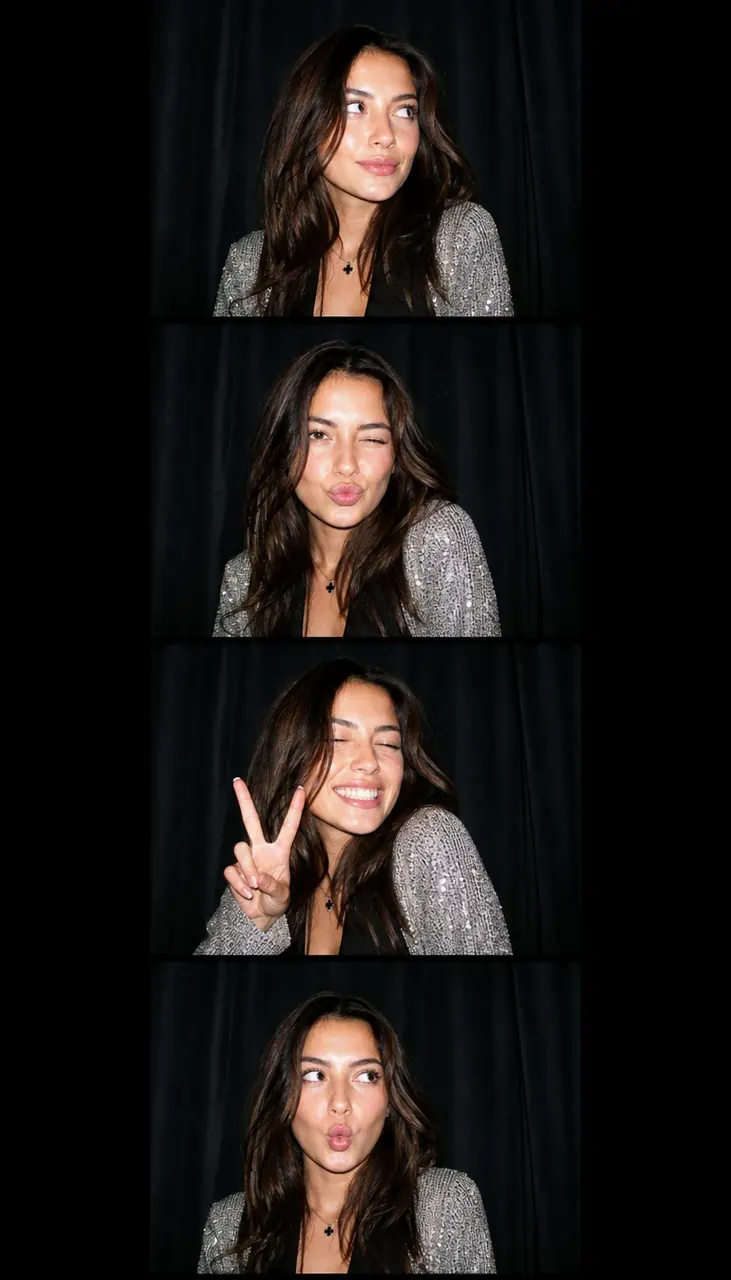
Y2K Photo Booth Strip

Y2K Photo Booth Strip

Turn the uploaded adult woman selfie into a Y2K photo booth strip. Preserve her identity across four stacked candid frames. Add direct flash, glossy hair, sparkly `[OUTFIT]`, black curtain background, playful but tasteful expressions, early digital camera grain, no readable text, and a 9:16 vertical layout.

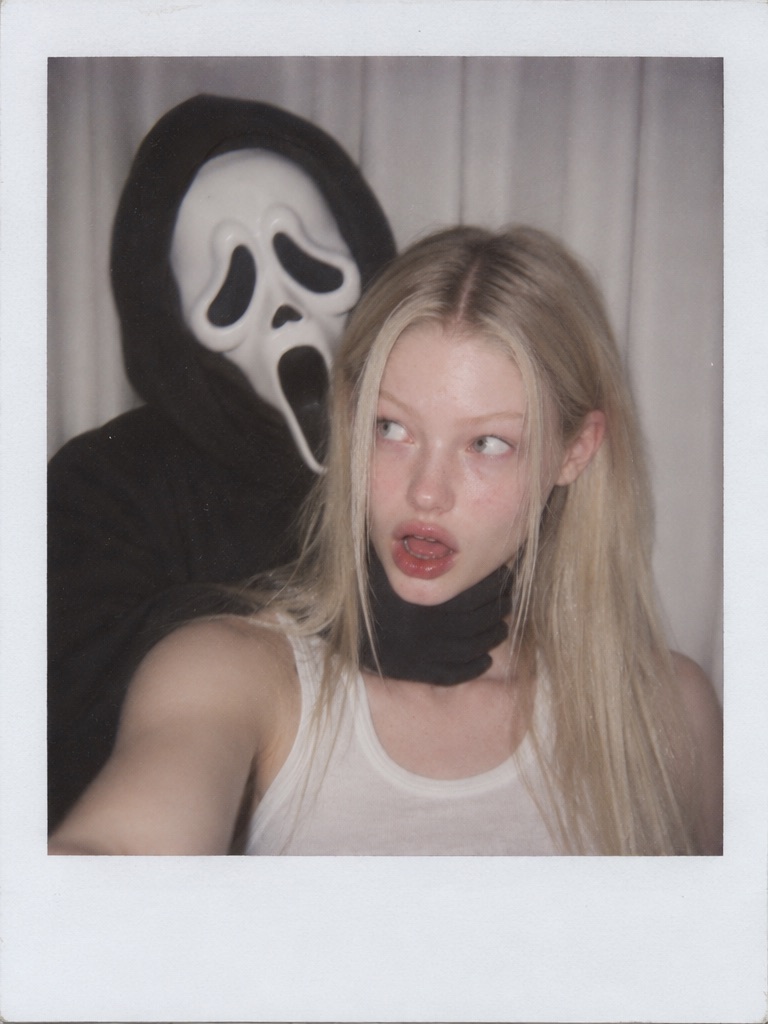
Polaroid Ghost Prank Portrait

Polaroid Ghost Prank Portrait

Take a photo using a Polaroid camera. The photo should look like a normal photo, without any clear subjects or props. The photo should have a slight blur effect, and the light source should be evenly distributed across the frame, such as a flash in a dark room. Replace the background with a simple white curtain. The subject is photographed with a person wearing a white ghost mask and a black robe. The ghost mask stands behind the subject, with one hand playfully placed on the subject's neck. The subject looks shocked, creating an eerie yet humorous atmosphere. Do not retouch the face.

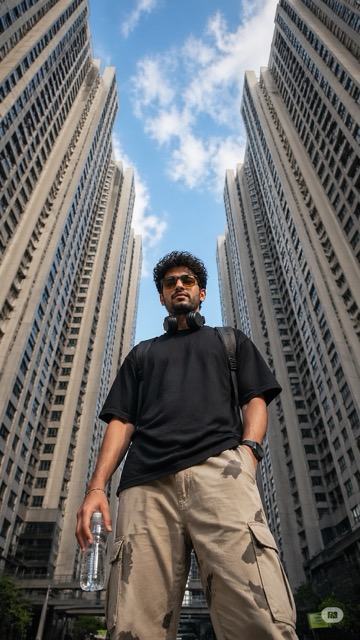
Ultra-realistic low-angle street photography of a young man standing confidently in the middle of a modern city, surroun

Ultra-realistic low-angle street photography of a young man standing confidently in the middle of a modern city, surroun

Ultra-realistic low-angle street photography of a young man standing confidently in the middle of a modern city, surrounded by tall symmetrical high-rise apartment buildings forming a geometric frame around the sky. Shot from ground level looking upward (worm’s-eye view), creating a powerful and dominant perspective. The subject is a stylish young man with short curly hair and light facial hair, wearing yellow-tinted rectangular sunglasses, a plain black oversized t-shirt, beige cargo pants with subtle camo patches, and carrying a transparent water bottle in one hand. Black headphones rest around his neck, and a backpack strap is visible on his shoulders. Expression calm and slightly serious, looking directly into the camera. Background: bright blue sky with scattered soft clouds, buildings converging inward creating strong leading lines and symmetry. Urban residential towers with repeating windows and light concrete tones. Lighting: natural daylight, crisp shadows, high contrast, sharp details, HDR look. Composition: centered subject, vertical framing, strong perspective distortion from wide-angle lens (24mm or wider), cinematic depth. Style: fashion editorial meets urban realism, ultra-detailed, 8k, sharp focus, realistic skin texture, high dynamic range.

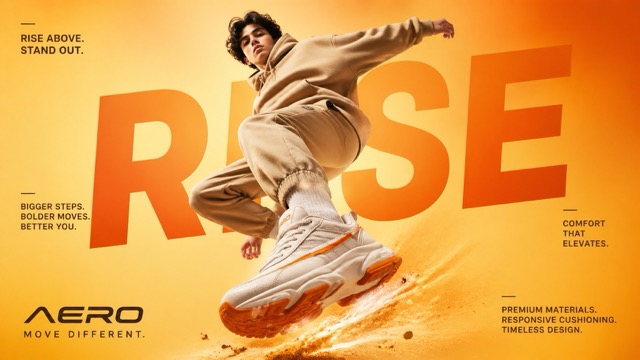
"A cinematic, high-end sneaker advertisement poster featuring a young male model mid-air in a dynamic jumping pose, capt

"A cinematic, high-end sneaker advertisement poster featuring a young male model mid-air in a dynamic jumping pose, capt

"A cinematic, high-end sneaker advertisement poster featuring a young male model mid-air in a dynamic jumping pose, captured from a low-angle perspective to emphasize power and motion. The model is wearing a coordinated beige streetwear outfit (hoodie and joggers), with oversized chunky white sneakers that have bold orange accents on the sole and side stripes. The background is a smooth studio gradient in warm tones, blending light yellow and vibrant orange for an eye-catching, energetic feel. Dramatic soft studio lighting enhances the subject, with glowing highlights and subtle shadows that complement the outfit and colour palette. Behind the model, large bold typography is seamlessly integrated into the composition, reading “RISE” in oversized modern sans-serif font, partially obscured by the subject for depth. Additional small promotional text is placed around the layout in a clean editorial style, such as: “RISE ABOVE. STAND OUT.” “BIGGER STEPS. BOLDER MOVES. BETTER YOU.” “COMFORT THAT ELEVATES.” “PREMIUM MATERIALS. RESPONSIVE CUSHIONING. TIMELESS DESIGN.” At the bottom, a modern sneaker brand logo “AERO” appears with the tagline “MOVE DIFFERENT.” Add subtle motion effects like dust particles or energy trails beneath the jumping foot to enhance impact. Ultra-realistic detail, sharp focus, high contrast, commercial fashion photography style, magazine-quality composition, 4K resolution."

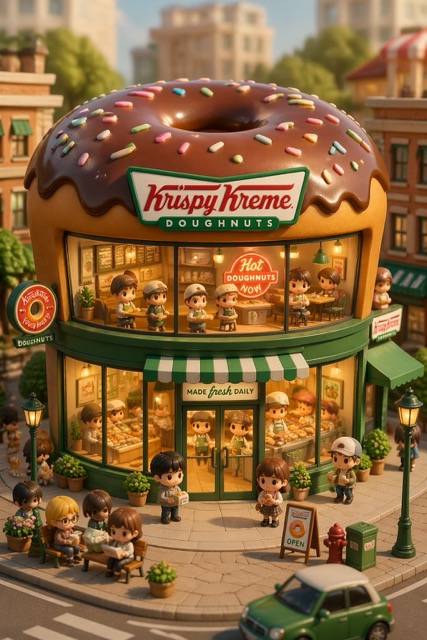
3D chibi-style miniature concept store of {Brand Name}, creatively designed with an exterior inspired by the brand's mos

3D chibi-style miniature concept store of {Brand Name}, creatively designed with an exterior inspired by the brand's mos

3D chibi-style miniature concept store of {Brand Name}, creatively designed with an exterior inspired by the brand's most iconic product or packaging (such as a giant {brand's core product, e.g., chicken bucket/hamburger/donut/roast duck}). The store features two floors with large glass windows clearly showcasing the cozy and finely decorated interior: {brand's primary color}-themed decor, warm lighting, and busy staff dressed in outfits matching the brand. Adorable tiny figures stroll or sit along the street, surrounded by benches, street lamps, and potted plants, creating a charming urban scene. Rendered in a miniature cityscape style using Cinema 4D, with a blind-box toy aesthetic, rich in details and realism, and bathed in soft lighting that evokes a relaxing afternoon atmosphere. --ar 2:3

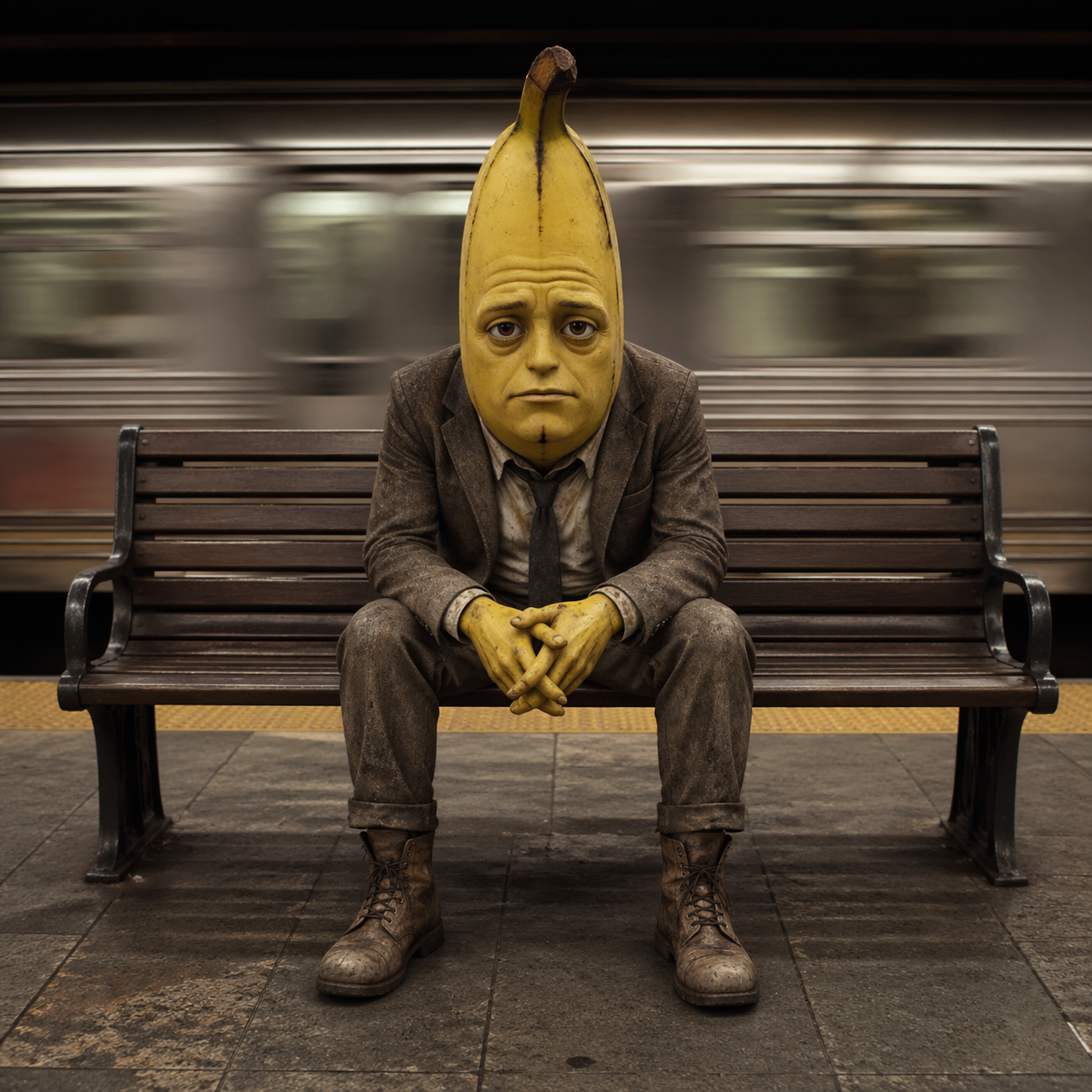
A cinematic portrait of a banana man sitting alone on a subway platform bench, centered in the frame, looking directly a

A cinematic portrait of a banana man sitting alone on a subway platform bench, centered in the frame, looking directly a

A cinematic portrait of a banana man sitting alone on a subway platform bench, centered in the frame, looking directly at the camera with a calm, slightly serious expression. he man wears a set of suit and boots. He looks exhausted and tired. The background shows a subway train rushing past, heavily motion-blurred to create a strong sense of speed and contrast with his stillness. Shallow depth of field, sharp focus on the subject, soft natural lighting, urban environment, muted color tones, high detail, professional photography, 50mm lens, long exposure effect, symmetrical composition.

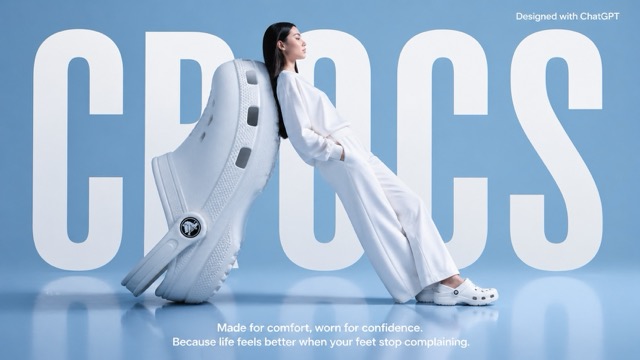
A high-fashion surrealist advertising poster for Crocs. The scene is set in a minimalist, monochrome light blue studio w

A high-fashion surrealist advertising poster for Crocs. The scene is set in a minimalist, monochrome light blue studio w

A high-fashion surrealist advertising poster for Crocs. The scene is set in a minimalist, monochrome light blue studio with a semi-reflective floor. The central focus is an oversized, giant white Croc clog positioned on its heel at a diagonal angle, serving as a backrest. A fashion model with long dark hair, dressed in a clean, all-white coordinated sweatshirt and wide-leg trousers, leans her entire back against the giant shoe in a relaxed, leaning posture. She is facing right in profile, looking ahead with a serene expression, and wearing standard-sized white Crocs. In the background, the word "CROCS" is written in massive, bold, white condensed sans-serif typography, partially occluded by the giant shoe and the model to create a sense of depth. At the top right, "Designed with ChatGPT" At the bottom center, a white sans-serif tagline reads: "Made for comfort, worn for confidence. Because life feels better when your feet stop complaining." The lighting is soft, cool, and even, casting gentle shadows and a soft reflection of the subjects on the glossy blue floor. The overall aesthetic is clean, modern, and high-concept.

Explore ChatGPT Photo Prompts by Style

Browse portraits, cinematic scenes, vintage-inspired photos, fashion looks, and creative transformations. Open an example to read the full prompt, copy it for later, or try it in Pixomi AI.

Loading...
No more prompts

How to Use ChatGPT Prompts for Photos

Turn an example into your own photo idea with three simple steps.

1

Choose Your Photo Style

Pick an example with the lighting, composition, and mood you want. Check whether the prompt describes a new image or an edit that needs a reference photo.

2

Copy and Customize the Prompt

Replace details such as the subject, outfit, location, and colors. For photo edits, specify which facial features, clothing, or objects should stay unchanged.

3

Create, Review, and Refine

Use the prompt in your chosen image tool and upload a reference photo when needed. Review the result, then adjust one detail at a time to refine the image.

One Photo, Different Creative Directions

Explore how changes in lighting, setting, and visual style can give the same photo a different mood. Use these ideas to guide your next edit.

Create Cinematic Portraits

Create Cinematic Portraits

Build a cinematic look with a clear setting, directional light, and deliberate framing. Try rainy streets, soft window light, or a neon-lit background. Describe the atmosphere while asking to preserve the subject’s recognizable features.

Explore Vintage and Film-Inspired Looks

Explore Vintage and Film-Inspired Looks

Give your photos a nostalgic feel with soft grain, faded colors, direct flash, or an instant-photo border. Specify the lighting and color palette instead of relying on “vintage” alone.

Design Creative Photo Edits

Design Creative Photo Edits

Reimagine a portrait as a scrapbook collage, photo booth strip, or editorial layout. Explain the number of frames, subject placement, background details, and elements that should stay consistent across the composition.

How to Write a Better ChatGPT Prompt for Photo Editing

A clear photo prompt explains what to change, what to preserve, and how the finished image should look. Use these six elements to give your idea more direction.

Subject and Identity

Describe who or what the image should feature. When editing a photo, specify the facial features, expression, and proportions you want to preserve.

Background and Setting

Name the location and relevant surroundings, such as a quiet studio, a rainy city street, or a sunlit room.

Lighting

Specify soft window light, warm backlighting, direct flash, or dramatic side lighting to shape the atmosphere.

Composition and Framing

Describe a close-up, waist-up portrait, or full-body shot. Include the subject’s placement and the intended image orientation.

Color and Visual Style

Choose a clear direction, such as muted film colors, clean editorial photography, or a high-contrast black-and-white look.

Details to Keep or Change

State which clothing, objects, poses, and background elements should remain. Separate those instructions from the changes you want.

ChatGPT Photo Prompts FAQ

Find answers about choosing, customizing, and using photo prompts.

A ChatGPT photo prompt is a written instruction describing a photo you want to create or edit. It can explain the subject, background, lighting, composition, and visual style. For an existing photo, it should also identify the details you want to preserve.

Start with an example that matches your preferred look. Replace the outfit, location, colors, lighting, or framing with your own details. Keep the instructions that define the effect, and remove anything that does not fit your idea.

It depends on the example. Prompts that describe editing an uploaded photo need a reference image. Prompts that describe a new scene can be used as a starting point for text-to-image creation. Check the wording before you begin.

Ask to preserve recognizable facial features, face shape, skin tone, and natural proportions. Clearly separate the changes you want—such as a new outfit or background—from the features you want to keep. Results can vary with the model and reference photo.

The model, reference image, settings, and generation can all affect the result. Treat each example as a creative starting point. If the result misses your intended look, make the prompt more specific and refine one element at a time.

You can copy a prompt or use the available Pixomi creation option. Choose a compatible image model and upload your own reference photo when the prompt calls for one. Results in Pixomi may differ from those produced in ChatGPT or other image tools.

Make Your Next Photo Idea Your Own

Choose a prompt, add your personal details, and explore a new look in Pixomi AI—from cinematic portraits to nostalgic film-inspired edits.

Create in Pixomi AI
Video cover