
Upload a filtered photo and restore a more natural-looking version with AI.
More AI Image Generators
Explore our collection of specialized AI image generators designed for different creative needs and styles
























AI Filter Remover for Authentic, Natural-Looking Photos
Use AI Filter Remover to effortlessly soften heavy color grading, aggressive beauty effects, and stylized overlays. Reclaim the genuine essence of your images while keeping your subject perfectly recognizable and true to life.
Transform over-edited pictures back to their original charm. Simply upload one filtered image, describe the specific natural result you want to achieve, and let our advanced AI Filter Remover meticulously create a cleaner, more balanced version online. Experience believable color restoration, realistic texture recovery, and perfectly balanced contrast and lighting—all generated in mere seconds without the need for complex editing software.

How to Use AI Filter Remover
AI Filter Remover turns a simple upload-and-prompt workflow into a fast photo cleanup. No complex adjustment layers are required, so AI Filter Remover is easy to use in any browser.

Upload Your Filtered Photo
Choose one portrait, selfie, product shot, or lifestyle image. AI Filter Remover uses your upload as the visual reference and keeps the composition intact.

Describe the Natural Result
Tell AI Filter Remover what looks too strong, such as cool tones, orange skin, crushed shadows, excessive smoothing, vintage color, or dramatic saturation.

Generate and Compare
Run AI Filter Remover, review the restored version beside the filtered photo, and refine your prompt when you want a lighter or stronger correction.
Best AI Image Tools for Creative Projects
Explore creative tools for image, learn tips and tricks, and see how AI can be your assistant in turning concepts into finished projects.
What AI Filter Remover Can Improve
AI Filter Remover addresses color casts, excessive smoothing, harsh contrast, glow, and overprocessed detail in one guided workflow. Each AI Filter Remover result is generated from your image and instructions, so output can vary with source quality and filter strength.
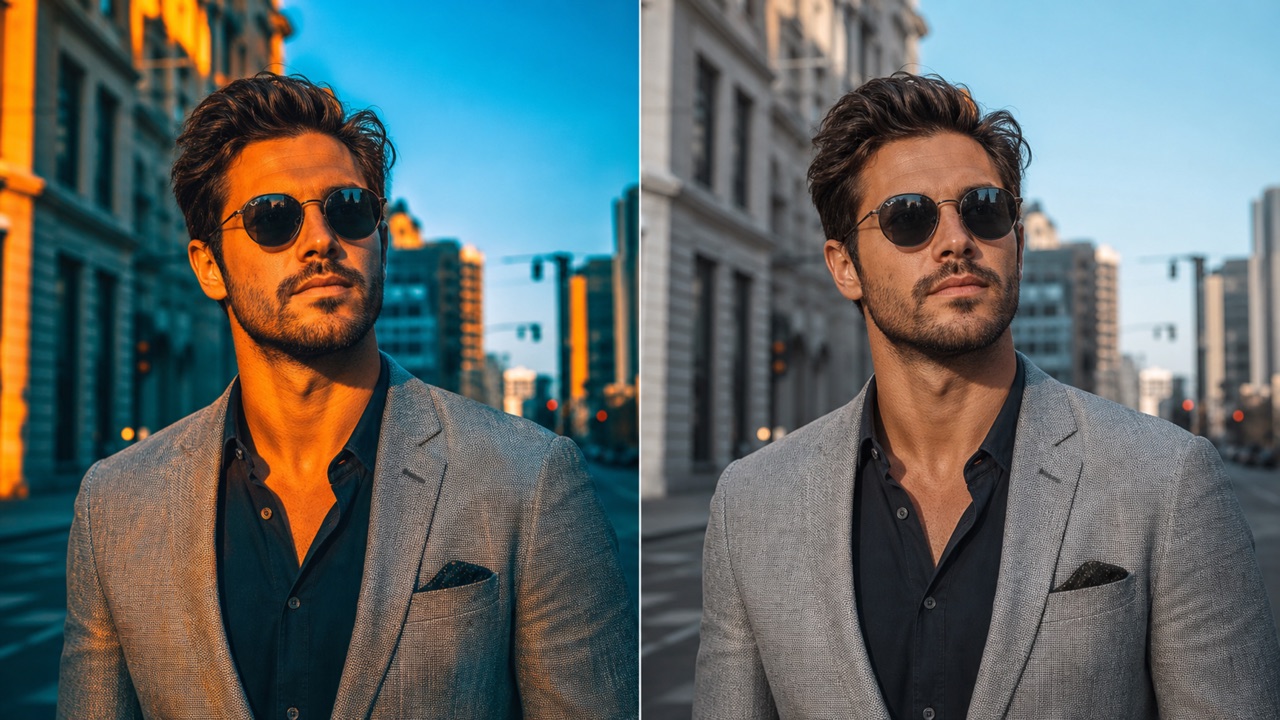
AI Filter Remover for Balanced Color
Strong presets can push skin, skies, interiors, and products toward unnatural hues. AI Filter Remover reduces distracting casts and rebuilds a more neutral color relationship. Use AI Filter Remover when a photo feels too blue, orange, green, faded, or intensely saturated, while keeping the scene and subject consistent.
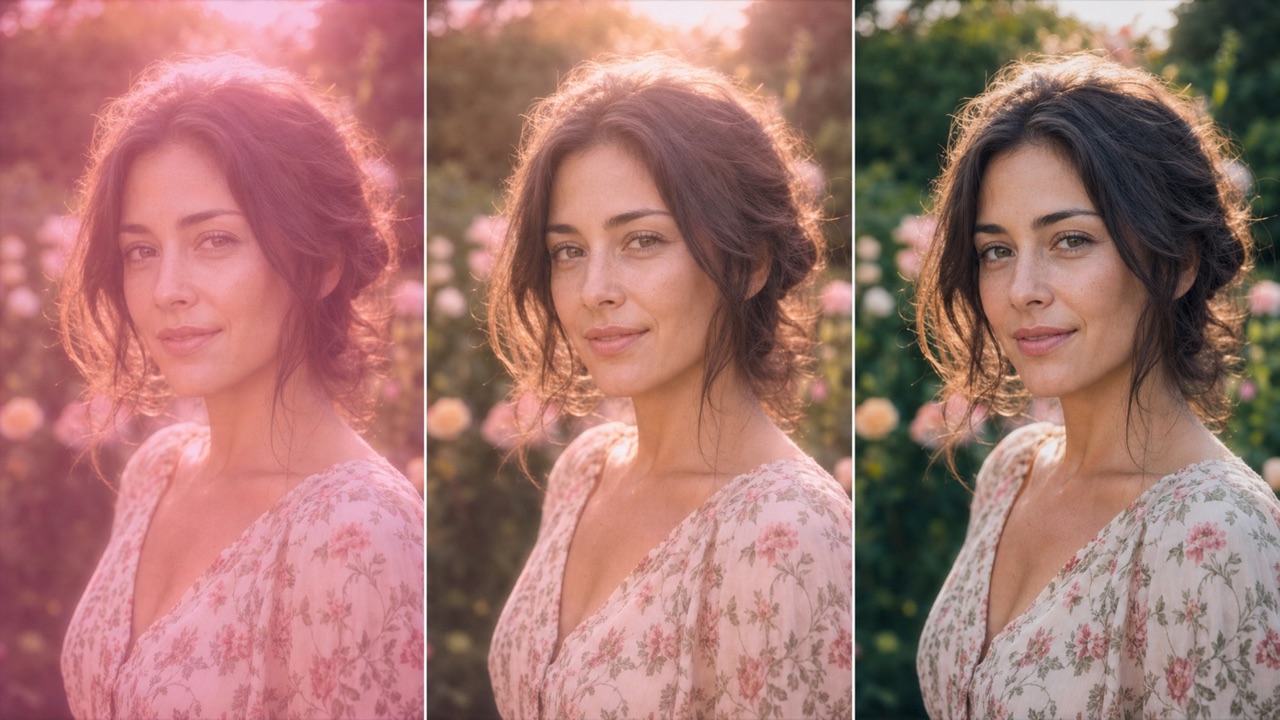
AI Filter Remover for Realistic Texture
Beauty filters may flatten pores, fabric, hair, packaging, or background detail. AI Filter Remover can create a more believable texture treatment without intentionally changing identity or composition. Guide AI Filter Remover with words such as natural skin texture, subtle detail, realistic fabric, or gentle sharpening for a controlled restoration.
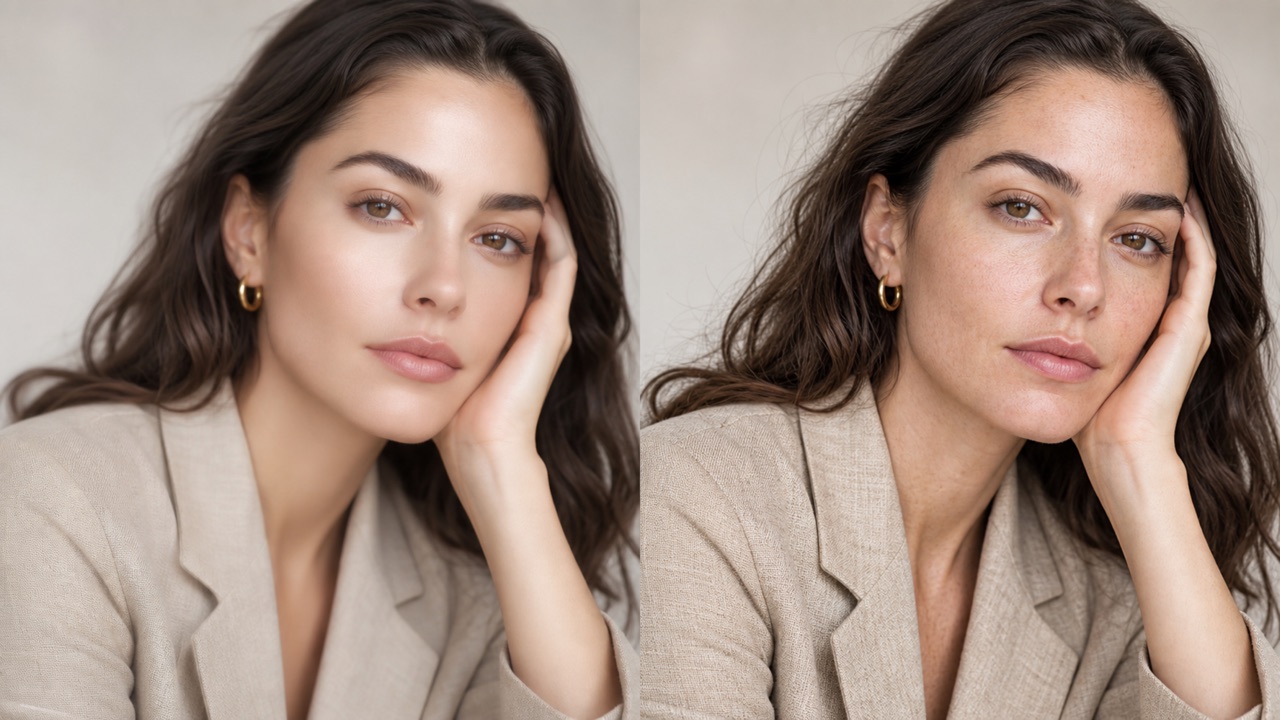
AI Filter Remover for Softer Contrast
Dramatic filters often crush shadows, clip highlights, or add artificial glow. AI Filter Remover balances tonal range so faces and surroundings read more naturally. Ask AI Filter Remover to open dark areas, calm bright halos, preserve depth, and avoid the washed-out look that can follow aggressive correction.

AI Filter Remover with Prompt Control
Not every filter needs full removal. AI Filter Remover follows your requested strength, mood, and priorities, from a subtle correction to a cleaner natural finish. Tell AI Filter Remover what to preserve and what to reduce so the output matches your intent instead of applying a fixed one-click preset.
Who Benefits from This Photo Restoration Platform
Our intuitive platform supports content creators, professional photographers, e-commerce sellers, digital marketers, and everyday casual users who passionately desire a much cleaner, significantly less processed look for their imagery. Because this highly accessible web application works entirely online within your favorite browser, it seamlessly fits into quick workflow reviews, spontaneous visual restoration experiments, and large-scale content refreshes, completely eliminating the frustrating need to download or install heavy desktop editing software.

Portraits and Selfies
Whether you are dealing with aggressive beauty-filter smoothing, excessively tinted skin, artificial blush, or an exaggerated digital glow, this powerful tool offers an effective solution. It helps you effortlessly create a much more grounded, realistic portrait that genuinely reflects the subject, all while carefully preserving their recognizable facial features and natural charm without making them look artificially altered.

Product and Brand Photos
When an overly stylized preset drastically alters the essential color of your packaging, materials, food items, or garments, you can rely on our advanced restoration technology to bring back authenticity. The platform can reliably produce a much cleaner, color-accurate visual reference that is absolutely perfect for e-commerce catalogs, online store listings, customer reviews, and comprehensive visual marketing planning.

Old Social Media Images
Take a trip down memory lane and revisit cherished images that were previously edited using highly dated social media trends, heavy vintage fades, or extreme levels of saturation. By stripping away these harsh digital artifacts, the system breathes new life into your deeply archived posts and saved personal photos, providing them with a refined, timeless appearance that looks fantastic even by today's aesthetic standards.

Creative Re-Editing
Digital artists and editors can utilize this smart utility to build a perfectly neutral-looking base image before they start applying a completely new color grade or graphic design. This streamlined process dramatically simplifies creative experimentation and iteration, which is especially invaluable when the original, unedited raw file has been lost or is simply no longer available to work with.
Why Creators Choose AI Filter Remover
People choose AI Filter Remover for prompt-based control, fast comparisons, and a workflow that does not demand advanced editing knowledge. AI Filter Remover is especially helpful when the unfiltered source is missing and a natural-looking alternative is needed.
AI Filter Remover helped me calm an old portrait preset without turning the face into a different person. The natural color gave me a much better starting point for final edits.
I use AI Filter Remover when supplier images arrive with aggressive saturation. It is a fast way to explore a cleaner visual direction before our team prepares production assets.
AI Filter Remover makes older social photos feel current again. I can request subtle changes, compare the result, and avoid spending time rebuilding adjustments from scratch.
AI Filter Remover is useful for visual research because it creates a neutral alternative quickly. I especially like being able to describe which colors and contrast should change.
With AI Filter Remover, I restored a softer look to travel photos that had heavy teal shadows. The scenery stayed familiar while the light felt more believable.
AI Filter Remover gives our students a simple way to discuss color casts, texture, and contrast. It is approachable enough for quick demonstrations and prompt experiments.





AI Filter Remover FAQ
Learn how AI Filter Remover handles filtered images, prompt guidance, realistic expectations, source quality, and responsible use before you generate a restored version.
AI Filter Remover edits an uploaded photo to reduce visible filter effects such as strong color casts, heavy smoothing, exaggerated saturation, glow, or harsh contrast. It generates a plausible natural-looking version; it cannot guarantee recovery of the exact original pixels hidden by an earlier edit.
Yes. AI Filter Remover can reduce artificial smoothing, tint, blush, glow, and contrast while aiming to preserve identity, expression, pose, and composition. Results depend on how much information remains in the uploaded photo.
Tell AI Filter Remover what looks unnatural and what must stay unchanged. For example: reduce the cool blue filter, restore neutral skin tones, keep the same face and background, preserve freckles, and use realistic contrast.
No tool can reliably reconstruct information that a filter permanently removed or changed. AI Filter Remover creates a visually plausible restoration based on the filtered image and your prompt, not a forensic recovery of an unknown original file.
AI Filter Remover works best with clear, well-sized images where the subject and key details remain visible. Extremely low resolution, blocked highlights, crushed shadows, stickers, masks, or severe face reshaping can limit restoration quality.
You can use AI Filter Remover to explore cleaner versions for design, content, education, and planning. Review the generated image carefully, confirm you have rights to the source, and follow the applicable Pixomi terms for your intended use.
Restore Authentic Beauty and a Natural Look with AI Filter Remover Today
Ready to strip away harsh filters and reveal the true beauty of your photos? Upload your overly processed or filtered image, describe exactly what elements should look more natural, and let our powerful AI Filter Remover instantly create a cleaner, highly detailed, and beautifully balanced version online in just a few seconds. Experience the magic of effortless photo restoration now!
