
More AI Image Generators
Explore our collection of specialized AI image generators designed for different creative needs and styles
























Image Text Editor to Edit Text in Image with AI
Upload any image, type the replacement words, choose an image size, and let our image text editor update the text while keeping the original font style.
Our image text editor helps you edit text in image files without rebuilding the whole design. Upload a poster, product photo, menu, screenshot, flyer, or social graphic, then enter the words you want to place into the reference image. The image text editor studies the original font, size, color, shadow, outline, texture, spacing, alignment, and perspective so the new text looks natural. If you need to edit text in image content for ads, ecommerce, localization, or quick corrections, this image text editor gives you a focused image to image workflow. Change the words, keep the visual style, and create a polished result with the image text editor online.
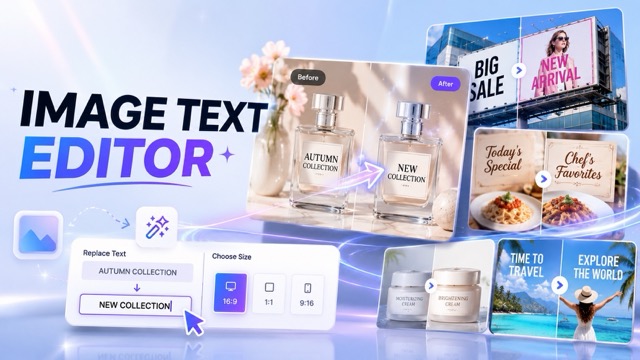
How to Use Image Text Editor
The image text editor is built for a simple four step workflow: upload your picture, write the replacement text, choose an output size, and generate. It makes it easier to edit text in image designs while keeping the original visual identity.

Upload an Image with Text
Start by uploading any image that contains editable words. The image text editor works with posters, product images, menus, signs, banners, screenshots, and social graphics where you want to edit text in image content.

Enter Your Replacement Text
Use the prompt box to describe the new words you want. Tell the image text editor what the original text should become, and the tool will edit text in image areas while matching the existing design.

Choose the Output Image Size
Select the size you need for a website, marketplace, ad, post, or campaign asset. The image text editor keeps the layout clean so you can edit text in image files for different publishing formats.

Click Generate and Download
Click generate and let AI complete the image to image edit. The image text editor updates the selected text, blends the background, and helps you edit text in image results ready for download.
Best AI Image Tools for Creative Projects
Explore creative tools for image, learn tips and tricks, and see how AI can be your assistant in turning concepts into finished projects.
Image Text Editor Features for Clean Text Replacement
The image text editor gives users a direct way to edit text in image files through an image to image workflow. It is made for replacing text, keeping the same font look, preserving the background, and exporting clean visuals for real projects.
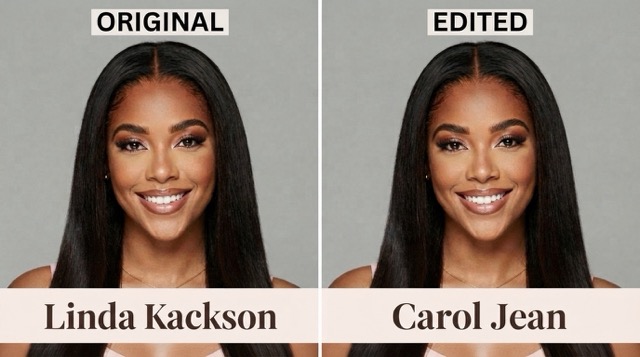
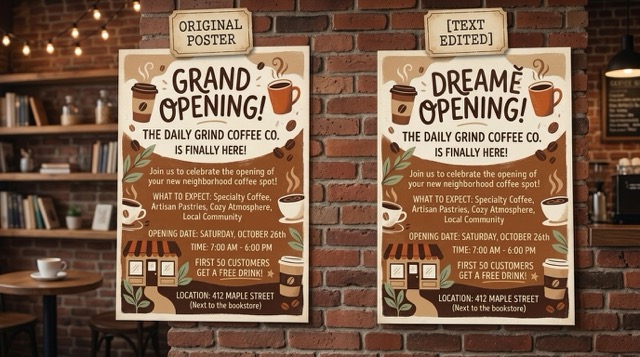
Replace Text While Keeping the Same Font Style
- The image text editor is designed to replace words while preserving the original font appearance.
- When you edit text in image content, the tool aims to match font weight, letter spacing, line spacing, color, stroke, shadow, glow, and perspective.
- Use the image text editor when a poster, menu, product photo, or banner needs new copy but the same visual style.
- The result should feel like the text was always part of the original image, not pasted on top.
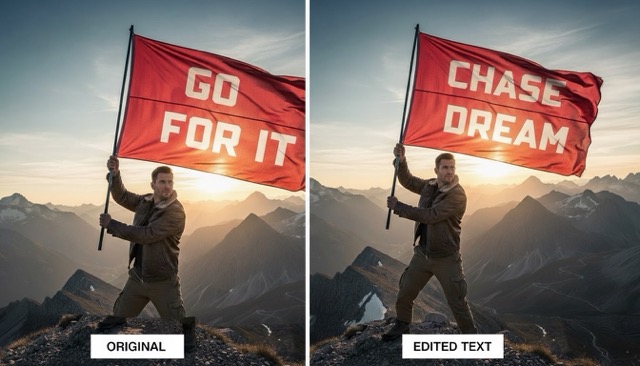
Edit Text in Image Without Redesigning Everything
- The image text editor focuses on text replacement rather than full image redesign.
- You can edit text in image files while keeping people, products, objects, backgrounds, lighting, color mood, and composition stable.
- This image text editor is useful when you only need to update a date, price, slogan, label, headline, or typo.
- It helps creators make precise changes without opening complex design software.
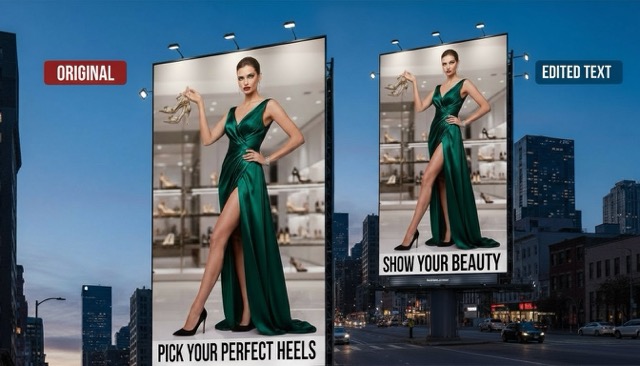
Prompt Based Control for New Words
- The image text editor lets users write the replacement text directly in the prompt box.
- You can say what the old text should become, or simply provide the new words you want to see.
- With this image text editor, marketers can edit text in image creatives for new offers, product names, campaign lines, event dates, or translated versions.
- The prompt based workflow keeps the process clear for beginners and fast for daily creative teams.
Flexible Output Sizes for Real Publishing Needs
- After uploading and writing your replacement text, choose the image size that fits your channel.
- The image text editor supports a smoother workflow for social posts, product listings, ad banners, website visuals, flyers, and campaign graphics.
- You can edit text in image assets and create size ready outputs without starting from a blank canvas.
- This makes the image text editor practical for fast content updates across multiple platforms.
Why Choose Image Text Editor
Choose the image text editor when your design is already finished but the wording needs to change. It helps creators, sellers, marketers, and local businesses edit text in image assets faster, cleaner, and with stronger style consistency.

Poster and Flyer Text Updates
Use the image text editor to update event dates, headlines, prices, or calls to action on posters and flyers. It helps you edit text in image designs without rebuilding the full layout.

Product Image Text Editing
Ecommerce sellers can use the image text editor to change product labels, sale text, feature notes, and promotional copy. When you edit text in image product assets, the background and product should stay consistent.

Social Media Graphic Revision
Creators can use the image text editor to refresh captions, titles, quotes, and campaign messages on social visuals. It is a fast way to edit text in image posts for new trends or seasonal content.

Menu and Sign Text Replacement
Restaurants, cafes, and local stores can use the image text editor to update menu items, prices, opening hours, and signs. It helps teams edit text in image materials while keeping the original design style.

Ad Localization and Campaign Variants
Marketing teams can use the image text editor to create localized ad versions and regional campaign messages. You can edit text in image creatives for different languages while preserving visual consistency.

Typo Fixes in Existing Images
Fix spelling mistakes, old dates, wrong names, or outdated copy with the image text editor. Instead of redesigning from scratch, edit text in image areas and keep the rest of the image unchanged.
What Users Say About Image Text Editor
Users choose the image text editor because they want fast, focused, and natural text replacement. These teams edit text in image assets for marketing, ecommerce, local business, and social content without starting over.
The image text editor helped me update several campaign posters without asking the design team to rebuild them. I could edit text in image files, keep the same font look, and prepare new versions much faster.
I use the image text editor for product sale banners when prices change. It is useful because I can edit text in image assets while keeping the product photo and background consistent.
For social graphics, the image text editor saves a lot of time. I can edit text in image posts for a new caption or headline, then generate a clean version for publishing.
The best part of this image text editor is the same font feel. I often need to edit text in image mockups for clients, and the final result looks much closer to the original design.
I used the image text editor to update menu prices in existing images. It made it simple to edit text in image menus without changing the food photos or the restaurant style.
Our agency uses the image text editor to test ad variations quickly. We can edit text in image creatives for different offers, languages, and messages while keeping the design direction stable.




Frequently Asked Questions About Image Text Editor
Learn how the image text editor works, how it helps you edit text in image files, and how AI can replace words while preserving the original design.
An image text editor is an AI tool that lets you upload an image and replace the words inside it. With this image text editor, you can type new text in the prompt box, choose an output size, and generate an edited image. It is built for users who need to edit text in image files while keeping the original design style.
Yes. The image text editor is designed to edit text in image content while preserving the original font appearance as closely as possible. It aims to match font style, weight, size, color, spacing, shadow, outline, and perspective so the new words blend naturally.
Upload your image, enter the replacement words in the prompt box, choose the image size, and click generate. The image text editor will process the request and edit text in image areas while keeping the rest of the picture stable.
You can use the image text editor for posters, product images, menus, flyers, signs, screenshots, social media graphics, and ad creatives. It is especially helpful when you need to edit text in image designs that already look good but contain outdated or incorrect wording.
The image text editor is designed to preserve non-text content. When you edit text in image files, the tool should keep people, objects, background, lighting, layout, and composition as close to the original as possible.
Yes. Marketers can use the image text editor to create different campaign versions, update offers, test headlines, or localize ad copy. It is a practical way to edit text in image ads without recreating every design from scratch.
Start Editing Image Text with AI
Upload a picture, enter the new words, choose a size, and generate. The image text editor helps you edit text in image assets while keeping the same font style, clean background, and original visual layout.
