80s & 90s AI Photo Prompts: 6 Retro Looks to Recreate from Your Photo
Copy ready-to-use 80s and 90s AI photo prompts for retro portraits, family photos, yearbook looks, Bollywood styles, and more. Learn how to use a reference photo, preserve identity, fix weak retro results, and recreate each look with GPT Images 2.5.
Want to turn a normal photo into an authentic 80s or 90s portrait? A good prompt can change the hairstyle, outfit, backdrop, lighting, film texture, and overall decade while keeping the person recognizable.
This guide gives you ready-to-copy 90s AI photo prompts and 80s AI photo prompts for studio portraits, casual snapshots, family photos, school yearbooks, fashion portraits, Bollywood-inspired looks, and Maharashtra-inspired retro photos. You’ll also learn how to preserve facial identity, fix the wrong outfit, remove modern props, and make a weak retro result look much more convincingly 80s or 90s.
You can test the prompts with GPT Images 2.5 by uploading a reference photo and using any prompt below as a starting point.
How to Use a Reference Photo
Start with a clear photo where the face is easy to see. A front-facing or slightly angled portrait usually works better than an extreme side profile.
Avoid heavy beauty filters, sunglasses, hands covering the face, and very dark lighting if keeping the original identity matters.
A simple workflow is:
- Upload your reference photo.
- Choose an 80s or 90s style.
- Copy the matching prompt below.
- Replace any optional clothing, hairstyle, or background details.
- Generate the image.
- Fix only the part that looks wrong instead of rewriting the entire prompt.
If you want to create several versions from the same photo, use GPT Images 2.5 and change one element at a time, such as the decade, outfit, studio background, or camera style.
A Simple Retro Portrait Prompt Formula
A useful retro portrait prompt usually includes:
Identity + decade + photo type + clothing + hairstyle + setting + lighting + camera look + preservation rules
A basic version looks like this:
Use the uploaded photo as the identity reference. Preserve the same recognizable face, facial proportions, skin tone, and overall identity. Recreate the person in a realistic 1990s portrait with period-appropriate clothing, hairstyle, background, lighting, and analog photography. Make the result look like a photograph actually taken in the 1990s rather than a modern digital portrait with a vintage filter. Preserve natural facial proportions and do not replace the person's identity.
That structure can then be adapted for a specific 80s or 90s look.
1. Generic 1980s Portrait Prompt
For a classic 80s result, focus on studio photography rather than simply adding grain.
Copy This Prompt
Use the uploaded photo as the identity reference and preserve the person's recognizable face, facial proportions, skin tone, and key features. Recreate the person in a realistic mid-1980s portrait studio photograph. Add voluminous period-appropriate hair, authentic 1980s casual clothing, simple statement accessories, and a softly mottled studio backdrop. Use warm studio lighting, gentle direct flash, slightly soft focus, visible 35mm film grain, mild color fading, and subtle printed-photo texture. Make the result look like an actual portrait developed in the 1980s rather than a modern photo with a retro filter. Do not change the person's identity or apply modern beauty retouching.
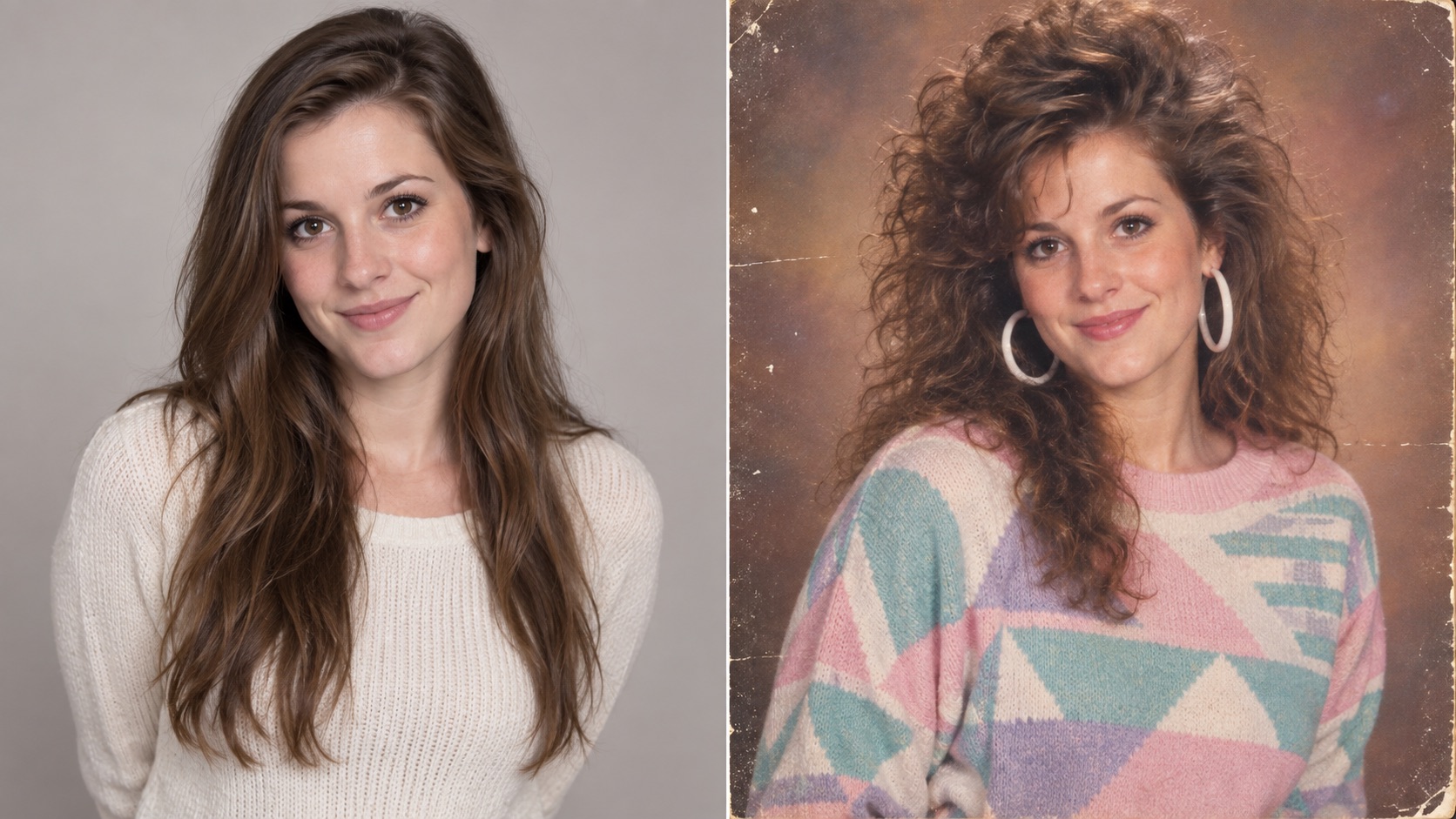
(Modern portrait transformed into an 80s studio photo. Try a similar look with GPT Images 2.5.)
The strongest 80s results usually combine several period-specific details at once: larger hair, recognizable clothing shapes, flash-based studio lighting, a mottled backdrop, softer focus, and printed-photo texture.
2. Generic 1990s Photo Trend Prompt
A strong 90s photo trend prompt should usually feel more casual than a polished fashion shoot.
Denim, direct flash, simple interiors, compact-camera framing, and slightly imperfect exposure can make the result feel much more believable.
Copy This Prompt
Transform the uploaded portrait into an authentic 1990s casual snapshot while preserving the person's identity, face shape, eyes, nose, mouth, skin tone, and natural facial proportions. Dress the subject in period-appropriate 1990s casual clothing such as relaxed denim, a plain T-shirt, plaid layers, or a light denim jacket. Use natural 1990s hair and place the subject in a believable 1990s indoor setting with period-appropriate furniture and objects. Use direct on-camera flash, slight grain, soft contrast, mildly faded consumer-film colors, and imperfect casual framing. Avoid smartphones, wireless earbuds, modern screens, contemporary fashion, HDR lighting, and overly smooth skin.
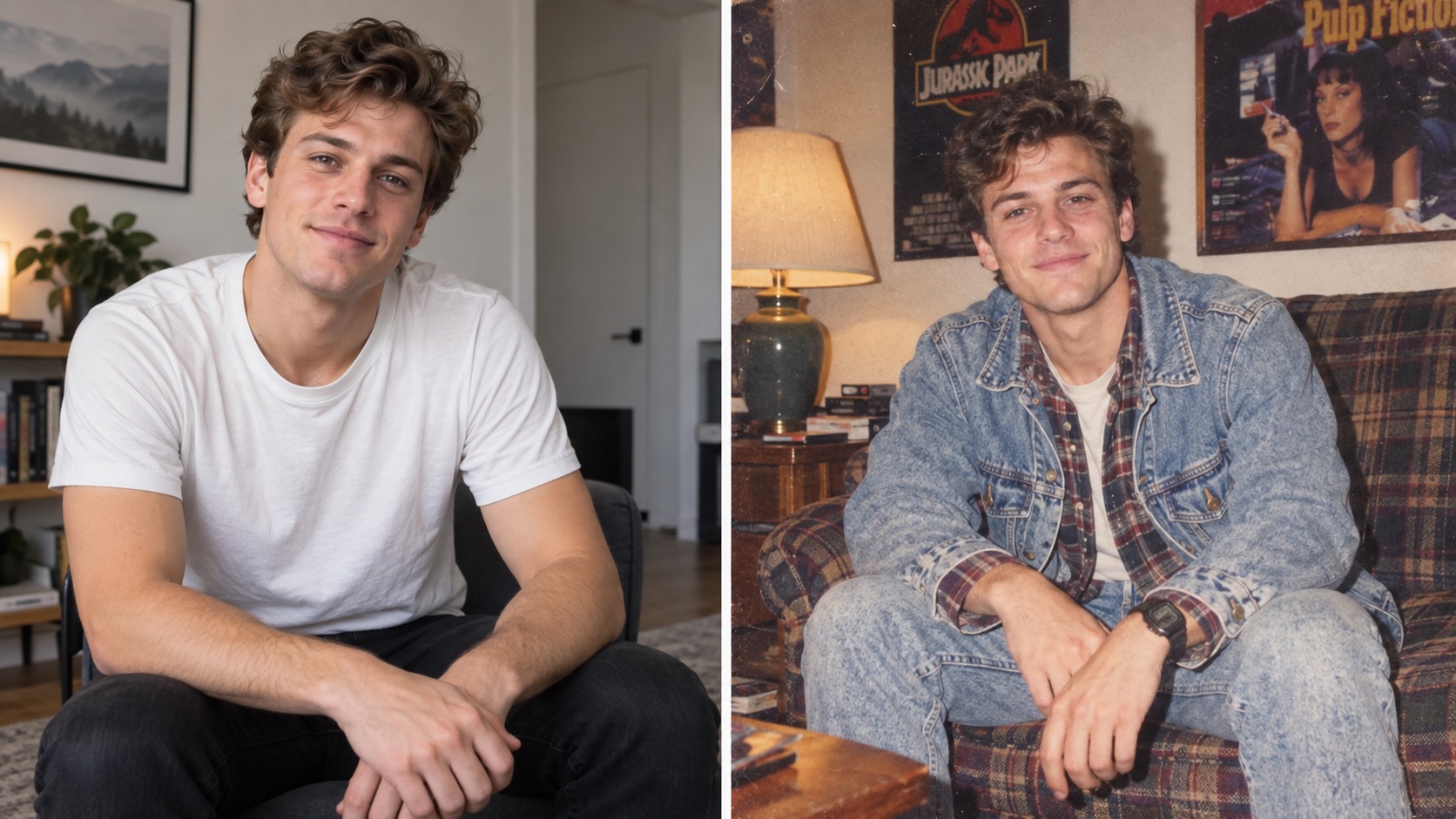
(Casual 90s snapshot created from a modern reference photo. Test the style with the GPT Images 2.5 image generator.)
For 90s AI photo prompts, avoid describing only the clothes. The room, lighting, framing, camera feel, and film texture are just as important.
3. 80s Bollywood-Inspired Portrait Prompt
A Bollywood-inspired retro portrait works better when the prompt describes a specific photographic context instead of simply saying “make it Bollywood.”
Copy This Prompt
Use the uploaded portrait as the identity reference. Preserve the person's recognizable facial features, skin tone, age, and natural proportions. Recreate the subject as the star of a glamorous 1980s Indian cinema publicity portrait. Use voluminous period-inspired hair, elegant 1980s styling, rich fabric textures, tasteful jewelry, warm cinematic makeup, and an expressive but natural studio pose. Use warm key lighting, soft highlights, slightly softened focus, visible analog grain, rich film color, and the look of a printed movie publicity photograph from the 1980s. Keep the face clearly recognizable and avoid modern clothing, modern makeup trends, plastic-looking skin, or fantasy elements.
If you already like the face and lighting but want different clothing, edit only the outfit rather than regenerating the whole image.
For example:
Keep the face, pose, hair, lighting, background, and photographic style unchanged. Replace only the outfit with [describe the desired 1980s outfit]. Do not modify any other part of the image.
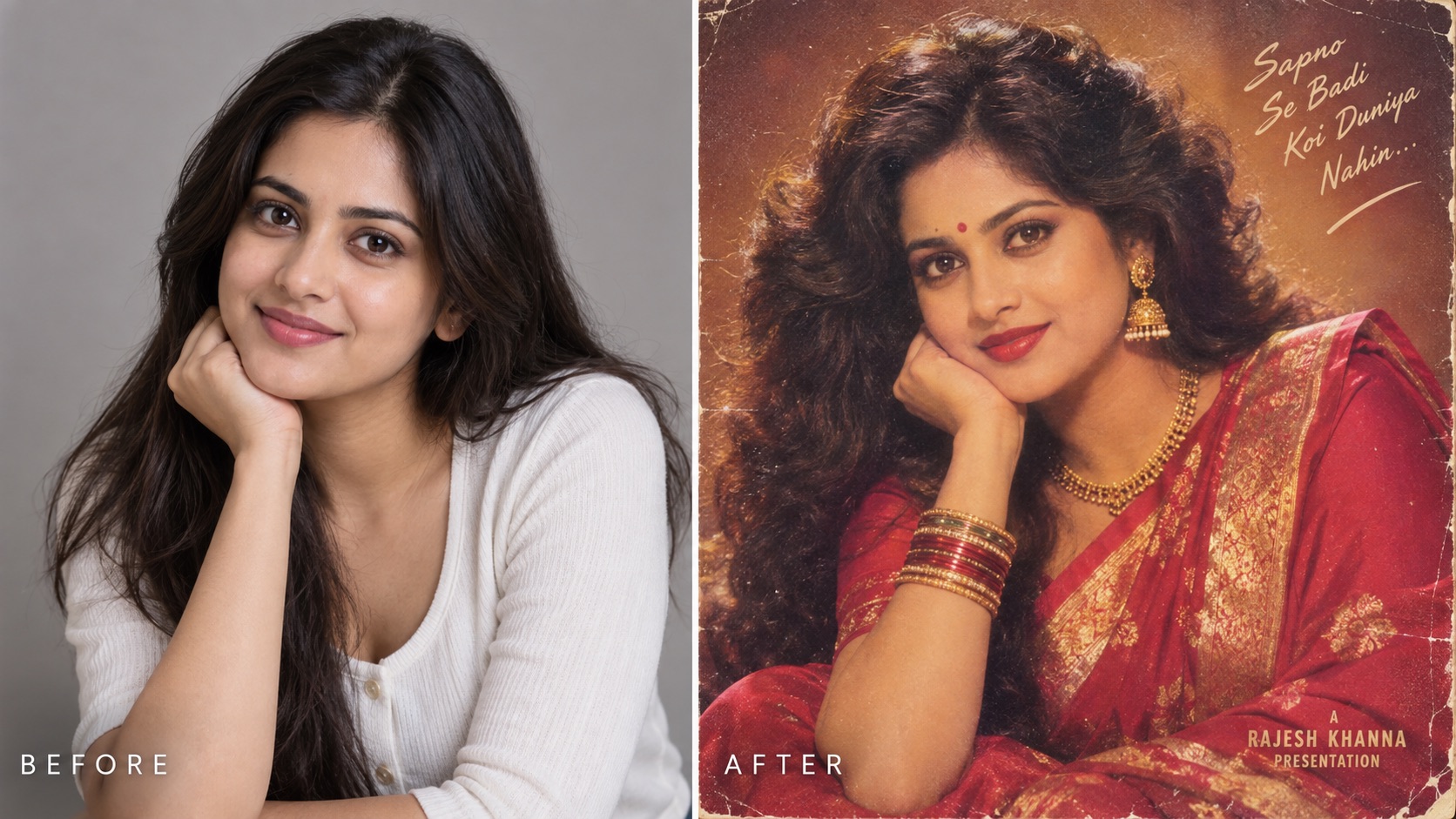 (Modern portrait transformed into an 80s Bollywood-inspired glamour photo. Try a similar retro look with GPT Images 2.5.)
4. Maharashtra-Inspired Retro Portrait Prompt
For regional styling, specific visual instructions usually work better than a broad label.
Copy This Prompt
Preserve the identity of the person in the uploaded photo, including facial structure, skin tone, eyes, nose, mouth, and natural proportions. Recreate the portrait with a Maharashtra-inspired late-1980s to early-1990s aesthetic. Use a period-appropriate traditional Maharashtrian outfit with culturally coherent fabric, jewelry, hairstyle, and accessories. Place the subject in a simple indoor family-portrait or studio setting appropriate to the period. Use warm direct lighting, restrained shadows, slightly faded print colors, realistic analog grain, and subtle softness. The final image should look like a genuine photograph from the era rather than a contemporary costume shoot. Do not mix unrelated regional clothing or accessories.
If you want a particular saree, jewelry style, hairstyle, or male outfit, describe that item directly instead of asking the model to guess.
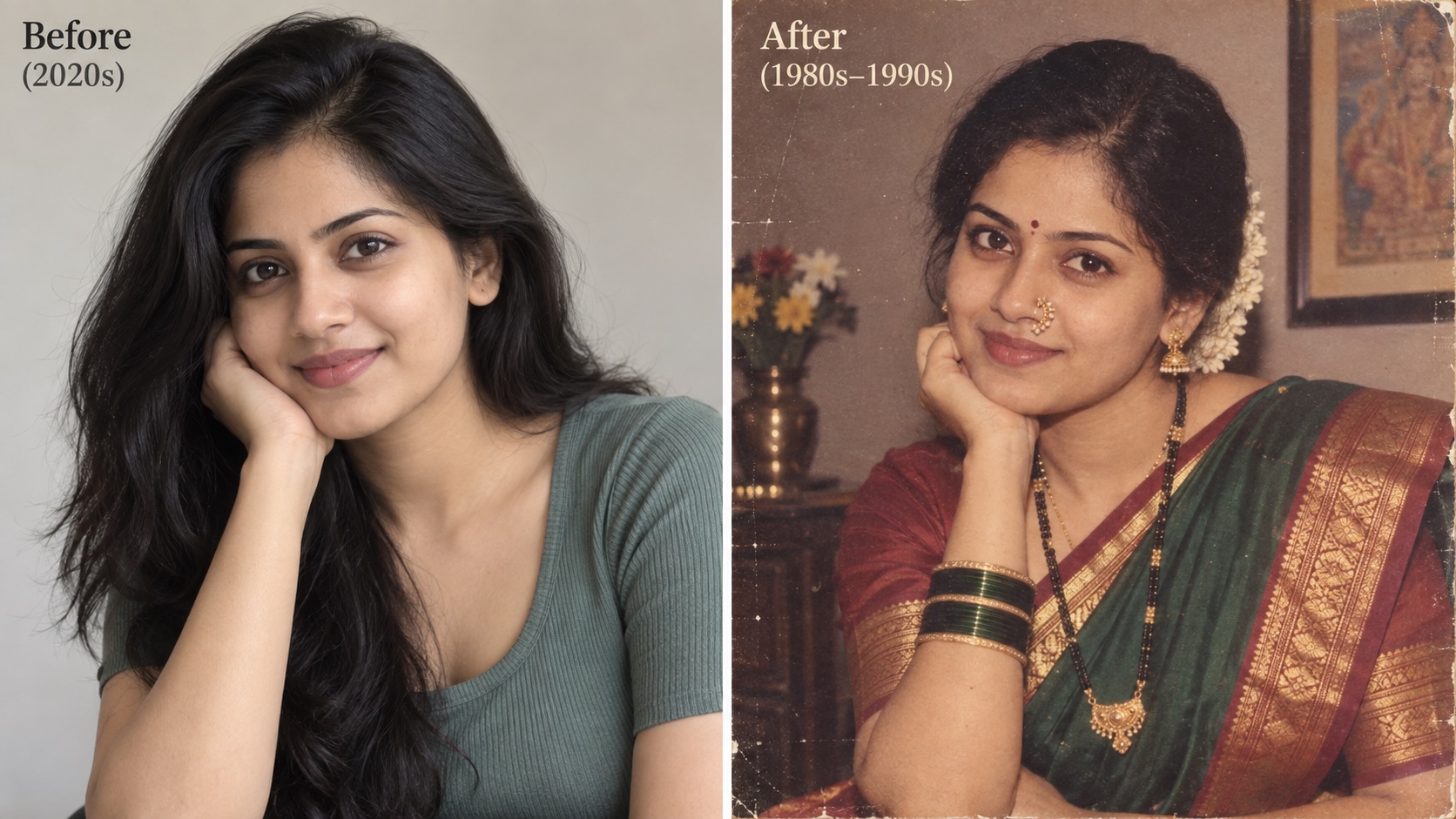
(Modern portrait recreated as a Maharashtra-inspired retro photo with traditional styling and an authentic analog finish. Create your own version with GPT Images 2.5.)
5. 80s or 90s Family Portrait Prompt
Family portraits need stronger identity instructions because the model has to preserve several people at once.
Copy This Prompt
Use the uploaded family photo as the identity and composition reference. Preserve each person's individual facial features, approximate age, skin tone, family resemblance, relative height, and position in the group. Recreate the image as a realistic late-1980s to early-1990s family studio portrait. Give each person distinct period-appropriate clothing and hairstyles instead of identical outfits. Use a softly mottled studio backdrop, balanced group posing, warm flash photography, visible film grain, slightly faded print colors, subtle softness, and authentic printed-photo texture. Keep the number of people unchanged. Do not merge faces, duplicate people, remove anyone, add extra family members, or replace anyone with a generic face.
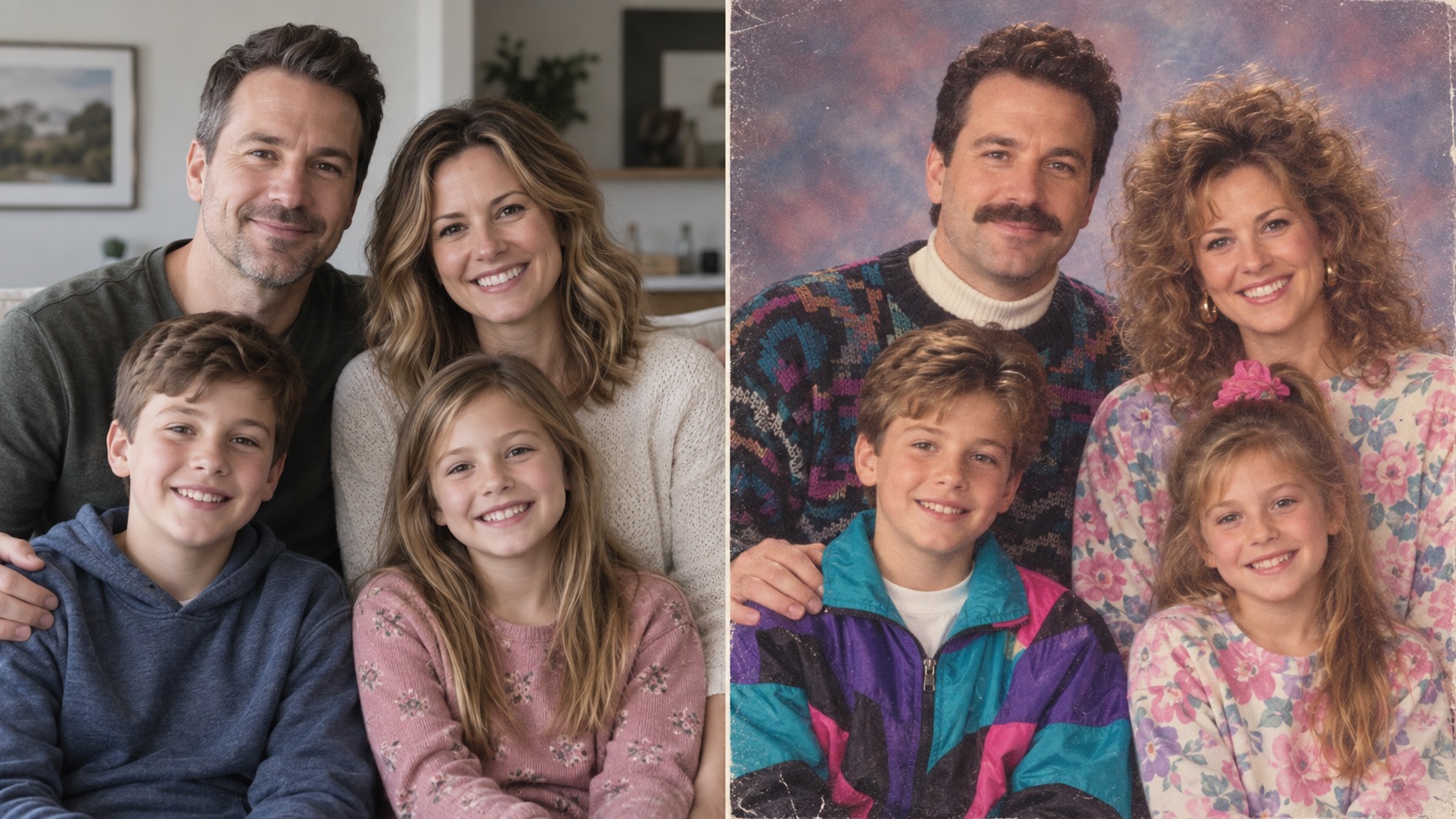
(Modern family photo transformed into a late-80s/early-90s studio portrait. Recreate the style with GPT Images 2.5.)
If the model adds or removes someone, repeat the number of people explicitly:
Keep exactly four people in the image. Do not add, remove, duplicate, merge, or replace any person.
6. 90s School Yearbook and Studio Fashion Prompts
A yearbook portrait and a 90s fashion portrait belong to the same decade, but they should not use the same photographic treatment.
90s School Yearbook Prompt
Use the uploaded portrait as the identity reference and preserve the person's recognizable facial features and natural proportions. Recreate the image as a realistic 1990s school yearbook studio portrait. Frame the subject from the shoulders or chest up, facing the camera with a relaxed neutral expression. Use simple period-appropriate clothing, naturally voluminous 1990s hair, a softly mottled studio background, straightforward portrait lighting, mild flash, slightly soft focus, visible film grain, subtle print fading, and natural skin texture. Keep the composition simple and believable. Do not add modern styling, dramatic cinematic lighting, or unnecessary props.
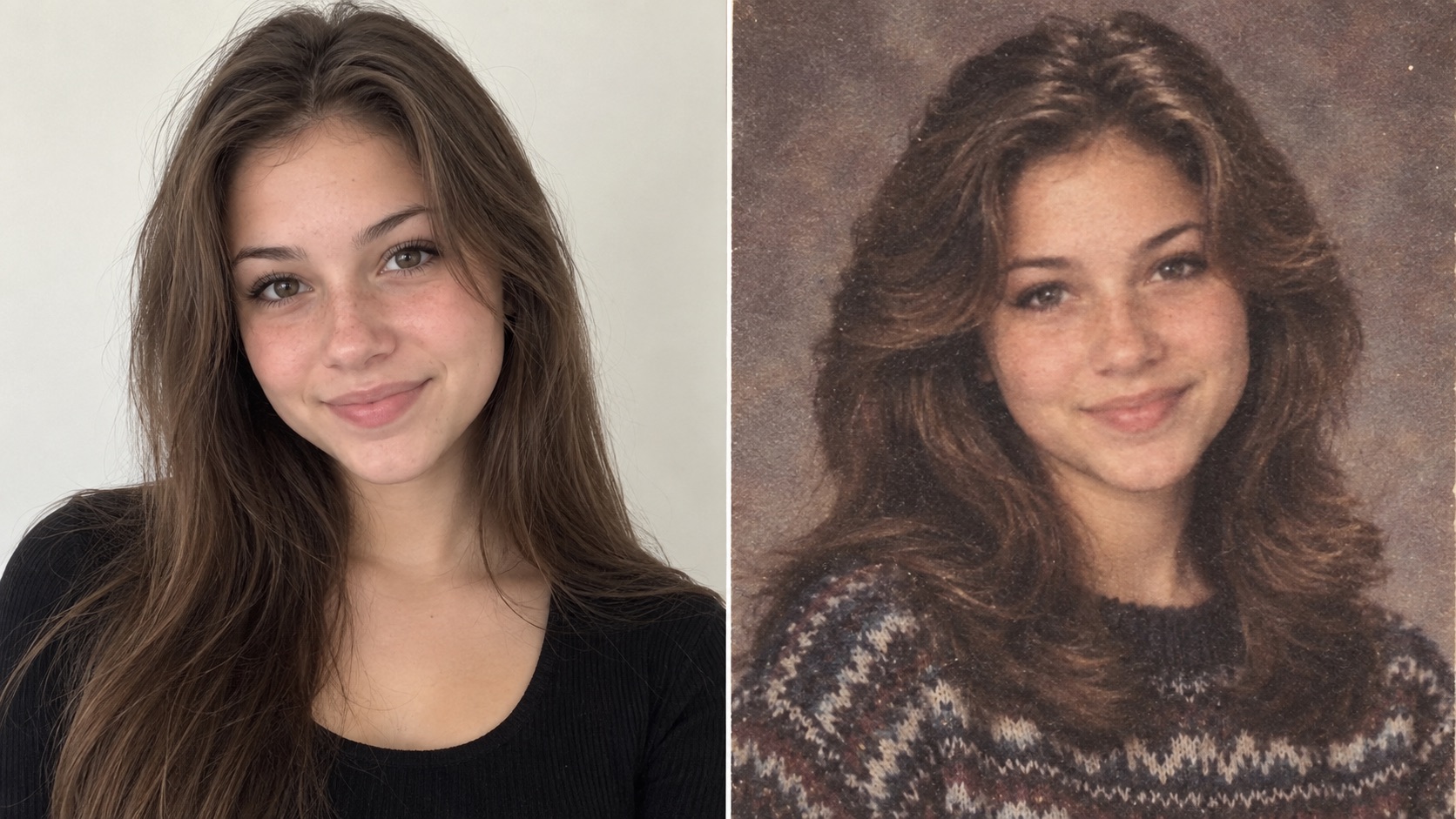
(Modern portrait recreated as a 90s school yearbook photo. Try the prompt with GPT Images 2.5.)
90s Studio Fashion Prompt
Use the uploaded portrait as the identity reference. Preserve the person's face, skin tone, facial proportions, and recognizable features. Transform the image into a realistic 1990s studio fashion portrait with a structured oversized blazer, period-appropriate tailoring, statement earrings, voluminous styled hair, a confident editorial pose, directional studio lighting, a plain seamless backdrop, muted analog color, visible film grain, and subtle printed-photo texture. Make the image feel like a real 1990s fashion studio photograph rather than a modern fashion photo with a vintage filter.
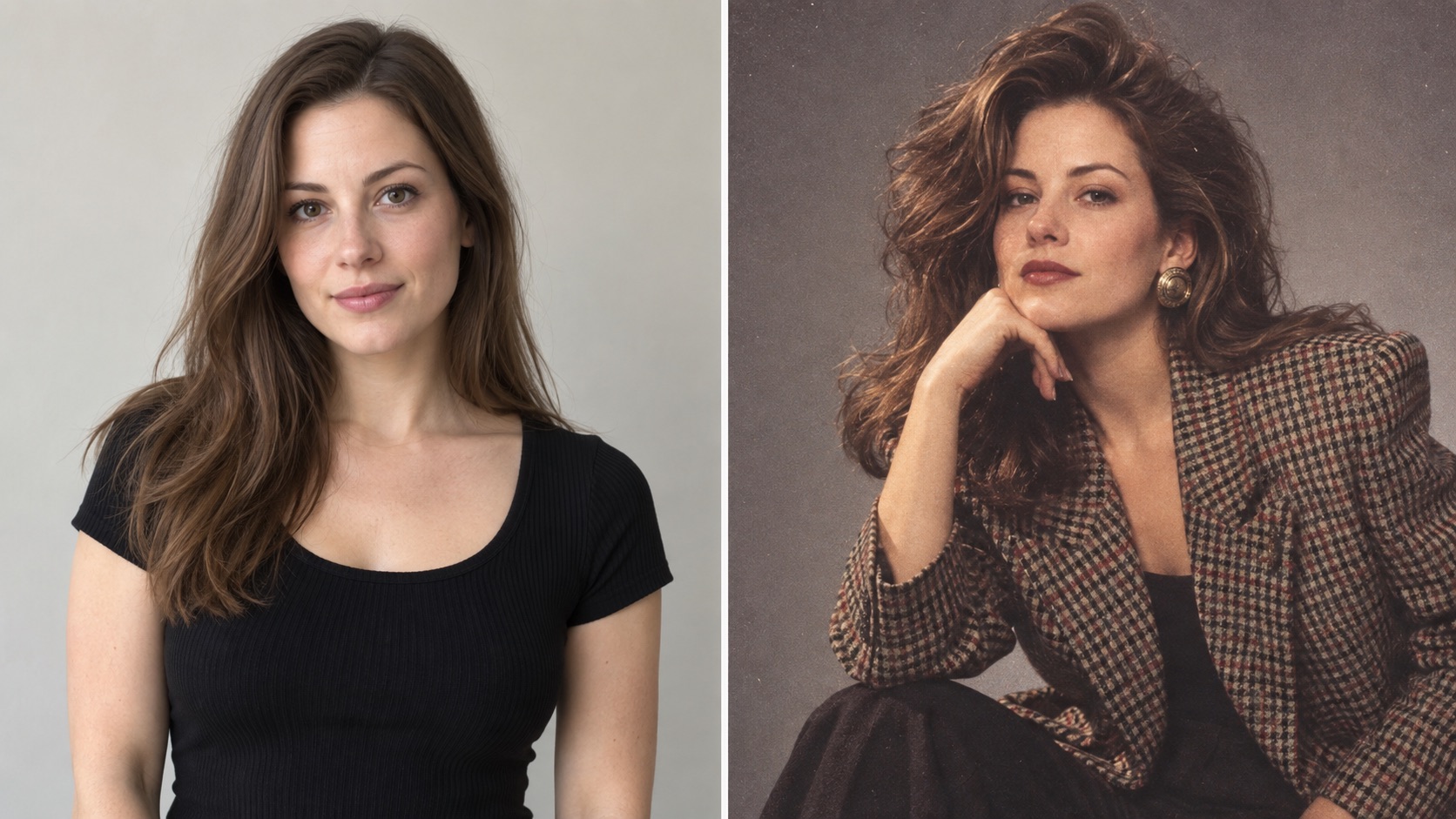
(90s studio fashion transformation with stronger editorial styling. Create your own version with GPT Images 2.5.)
How to Stop AI From Changing Your Face
One of the most common problems with 90s AI photo prompts and 80s AI photo prompts is identity drift.
If the clothes and background look right but the person no longer looks like the reference photo, use a correction prompt instead of starting over.
Identity Fix Prompt
Keep the current composition, hairstyle, clothing, background, lighting, and retro photographic style unchanged. Restore the subject's facial identity from the uploaded reference image. Match the original face shape, eyes, eyebrows, nose, mouth, jawline, skin tone, and natural proportions. Do not beautify, reshape, age, or replace the face. Change only the facial identity accuracy.
The key instruction is change only. It tells the model not to redesign the parts that already work.
How to Fix the Wrong Outfit
If the face and retro style are already correct, do not repeat the entire retro portrait prompt.
Use a targeted edit:
Keep the face, identity, pose, hairstyle, background, lighting, framing, and photographic style exactly unchanged. Replace only the outfit with [describe the outfit]. Make the garment construction, fabric, fit, and accessories appropriate to the specified decade. Do not change anything else.
If you have a separate clothing reference image, define the role of each image:
Image 1 = identity reference. Image 2 = outfit reference. Preserve the person from Image 1 and use only the clothing design from Image 2. Do not copy the face, body, pose, or background from Image 2.
This is usually more reliable than asking the model to “combine both images” without explaining which image controls which part.
How to Remove Modern Props
A retro image can look convincing until the model adds a smartphone, wireless earbuds, modern laptop, LED lighting, or another clearly contemporary object.
Use:
Keep the person, face, pose, clothing, lighting, framing, and overall composition unchanged. Replace only the modern objects with believable period-appropriate alternatives from the 1990s. Remove smartphones, wireless earbuds, modern flat screens, contemporary branding, and other clearly modern objects. Maintain the same scene layout and retro photographic style.
For 90s AI photo prompts, this small cleanup step can make a large difference.
How to Fix Bad Small Text
Yearbook captions, magazine covers, posters, name badges, cassette labels, and signs can easily contain misspelled text.
If exact wording matters, edit the text separately:
Keep the entire image unchanged except for the text on the [object or location]. Replace it with exactly: “CLASS OF 1997”. Spell the text correctly and fit it naturally into the existing space. Do not add any other words and do not change the rest of the image.
Avoid asking the model to redesign the scene and correct several pieces of text at the same time.
First finish the image. Then fix the text.
How to Make the 80s or 90s Style More Obvious
Sometimes the first result looks technically retro but the difference is too weak.
If that happens, strengthen the decade-specific elements rather than adding vague words such as “more vintage.”
Use:
Make the retro transformation much more visually obvious while preserving the subject's identity. Strengthen the period-specific hairstyle, clothing silhouette, accessories, studio or room decor, lighting, direct-flash characteristics, analog film grain, faded print colors, slight softness, and physical printed-photo texture. The result should look like a photograph genuinely taken and developed during the specified decade, not a modern portrait with a subtle retro filter.
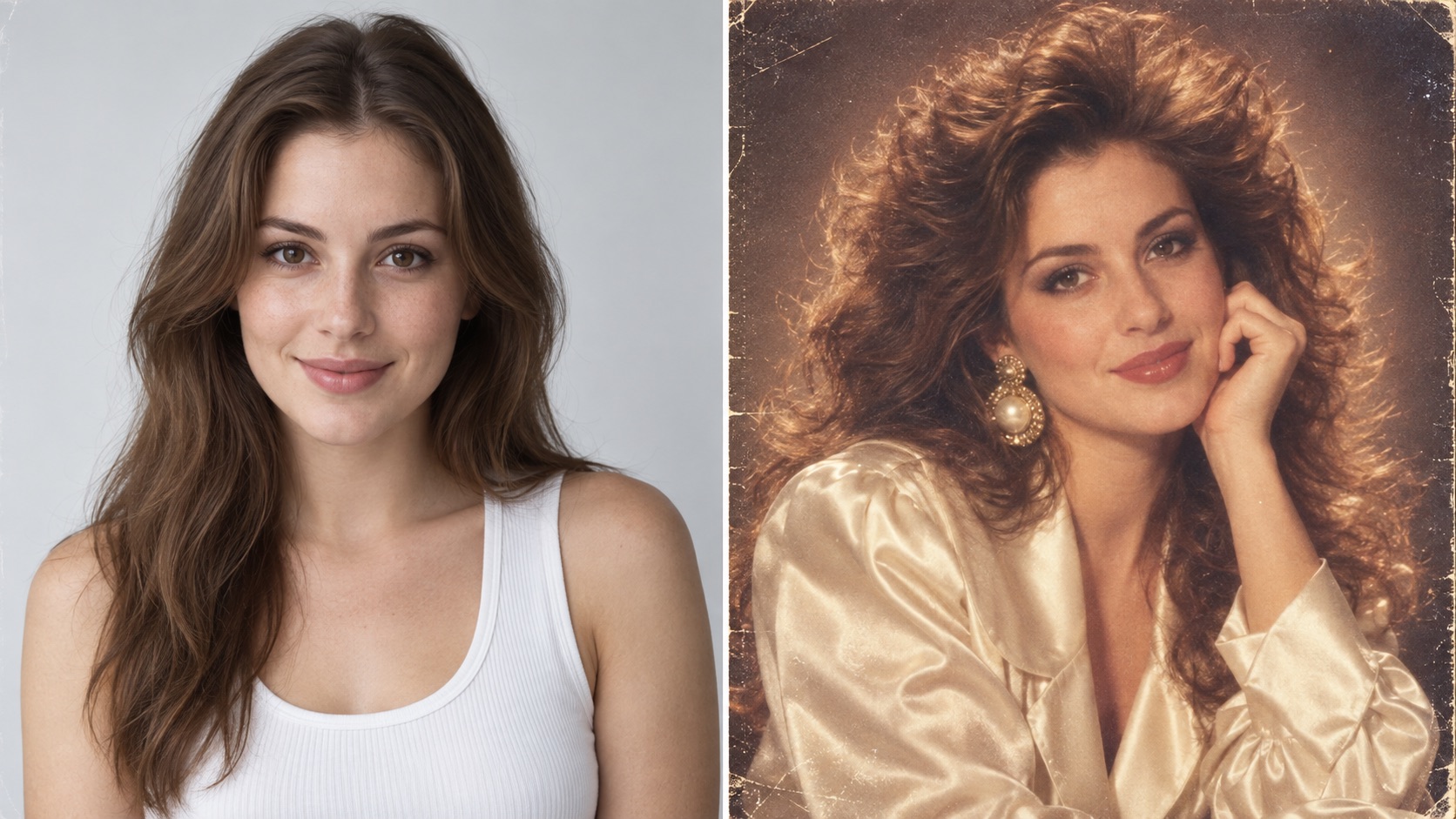
(Stronger retro styling makes the decade immediately recognizable. Explore similar transformations with GPT Images 2.5.)
If the result still feels too modern, check five things: hair, clothing shape, background, lighting, and film texture. One weak element can make the entire image feel contemporary.
What Makes a Retro AI Photo Look Convincing?
The best 80s AI photo prompts and 90s AI photo prompts describe a photograph, not just an outfit.
Before generating, decide:
- Is it a studio portrait, yearbook photo, family photo, fashion shoot, or casual snapshot?
- What hairstyle belongs to that decade?
- What clothing shape and accessories fit the scene?
- Is the lighting soft studio light or direct camera flash?
- Should the image look like 35mm film, a compact-camera print, or a school portrait?
- Should there be grain, fading, slight softness, scratches, or print wear?
- Which parts of the person's identity must remain unchanged?
You do not need to add every possible retro detail. You need details that belong together.
A casual 1990s point-and-shoot snapshot should not use the same lighting, pose, or background as a 1990s fashion editorial. A school yearbook portrait should not look like a movie publicity still.
That distinction is what makes a 90s photo trend prompt feel specific instead of generic.
Create Your Own 80s or 90s AI Photo
Start with the prompt closest to the look you want, upload a clear reference photo, and adjust only the details that matter. If the face is right but the outfit is wrong, edit the outfit. If the image still feels too modern, strengthen the hairstyle, lighting, backdrop, film grain, and other decade-specific details instead of regenerating everything from scratch.
You can create retro photos with GPT Images 2.5 using your own reference image and any of the prompts above. Describe the decade, hairstyle, clothing, setting, lighting, and photographic treatment clearly, then refine individual details until the result matches the look you want.
Whether you are trying 90s AI photo prompts, 80s AI photo prompts, a yearbook portrait, a family studio photo, or a retro fashion look, the goal is the same: keep the person recognizable while making the decade feel unmistakable. Start with one prompt, refine one detail at a time, and turn an ordinary reference photo into a convincing 80s or 90s portrait.