Qwen Image 2.1 Explained: New Features and Key Differences from 2.0
Explore Qwen Image 2.1 and its latest AI image generation and editing capabilities. Compare Qwen Image 2.1 vs 2.0, discover the key upgrades, and learn how native transparency, multi-image references, and local editing support creative workflows.
Qwen Image 2.1 was officially released on September 20, 2026, introducing a more flexible approach to AI image generation and editing. Developed by Alibaba's Qwen team, the model combines text-to-image generation, image editing, transparent image creation, and multi-reference composition within a unified architecture.
While Qwen Image 2.0 established a strong foundation for photorealistic images and complex typography, Qwen Image 2.1 expands what users can accomplish with existing visual materials. From generating transparent stickers to combining multiple product references into a single photograph, the update focuses on practical image creation and editing workflows.
So, what exactly changed between Qwen Image 2.1 and 2.0? This guide explores the new capabilities, technical improvements, real-world applications, and important differences between the two versions.
What Is Qwen Image 2.1?
Qwen Image 2.1 is an AI image generation and editing model designed to transform text instructions and reference images into visual content. It supports both creating entirely new images and modifying existing ones without requiring separate generation and editing models.
Its visual generation component contains approximately 7 billion parameters and uses a single-stream diffusion transformer architecture with 32 layers. The model also incorporates a Qwen3-VL 8B text encoder for interpreting instructions and reference images.
Instead of simply increasing model size, the Qwen team focused on optimizing how the model processes visual information and reuses computational resources during generation.
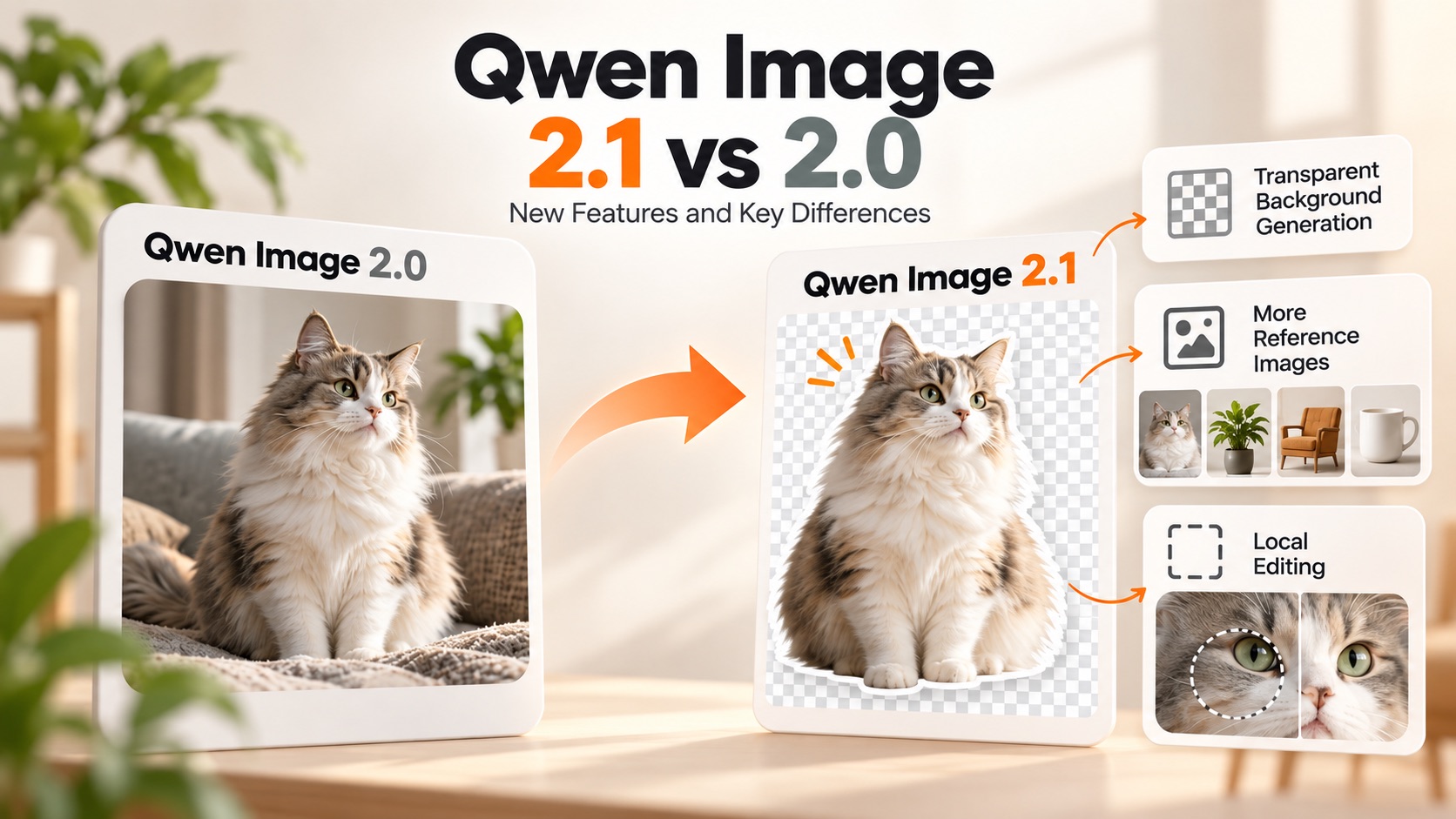
One particularly significant addition is native transparency. Qwen Image 2.1 can generate images with an alpha channel directly, allowing users to create transparent assets without relying on a separate background removal process.
The model also supports up to ten reference images and more flexible editing instructions, including modifications guided by circles, painted annotations, and masks.
Together, these capabilities make Qwen Image 2.1 useful for creative projects that require multiple visual elements, precise modifications, and reusable image assets.
What's New in Qwen Image 2.1?
The update introduces several improvements that go beyond generating visually appealing images. Its new capabilities address practical problems encountered in graphic design, product photography, character creation, and AI-assisted image editing.
1. Native Transparent Image Generation
One of the most notable additions to Qwen Image 2.1 is its ability to generate transparent images directly from text prompts.
Traditional AI image generation workflows often involve creating an image with a solid background and then using a separate tool to remove that background. This process can introduce unwanted edges, missing details, or artifacts around complex subjects.
Qwen Image 2.1 integrates transparency into its image generation process. Users can request an RGBA image, allowing the model to produce visual content with a transparent background.
For example, a prompt could request:
A cute cartoon corgi sticker with soft orange fur and a playful expression. Generate an RGBA image with an alpha channel and a transparent background.
The same capability extends beyond simple stickers. Users can generate product cutouts, decorative illustrations, isolated characters, and other transparent visual assets.
Qwen Image 2.1 also supports editing transparent images and extracting subjects from existing photographs. This makes transparency part of the creative workflow rather than a separate finishing step.
2. Multi-Reference Image Editing with Up to 10 Images
Qwen Image 2.1 supports up to ten reference images, making it possible to combine multiple visual sources within a single generation request.
For example, imagine creating a fashion photograph using five separate references:
- Image 1: A model.
- Image 2: A jacket.
- Image 3: A pair of shoes.
- Image 4: A handbag.
- Image 5: A hat.
The model can interpret these references and generate a photograph in which the model wears the selected clothing and accessories.
Other possible applications include creating group photographs from individual portraits, combining furniture references into an interior design scene, and maintaining consistent visual elements across creative projects.
Multi-reference editing is particularly useful when a project depends on existing materials rather than completely new AI-generated designs.
The ten-image limit describes the model's supported capability. Individual online services or inference providers may impose different input limits.
3. More Flexible Local Image Editing
Qwen Image 2.1 introduces flexible methods for indicating exactly which parts of an image should change.
Instead of relying entirely on text descriptions, users can provide visual guidance through circles, painted annotations, or separate masks.
For example, a fashion photograph might require three changes: removing a watch, changing the model's hair color, and replacing a jacket.
The desired modifications can be identified individually, helping the model understand which areas correspond to each instruction.
This approach is useful for product photography, portrait retouching, clothing replacement, and creative image manipulation.
It also makes image editing more accessible to users who find it difficult to describe precise visual locations through text alone.
4. Improved Portrait and Product Fidelity
Maintaining consistency is an important challenge in AI image editing. When users modify a photograph, they often want the original person or product to remain recognizable.
Qwen Image 2.1 emphasizes identity preservation when editing people and products.
This capability supports workflows such as changing a portrait's background, creating alternative product compositions, or modifying a person's clothing while retaining recognizable characteristics.
For businesses and creators, consistency can be particularly important when producing multiple images featuring the same product or character.
Although identity preservation is a highlighted capability, users should still inspect generated results carefully when exact visual consistency is essential.
5. Refined Typography, Textures, and Image Quality
Text rendering has been an important focus of the Qwen Image family, and Qwen Image 2.1 continues that development.
The Qwen team highlights refinements in typography, portrait lighting, realistic textures, and fine visual details.
These improvements can benefit projects involving promotional posters, product advertisements, editorial photography, and images that combine text with visual content.
However, improved typography should not be confused with an entirely new capability. Qwen Image 2.0 already placed considerable emphasis on professional text rendering and complex visual layouts.
Qwen Image 2.1 vs 2.0: What Are the Differences?
Qwen Image 2.0 was released on February 10, 2026, with an emphasis on professional typography, photorealism, semantic adherence, and integrated image generation and editing.
Qwen Image 2.1 builds on several of those capabilities while introducing more flexible asset creation and multi-reference workflows.
The following comparison highlights the main differences documented in the official releases.
| Feature | Qwen Image 2.0 | Qwen Image 2.1 |
|---|---|---|
| Release date | February 10, 2026 | September 20, 2026 |
| Image generation | Supported | Supported |
| Image editing | Supported | Supported |
| Native 2K resolution | Supported | Supported |
| Typography | Professional text rendering and complex layouts | Continued typography and aesthetic refinements |
| Transparent images | Not highlighted as a native capability in the 2.0 release | Native RGBA generation and editing |
| Reference images | Up to 3 through Alibaba Cloud's documented editing API | Up to 10 supported by the released model |
| Local editing | Instruction-based image editing | Circle-guided, annotation-guided, and mask-guided editing |
| Main emphasis | Typography, photorealism, and visual composition | Transparency, versatile editing, and efficient generation |
Note: The reference-image figures describe different documented interfaces: Alibaba Cloud's Qwen Image 2.0 editing API and the Qwen Image 2.1 model release. Actual limits depend on the service or deployment.
Image Generation and Visual Quality
Qwen Image 2.0 introduced native 2K generation and placed significant emphasis on realistic scenes, complex compositions, and accurate interpretation of detailed prompts.
It also supported instructions of approximately 1,000 tokens for creating professional infographics, posters, comics, and presentation-style visuals.
Qwen Image 2.1 retains native 2K generation and introduces additional refinements to visual aesthetics.
The distinction is not simply that the newer version generates higher-resolution images. Both support 2K output, while the newer release emphasizes more flexible creative workflows and efficient processing.
Image Editing and Reference Control
Both versions support AI image editing, but Qwen Image 2.1 expands the available methods for controlling modifications.
Qwen Image 2.0 can interpret editing instructions and combine multiple reference images. Alibaba Cloud's documented API accepts up to three input images for the 2.0 series.
Qwen Image 2.1 increases the model's supported reference-image count to ten and introduces more explicit local editing methods.
These changes are relevant when users need to combine many existing assets or communicate several modifications within the same image.
Architecture and Efficiency
Qwen Image 2.0 already introduced a lighter architecture compared with earlier Qwen Image models.
Qwen Image 2.1 continues the emphasis on efficiency through its approximately 7B-parameter visual generation component, mixed-granularity attention, and prefix key-value cache reuse.
The caching mechanism allows the model to reuse certain computations associated with text instructions and reference images across denoising steps.
This reduces redundant processing during image generation and editing.
However, actual generation speed and hardware requirements depend on the deployment environment, optimization framework, image resolution, and inference settings. The model's parameter count alone does not determine its total memory requirements.
What Can You Create with Qwen Image 2.1?
The model's new capabilities are particularly relevant to workflows that combine AI generation with existing photographs, products, and design materials.
AI Stickers and Transparent Illustrations
Users can generate transparent stickers, cartoon characters, decorative elements, and isolated illustrations from text prompts.
For example, a creator could request a collection of colorful animal stickers for a messaging platform or a set of transparent decorative illustrations for a website.
Native RGBA generation allows these assets to be placed over different backgrounds without first removing a solid background.
Product Photography and Marketing Images
Product photographers and online retailers can use reference images to explore different product compositions.
A user might upload photographs of a handbag, sunglasses, shoes, and clothing, then request a coordinated fashion photograph.
The same workflow can be used to explore product arrangements, alternative backgrounds, and promotional compositions.
Identity preservation also helps when the goal is to modify a product's surroundings without intentionally changing the product itself.
AI Virtual Try-On and Outfit Visualization
The ability to combine multiple image references makes Qwen Image 2.1 suitable for exploring virtual outfit compositions.
Users can reference an existing model photograph alongside separate clothing and accessory images, then ask the model to assemble the complete look.
This approach is useful for fashion concepts, outfit inspiration, and visual merchandising.
Generated try-on images should still be treated as visualizations rather than precise representations of garment fit or measurements.
Character Creation and Storyboards
Qwen Image 2.1 can use character references to generate new compositions and scenes.
For example, a creator could provide character views and request a storyboard featuring the character performing different actions.
Reference-based generation can help connect individual images into a more coherent visual sequence, making the model relevant to comics, concept art, and narrative illustration.
How to Use Qwen Image 2.1
The workflow depends on whether users want to create a new image, edit an existing photograph, or combine several reference images.
For text-to-image generation, users provide a prompt describing the subject, composition, appearance, and desired output. The model then generates an image based on those instructions.
For image editing, users provide an existing image and describe the modifications they want. They can also supply additional references or visual annotations when supported by the interface.
For transparent image generation, users should explicitly request an RGBA image with an alpha channel and transparent background.
Qwen's official documentation recommends clearly stating the transparency requirement rather than relying on a vague instruction such as "no background."
Developers can access the released model weights through Hugging Face and explore official integration examples for Diffusers and other supported inference frameworks.
Users who prefer a graphical interface can explore the official demo or compatible third-party interfaces, although available features may vary between services.
Is Qwen Image 2.1 Open Source and Free to Use?
Qwen Image 2.1 has publicly available model weights, allowing researchers and developers to examine and deploy the model under its license terms.
However, publicly available weights do not automatically mean unrestricted commercial use.
The official model is distributed under the Qwen Research License Agreement, which permits non-commercial research and evaluation and requires a separate commercial license for commercial use of the model materials.
Anyone planning to integrate the released weights into a commercial image generation service should review the license and obtain the necessary authorization.
Hosted services may also have their own access conditions, usage limits, and pricing.
Frequently Asked Questions
What is Qwen Image 2.1?
Qwen Image 2.1 is an AI image generation and editing model released by the Qwen team on September 20, 2026. It combines text-to-image generation, image editing, native transparency, and multi-reference composition.
What is the biggest difference between Qwen Image 2.1 and 2.0?
The most notable additions are native transparent image generation, support for up to ten reference images, and more flexible local editing. Qwen Image 2.0 already supported native 2K resolution and unified image generation and editing.
Can Qwen Image 2.1 generate transparent PNG images?
Yes. The model supports native RGBA generation, including an alpha channel for transparency. This makes it suitable for stickers, product cutouts, and other reusable graphic assets.
Does Qwen Image 2.1 support image editing?
Yes. Users can edit existing images using text instructions and reference images. The model also supports local editing through visual annotations and masks.
How many reference images does Qwen Image 2.1 support?
The released model supports up to ten reference images. However, the maximum number available to an individual user may depend on the interface or inference provider.
Does Qwen Image 2.1 support 2K image generation?
Yes. Its official documentation lists native 2K generation, including a recommended square resolution of 2048 × 2048 pixels and several additional aspect ratios.
Conclusion
Qwen Image 2.1 expands the Qwen Image family's capabilities beyond conventional text-to-image generation and instruction-based editing.
While Qwen Image 2.0 established support for professional typography, photorealistic imagery, native 2K resolution, and unified generation and editing, Qwen Image 2.1 introduces new possibilities for creating transparent visual assets, combining multiple references, and controlling localized changes.
Native RGBA output is particularly relevant for designers and creators who need reusable graphic elements. Meanwhile, multi-reference composition and guided editing provide additional flexibility for product photography, fashion visualization, character design, and other creative projects.
Together, these developments demonstrate how AI image models are evolving from standalone image generators into tools for more complete visual creation and editing workflows.