
Create a photorealistic Halloween costume photograph. The subject is an adult person wearing the described costume for a Halloween party or trick-or-treat portrait. Make the clothing, accessories, makeup and materials clearly visible, with natural human anatomy, realistic skin, practical wearable construction, and no illustration, anime, character sheet, text or watermark. Create a photorealistic full-body cosplay portrait of a cute young woman dressed as Pikachu-inspired electric mouse girl, seated centered on an ornate vintage pink tufted loveseat. She has long wavy ash-blonde hair with soft bangs and twin side sections, large expressive eyes, natural glossy makeup, and a gentle smile while looking directly at the camera. Her pose is demure and playful: knees together facing forward, feet on the floor, both hands lifted near her head as if adjusting the ears. Costume details: a yellow headband with two tall lightning-mouse ears with black tips, a fitted strapless yellow mini dress with black V-shaped bust detail and a flared skirt, long yellow arm warmers, yellow thigh-high stockings, black armband accents, a black choker with a small metal ring, and black high-heeled Mary Jane platform shoes. Setting: an elegant pastel room with powder-blue walls, gold-trimmed wall molding, a carved dark-wood rococo sofa frame, dusty-rose velvet upholstery, pale wood floor, and softly blurred background decor including a white ornate mantel, pink flowers in a vase, and warm chandelier-like lights. Lighting should be soft natural window light with warm highlights, shallow depth of field, creamy bokeh, luxury fashion cosplay photography style, vertical 9:16 composition, sharp focus on the subject, realistic fabric texture, flattering skin tones, no text, no watermark, no extra characters.
AI Halloween Costume Prompts: Find Your Party Look
Explore AI Halloween costume prompts for witches, vampires, couples, kids, and pets. Personalize outfits and plan your party portrait. Try a prompt.
Describe your idea and let AI create the perfect prompt for you
AI Halloween Costume Prompts For Your Next Look
Spooky, Playful, And Ready To Personalize
Explore AI Halloween costume prompts for solo portraits, coordinated couples, children, pets, and groups. Start with a complete outfit idea, then personalize the fabrics, accessories, setting, and lighting to create a Halloween look that feels like yours.
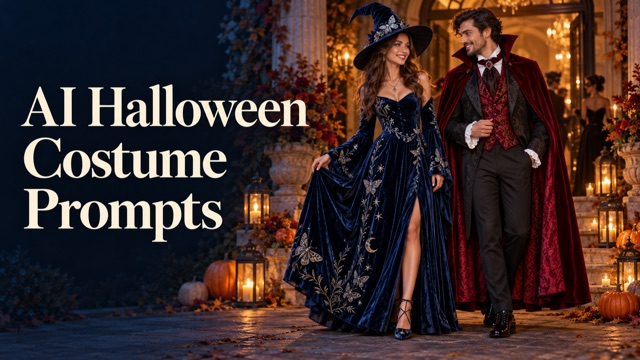
How To Use AI Halloween Costume Prompts
Build AI Halloween costume prompts around a clear outfit and a simple scene. Decide what the subject wears, which details should stay recognizable, and how much of the costume needs to appear before adding atmosphere.

Choose A Costume Direction
Choose AI Halloween costume prompts that match your subject and the mood of your event. Start with a recognizable silhouette, such as a long cape, tailored coat, or patchwork overalls. Add one defining accessory and a small color palette. When comparing AI Halloween costume prompts, look for details you can change independently. Full-length framing is useful when boots, a flowing hem, or the overall shape of the outfit matters.

Personalize The Person And Scene
Personalize AI Halloween costume prompts by replacing the subject, clothing colors, or location while keeping the details you like. For a photo edit, upload a clear reference and identify the facial features, hairstyle, skin tone, body proportions, and pose to retain. Separate those instructions from the requested clothing changes. Adapt AI Halloween costume prompts with one main setting and one lighting direction so the outfit remains the focus.

Generate, Check, And Refine
Use AI Halloween costume prompts as a starting brief, then review the result carefully. Check the face, hands, garment edges, accessories, and number of people before changing the mood. If a cape hides the outfit, ask for an open pose; if the image feels crowded, simplify the background. Refine AI Halloween costume prompts one detail at a time and save the wording alongside your preferred image for later use.
AI Halloween Costume Prompts With A Clear Silhouette
These AI Halloween costume prompts begin with clothing you can describe precisely: the cut of a coat, the texture of a cape, and the colors that connect a couple. Choose a direction, then adjust the details around your subject.
Moonlit Moth Witch Costume
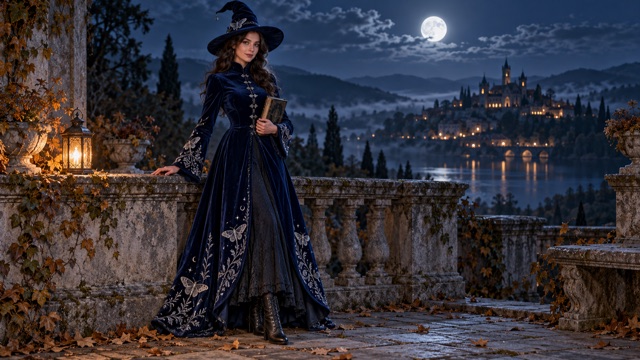
Give a familiar witch silhouette a personal finish with AI Halloween costume prompts built around midnight-blue velvet, silver moth embroidery, a bent pointed hat, and lace-up boots. Request a full-length portrait so the fabric, sleeves, and hem remain visible. Moonlight can outline the hat while a warm lantern reveals the embroidery without hiding the face. For a different character, replace the coatdress with a trouser suit or change the silver stitching to autumn gold. Keep AI Halloween costume prompts consistent by pairing the outfit with one location, such as a stone terrace or quiet garden. When editing a photo, describe the clothing separately from the face and pose to retain.
Crimson Velvet Vampire Costume
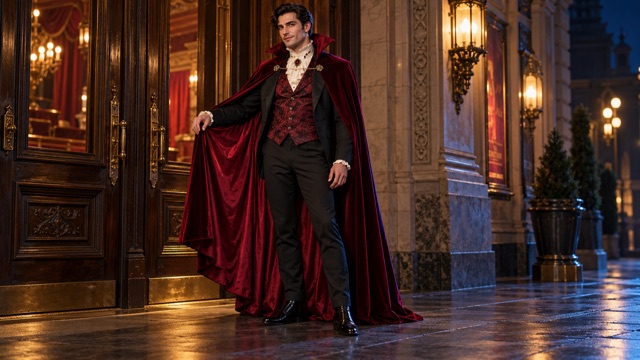
Make tailoring the focus of AI Halloween costume prompts for an elegant vampire portrait. Begin with a crimson velvet cape, burgundy brocade waistcoat, ivory collar, and polished black boots. Ask the subject to hold the cape slightly open so the layers underneath remain readable. Warm side lighting can reveal the brocade while a cool outline separates the dark suit from the doorway. Adjust AI Halloween costume prompts toward a playful party mood by replacing the old theater with a welcoming entrance and soft lanterns. Keep makeup understated when you want the expression to remain central. Describe the cape length, collar shape, and hand position before adding extra props or decorative details.
Sun And Moon Couple Costumes
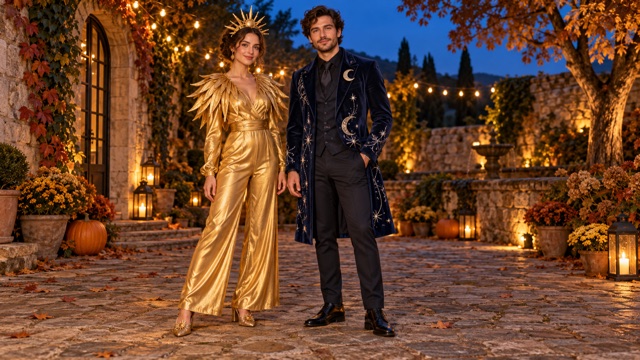
Plan a coordinated look with AI Halloween costume prompts that give each person a distinct outfit. The celestial example pairs a gold satin jumpsuit and sunray shoulder cape with a midnight-blue coat and silver crescent embroidery. Specify who stands on the left and right, then assign accessories and colors to each person. Shared lighting connects the portrait without blending the costumes together. Adapt AI Halloween costume prompts for couples by changing the theme while retaining this clear division of details. Keep faces unobstructed, leave space between bodies, and show both pairs of shoes. For a photo edit, use a reference where both people are visible and describe the individual features to preserve.
AI Halloween Costume Prompts For More Of Your Cast
Adapt AI Halloween costume prompts to the subject instead of giving everyone the same outfit instructions. Children benefit from simple, cheerful details; pets need natural proportions; groups need clearly assigned costumes and enough space for every person.
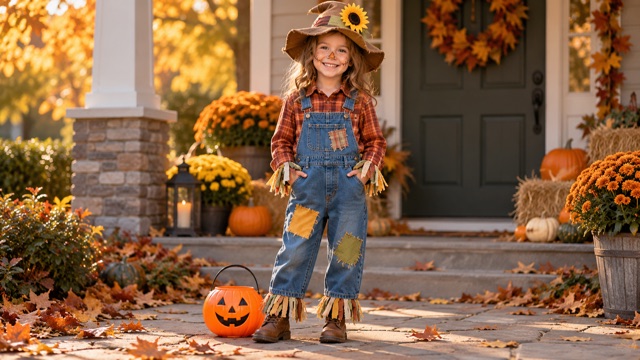
Cozy Patchwork Scarecrow Costume
Warm Autumn Colors And Soft Layers
Keep AI Halloween costume prompts for children cheerful and specific. Soft rust-colored flannel, roomy denim overalls, mustard and sage patches, and a felt sunflower create a recognizable scarecrow outfit without frightening makeup. Describe comfortable layers, sturdy shoes, and a relaxed standing pose. A porch with autumn leaves gives the portrait context while keeping the clothing central. When adapting AI Halloween costume prompts to a reference photo, ask to retain the child’s age, expression, and natural proportions. Place the candy bucket beside the subject if holding it would hide the patches. Change the background or fabric colors first, then check that cuffs, straps, and shoes remain distinct in the finished image.
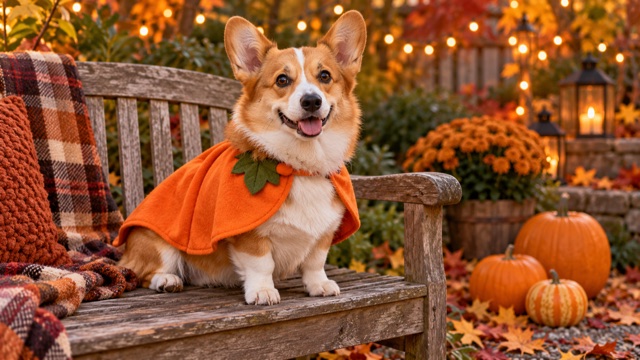
Pumpkin Cape Corgi Costume
A Festive Outfit With A Visible Face
Describe where the clothing rests when writing AI Halloween costume prompts for a pet. A lightweight pumpkin-orange cape can sit loosely over a corgi’s back, with a small green felt leaf near the neckline. Keep the ears, eyes, muzzle, chest, and visible paws clear so the animal remains the center of attention. Personalize AI Halloween costume prompts with your companion’s breed, fur markings, ear shape, and usual posture. An eye-level view on a garden bench makes the cape easy to see without requiring a human pose. Use softly blurred pumpkins and warm lights for atmosphere. Check the outline of each paw and the way the fabric meets the body before refining the background.
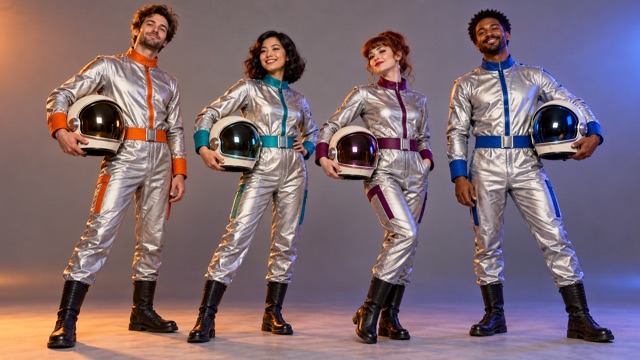
Retro Space Crew Group Costumes
One Shared Theme, Four Distinct Looks
Give AI Halloween costume prompts for groups an exact headcount and an outfit assignment for every person. This retro space crew uses four silver utility jumpsuits with black boots and separate orange, teal, plum, and cobalt accents. Helmets held at hip level keep faces visible and make the theme recognizable. Structure AI Halloween costume prompts around a gently staggered row with space between bodies, rather than overlapping poses. Shared fabric and lighting connect the group while the accent colors distinguish each outfit. The same approach can guide pirates, woodland characters, or a masquerade. Check that each person has the intended accessories and that no helmet or sleeve merges into a neighboring costume.
Put AI Halloween Costume Prompts To Work
Shape AI Halloween costume prompts around the image you need. A full-length portrait explains an outfit, a tighter crop emphasizes expression, and an invitation layout benefits from open space. Choose the composition before filling the scene with props.

Compare Party Outfit Ideas
Compare AI Halloween costume prompts by changing one element at a time, such as cape length, fabric color, or hat shape. Keep the pose and lighting similar so the differences are easy to judge. Save two or three favorite versions as an outfit-planning reference, then identify the garments and accessories that make each look distinctive.

Create A Seasonal Profile Portrait
Adapt AI Halloween costume prompts for a profile portrait by bringing the defining detail near the face. A decorated collar, pointed hat, or embroidered shoulder can communicate the theme in a small crop. Keep the eyes clear, simplify the background, and check the image at thumbnail size before deciding which accessories deserve more emphasis.

Coordinate Couples And Friends
Use AI Halloween costume prompts to coordinate a couple or friend group around shared materials and complementary colors. Assign each person a position and one distinguishing accessory. A simple lineup helps compare the outfits, while a looser pose can suit a party portrait. Keep individual faces and costume details visible throughout the composition.

Plan A Halloween Invitation Image
Build AI Halloween costume prompts for invitation artwork with open space beside or above the subjects. Add the event wording afterward so the image can focus on costumes and atmosphere. Keep faces, hats, and important accessories away from the edges, and choose a background that leaves room for a clear title and readable event details.
AI Halloween Costume Prompts FAQ
Practical answers about describing outfits, using reference photos, and improving the details of your Halloween portraits.
Useful AI Halloween costume prompts describe the subject, main garments, fabric, accessories, pose, setting, and lighting. A velvet cape with a structured collar gives clearer direction than a broad request for a spooky look. Include the exact number of people and request full-length framing when shoes or a long hem matter. Keep the most distinctive costume details near the beginning.
Yes. You can adapt AI Halloween costume prompts into photo-editing instructions using an image model that supports uploaded references. Start with a clear photo and identify the facial features, skin tone, hairstyle, body proportions, and pose to retain. Then describe the new clothing. Review the result because appearance can change during generation, particularly when hats, makeup, or dramatic lighting obscure the face.
For couples and groups, AI Halloween costume prompts should state the exact number of people and assign each person a position. Describe the outfits separately, then add the shared palette, setting, and lighting. A reference photo with every face visible can help guide the edit. Avoid asking several people to hold the same prop or occupy the same space.
Yes. Adapt AI Halloween costume prompts with a cheerful mood, soft fabrics, and simple accessories. For children, describe age-appropriate clothing and a natural expression. For pets, retain the animal’s body shape and keep the face, ears, and paws unobstructed. The scarecrow and pumpkin-cape examples provide specific starting points; change their colors or setting without adding unnecessary costume layers.
When AI Halloween costume prompts produce an incomplete outfit, check the framing and pose first. Ask for a full-length view with shoes inside the frame, move large props away from the body, and keep capes open enough to reveal the clothing. If accessories are mixed together, simplify the instructions and refine one detail before adding more decoration.
AI Halloween costume prompts create visual concepts for exploring outfits, colors, and styling. The images do not measure garment fit or show exactly how a real product will sit on your body. Use a result as a reference for the overall look, then check the actual clothing, materials, and accessories separately when planning what to wear.
Find The Costume You Want To Create
Choose AI Halloween costume prompts that match your favorite character or party theme. Personalize the outfit, make the scene your own, and build a portrait around the detail you want people to notice.
