
5 Best Seedance 2.5 Alternatives for AI Video in 2026
Choose the right model for motion control, native audio, rapid drafts, references, and creative workflow
Quick answer: which Seedance 2.5 alternative should you choose?
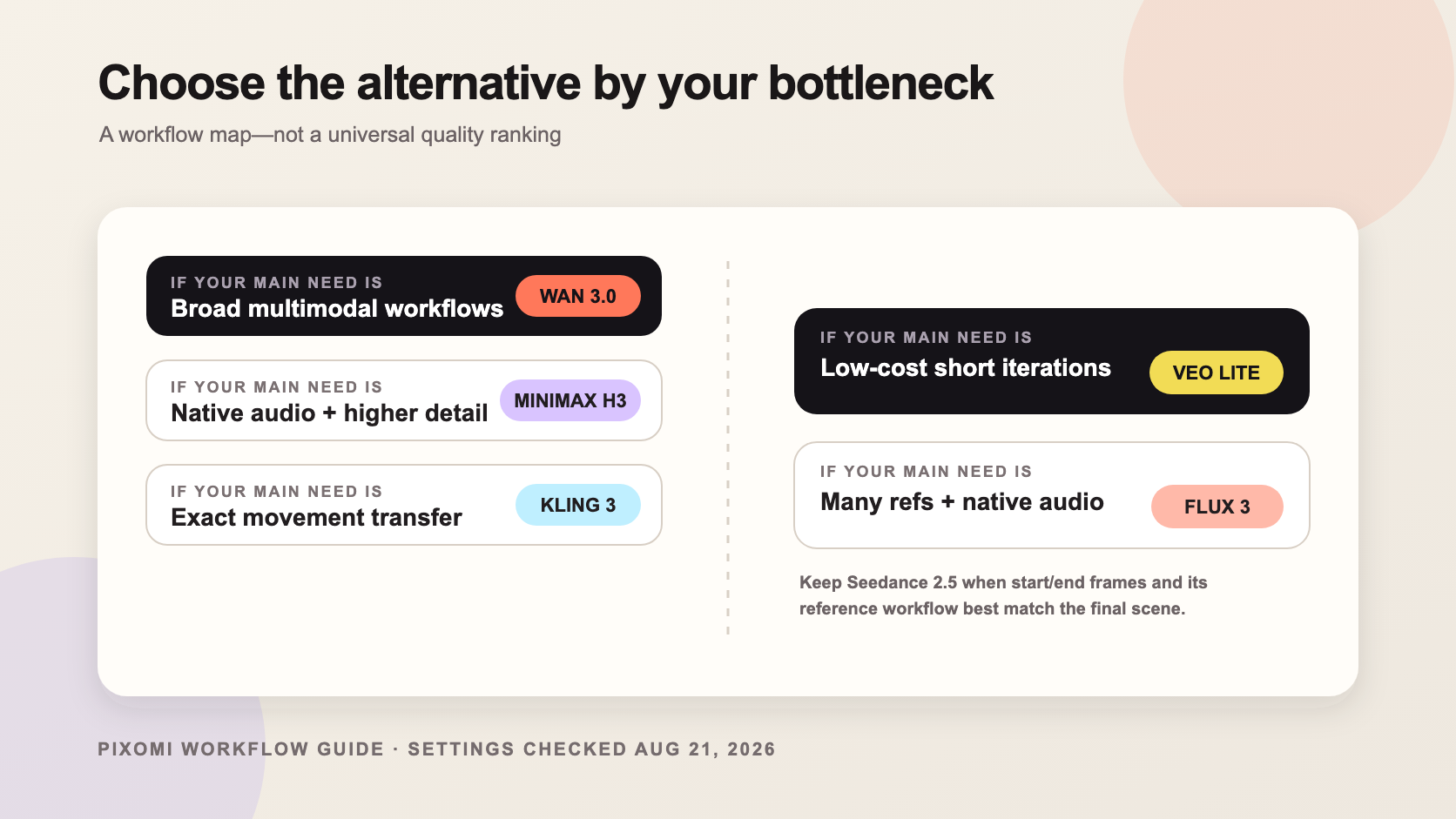
The best Seedance 2.5 alternative depends on the part of the workflow you need to improve. Choose Wan 3.0 for a balanced multimodal workflow, MiniMax H3 for native audio and higher-detail output options, Kling 3.0 Motion Control when a source performance must drive a new character, Veo 3.1 Lite for inexpensive short-form iteration, and FLUX 3 Video when you want flexible references and native audio.
You do not have to choose from marketing pages alone. Pixomi currently provides separate creation routes for Seedance 2.5, Wan 3.0, MiniMax H3, Kling 3.0 Motion Control, Veo 3.1 Lite, and FLUX 3 Video. That makes it practical to compare workflows without rebuilding your project on several unrelated platforms.
Important: this is a workflow-selection guide, not a head-to-head quality benchmark. The settings below were read from Pixomi's live generator forms on August 21, 2026. Credits and available controls may change, and different default durations or resolutions make raw credit numbers unsuitable as a direct price ranking.
Seedance 2.5 alternatives at a glance
| Model | Best fit | Inputs visible on Pixomi | Current starting setup shown | Main tradeoff |
|---|---|---|---|---|
| Seedance 2.5 | Cinematic concepts, references, start/end-frame direction | Text, start/end frame, reference | 5s; 480p/720p/1080p; audio toggle; 150 credits | Strong flagship route, but heavier starting credit requirement |
| Wan 3.0 | Balanced multimodal creation and video editing | Text, image, reference, video edit | 5s; 720p/1080p; 40 credits | Broad workflow; choose it for flexibility rather than one specialized control |
| MiniMax H3 | Native audio, multiple aspect ratios, higher-detail output | Text, image, reference | 8s; 768p/2K; 64 credits | More controls and a higher starting requirement than lightweight routes |
| Kling 3.0 Motion Control | Transferring a real performance to a new image or character | Source video, source image, prompt | 720p/1080p; credits calculated per second | Requires suitable source assets; not the simplest text-only option |
| Veo 3.1 Lite | Short-form drafts, ad variants, lower-cost iteration | Text, image | 4s/6s/8s; 16:9 or 9:16; 12 credits | Fewer reference and framing controls than the heavier workflows |
| FLUX 3 Video | Reference-heavy scenes and native-audio exploration | Multiple references plus prompt | 5s; up to 4K option; audio toggle | Early route with settings and availability that may change quickly |
Why look for an alternative to Seedance 2.5?
Seedance 2.5 is a strong option when you want a cinematic scene, a reference-led workflow, or explicit start/end-frame direction. But a universal winner is not a useful answer if your real bottleneck is cost, motion transfer, native audio, aspect-ratio coverage, or repeated short-form testing.
An alternative becomes useful when it removes a specific constraint:
- You need more low-cost drafts before choosing a direction. A lighter route can be more useful than a flagship model for early testing.
- You already have a movement reference. Motion transfer is a different job from writing a better text prompt.
- Audio belongs in the concept. Dialogue, ambience, and visible action may need to be generated together.
- You need a wider input mix. Product images, a motion reference, an existing clip, and audio can require a genuinely multimodal route.
- You need several formats. A campaign may require landscape, vertical, square, and widescreen variants rather than one hero clip.
Use those constraints as selection criteria. Do not switch models simply because another model is newer.
1. Wan 3.0 — best balanced Seedance 2.5 alternative
Wan 3.0 is the most balanced starting point in this list. Its current Pixomi route exposes text-to-video, image-to-video, reference-to-video, and video-edit workflows. The live form also offers 720p and 1080p output with a five-second starting duration.
Choose Wan 3.0 when your project is still changing shape. You might begin from a product image, add a reference for visual consistency, then use video editing to revise an existing shot. That flexibility is useful for ad concepts, social visuals, short narrative scenes, and product storytelling.
Best for: creators who want one route that covers several common production starting points.
Skip it when: your main requirement is precise performance transfer from a source video. Kling's dedicated motion-control workflow is more direct for that job.
Open Wan 3.0 in Pixomi and start with the smallest useful set of references. Adding every available input rarely makes a clearer brief.
2. MiniMax H3 — best for native audio and higher-detail options
MiniMax H3 is the better fit when sound is part of the scene rather than an editing step added later. Pixomi's current route accepts text, image, and reference inputs, offers six common aspect ratios, and exposes 768p and 2K options. The form currently starts at eight seconds and 64 credits.
That combination suits product spots with sound design, dialogue-led concepts, animated posters, music visuals, and story beats that must coordinate camera movement with audio. It also gives teams more framing options than a route limited to landscape and vertical.
Best for: audiovisual concepts where dialogue, ambience, music, or sound effects help define the idea.
Skip it when: you only need many inexpensive four-second hooks. A lighter route such as Veo 3.1 Lite gives you more room for rapid iteration.
Create with MiniMax H3 after writing the visual action and the sound event as one connected direction.
3. Kling 3.0 Motion Control — best for transferring movement
Kling 3.0 Motion Control solves a narrower but important problem. Instead of asking a model to invent motion from text alone, you provide a source video for movement and a source image for the new subject or visual identity. A prompt then clarifies how the transfer should behave.
This route is useful for dance clips, character performance, gestures, camera rehearsals, fashion movement, and social formats where a recognizable action matters more than open-ended scene generation. Pixomi currently exposes 720p and 1080p choices, with the credit requirement calculated by duration and resolution.
Best for: character motion and performance transfer based on real reference footage.
Skip it when: you do not have a clean source video and image. A text/image route will be faster to set up.
Before opening Kling 3.0 Motion Control, trim the reference to one readable action and use an image whose body position can plausibly support that movement.
4. Veo 3.1 Lite — best for lower-cost short-form iteration
Veo 3.1 Lite is the practical option for volume. Pixomi's current form supports text-to-video and image-to-video, four-, six-, and eight-second durations, landscape and vertical formats, and a starting requirement of 12 credits.
Those constraints can be an advantage when the goal is to test hooks rather than direct a complex sequence. Marketing teams can explore several openings, creators can compare vertical concepts, and product teams can animate an existing campaign image without spending flagship-model credits on every draft.
Best for: social hooks, ad variants, concept screening, and repeated short clips.
Skip it when: you need start/end frames, multiple reference types, or a motion-transfer pipeline.
Try Veo 3.1 Lite with one clear action and compare several small prompt changes before increasing production quality.
5. FLUX 3 Video — best for flexible references and native audio
FLUX 3 Video is a useful alternative when a scene needs several visual references or when sound must be generated with the video. The Pixomi form currently accepts multiple uploaded references, includes an audio-generation toggle, and exposes 480p, 720p, 1080p, and 4K choices for a five-second generation.
This makes the route interesting for character and style references, product motion, key visual animation, dialogue experiments, and audiovisual concept work. Because FLUX 3 is presented as an early route, treat its settings as especially changeable and confirm the live form before a large batch.
Best for: creators combining several visual references with native-audio direction.
Skip it when: predictable production settings matter more than exploring a new route.
Explore FLUX 3 Video with only the references that have a distinct job: identity, style, opening frame, or motion direction.
How to choose the right model for your project
Use this order instead of beginning with model names:
- Define the output job. Is this a social hook, cinematic concept, product ad, dialogue scene, dance transfer, or storyboard test?
- List the references you already have. Separate images, source motion, video clips, audio, and start/end frames.
- Decide whether sound is part of generation. If not, do not pay workflow complexity for native audio.
- Choose the cheapest useful draft route. Find the idea first, then move to a heavier model when the concept has earned it.
- Normalize before comparing. Keep the same core prompt, duration, aspect ratio, and source assets wherever each route allows.
A reusable comparison prompt
A premium running shoe on a wet concrete pedestal at blue hour. The camera makes one slow half-circle move while water droplets rise in brief slow motion. Cool city reflections, restrained commercial lighting, realistic material detail. End with the shoe centered and fully readable. No extra products, no text, no logo changes.
Adapt only the model-specific control:
- For Seedance 2.5, add a start or end frame when composition must land precisely.
- For Wan 3.0, use an image reference and try video edit when revising an existing clip.
- For MiniMax H3, specify the sound event and choose the needed aspect ratio.
- For Kling Motion Control, replace the invented camera movement with a clean source performance.
- For Veo 3.1 Lite, shorten the prompt to one visual hook and generate several variants.
- For FLUX 3, assign a clear role to each reference and describe the intended audio.
Record the prompt, source assets, duration, resolution, credits, output, and one failure for every run. That turns casual generation into a repeatable comparison.
Can Pixomi replace Seedance 2.5 with one model?
Not completely—and that is the useful point. Seedance 2.5 combines several capabilities in one flagship workflow. A good alternative strategy selects different models for different stages:
- Use Veo 3.1 Lite to screen low-cost hooks.
- Use Kling Motion Control when movement must follow a performance.
- Use Wan 3.0 when the project needs several input paths or video editing.
- Use MiniMax H3 or FLUX 3 when native audio is central.
- Return to Seedance 2.5 when its reference and frame controls best match the final scene.
Pixomi's advantage is not claiming that one model always wins. It is letting you move among current video models while keeping the broader creative workflow in one place. Start from the Pixomi AI Video Generator if you want to compare the available routes before committing to one.
Frequently asked questions
What is the best free Seedance 2.5 alternative?
“Free” depends on the credits and promotions available when you generate. For lower starting credit requirements on Pixomi, Veo 3.1 Lite is currently the lightest route in this comparison. Check the live form before generating because credits and promotions can change.
Which Seedance 2.5 alternative is best for motion control?
Kling 3.0 Motion Control is the most direct choice here when you have a source video and want its movement applied to a source image or character. It is a specialized motion-transfer workflow rather than a general text-only replacement.
Which alternative supports native audio?
MiniMax H3 and FLUX 3 Video expose native-audio workflows on Pixomi. Seedance 2.5 also shows an audio-generation option. Confirm the current form and preview the synchronization carefully before using a result in production.
Is Wan 3.0 better than Seedance 2.5?
It is better for some workflows, not universally. Wan 3.0 currently provides a broad mix of text, image, reference, and video-edit inputs at a lighter starting requirement. Seedance 2.5 may still be preferable when its start/end-frame and flagship reference workflow match the scene.
How should I compare AI video models fairly?
Use the same core prompt and source assets, then normalize duration, resolution, aspect ratio, and audio settings as closely as possible. Generate more than one sample and score the results against criteria chosen before you see them, such as subject consistency, motion, prompt adherence, sound synchronization, and usable frames.