
Upload a clear portrait, describe the passport or ID photo style you need, and create a polished result in seconds with Passport Photo Maker.
More AI Image Generators
Explore our collection of specialized AI image generators designed for different creative needs and styles















Passport Photo Maker for Clean, Professional Photos
Turn one clear portrait into a clean, professional document photo without booking a studio.
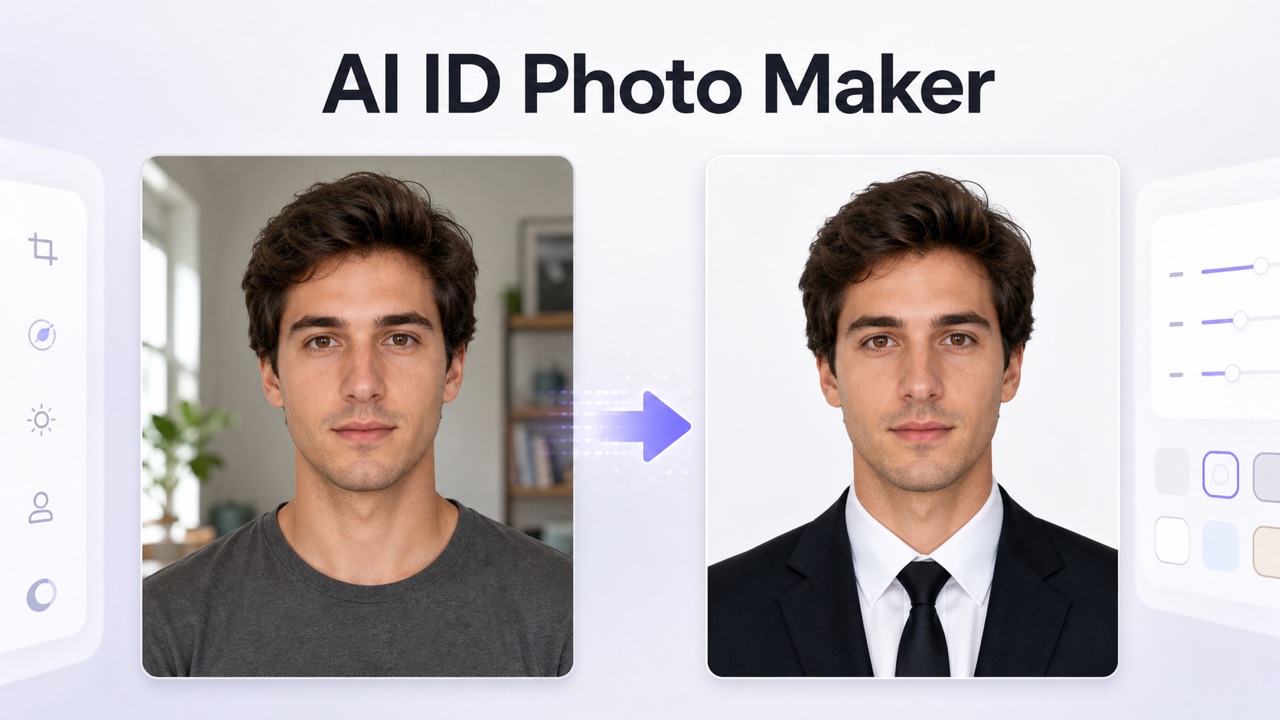
Passport Photo Maker keeps your face recognizable while refining the background, attire, lighting, and crop. Use Passport Photo Maker to prepare a professional result, then compare it with the current rules for your document before submitting.
How to Use Passport Photo Maker
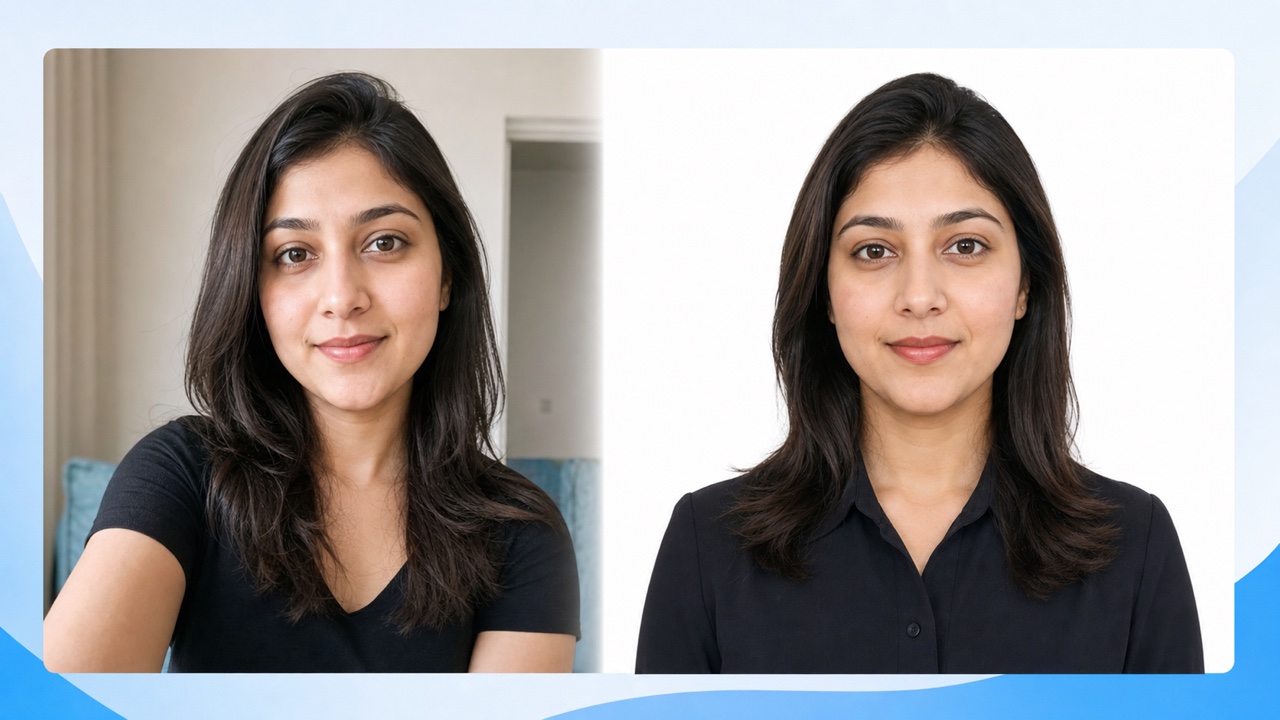
Passport Photo Maker turns a simple upload into a guided three-step workflow. You provide the portrait and practical requirements; the tool handles the visual transformation. This approach makes it easy to make passport photo online without complex layers or manual background work. The passport size photo maker process stays flexible enough for passports, visas, badges, applications, and other identity-photo needs.

Upload a Clear Portrait
Start Passport Photo Maker with a sharp, front-facing selfie or portrait. Keep your full head and shoulders visible, avoid heavy filters, and choose even light when possible. A clean source gives Passport Photo Maker more reliable facial detail and helps the passport size photo maker preserve your natural appearance instead of guessing around blur, shadows, or cropped hair.

Describe the Required Look
Tell Passport Photo Maker the document type, background color, attire, crop, and country style you need. You can request a neutral white background, formal clothing, centered framing, or another practical variation. Passport Photo Maker combines the portrait with your directions, while the passport size photo maker workflow keeps the edit focused on a professional identity image.

Review and Download
Generate the result, inspect facial likeness, edges, lighting, posture, and visible clothing, then download the version you prefer. Passport Photo Maker helps you move quickly, but document rules vary by authority. Compare measurements and presentation requirements before use. If needed, revise your prompt and run Passport Photo Maker again for a cleaner passport size photo maker result.
Best AI Image Tools for Creative Projects
Explore creative tools for image, learn tips and tricks, and see how AI can be your assistant in turning concepts into finished projects.
What Passport Photo Maker Helps You Prepare
Passport Photo Maker focuses on the visual decisions that matter most in a professional identity portrait: recognizable likeness, uncluttered background, appropriate attire, centered framing, and even light. The passport size photo maker gives you a simple prompt-led way to request those changes without learning design software. Use Passport Photo Maker to prepare and compare options, then verify dimensions, recency, expression, and editing restrictions for the exact document you plan to submit.
Preserve the Person Behind the Photo
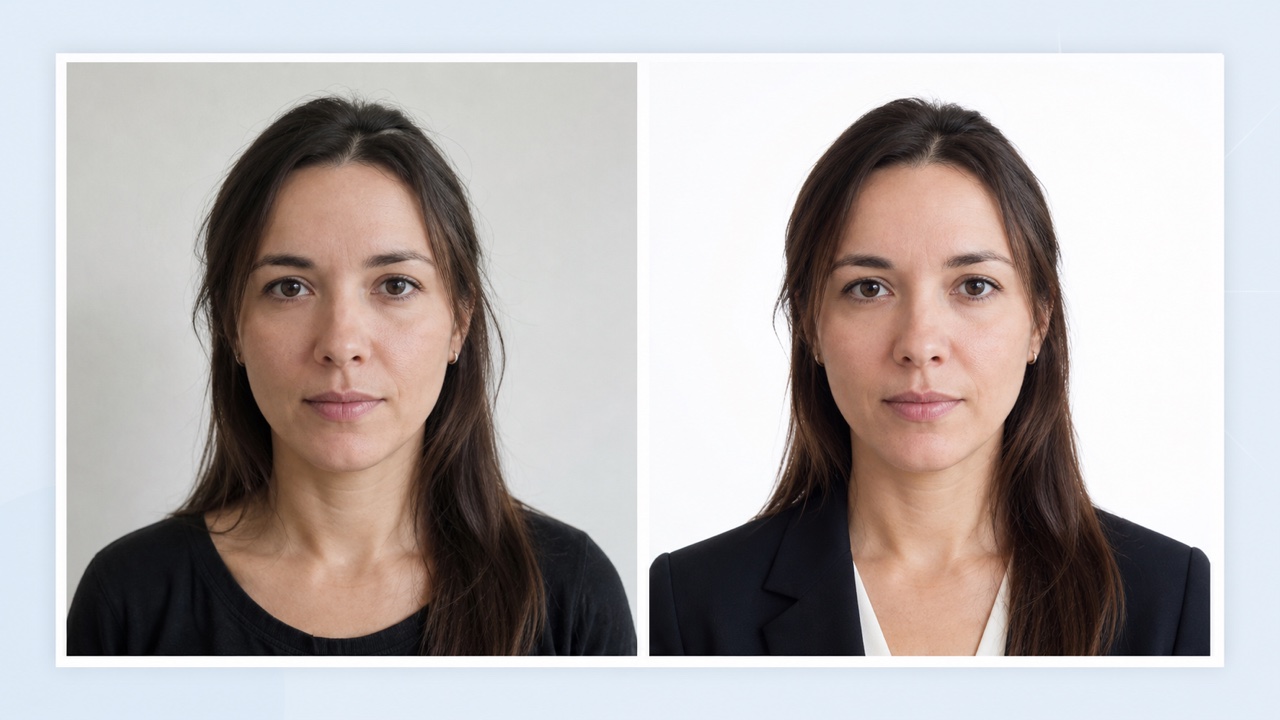
A useful identity photo must still look like you. Passport Photo Maker is directed to protect recognizable facial structure, skin tone, age, and natural proportions while improving presentation. Instead of turning a portrait into a stylized character, Passport Photo Maker concentrates on background cleanup, balanced light, clothing, and framing. That identity-first approach makes the passport size photo maker suitable for a passport photo from selfie workflow, employee records, membership cards, school files, and professional profiles. Review every result closely, especially around hair, ears, glasses, and jawlines. With a clear upload and a precise request, Passport Photo Maker can reduce distracting visual issues without erasing the real person who needs to be recognized. Passport Photo Maker should look polished, not artificial.
Choose a Clean Background and Professional Attire
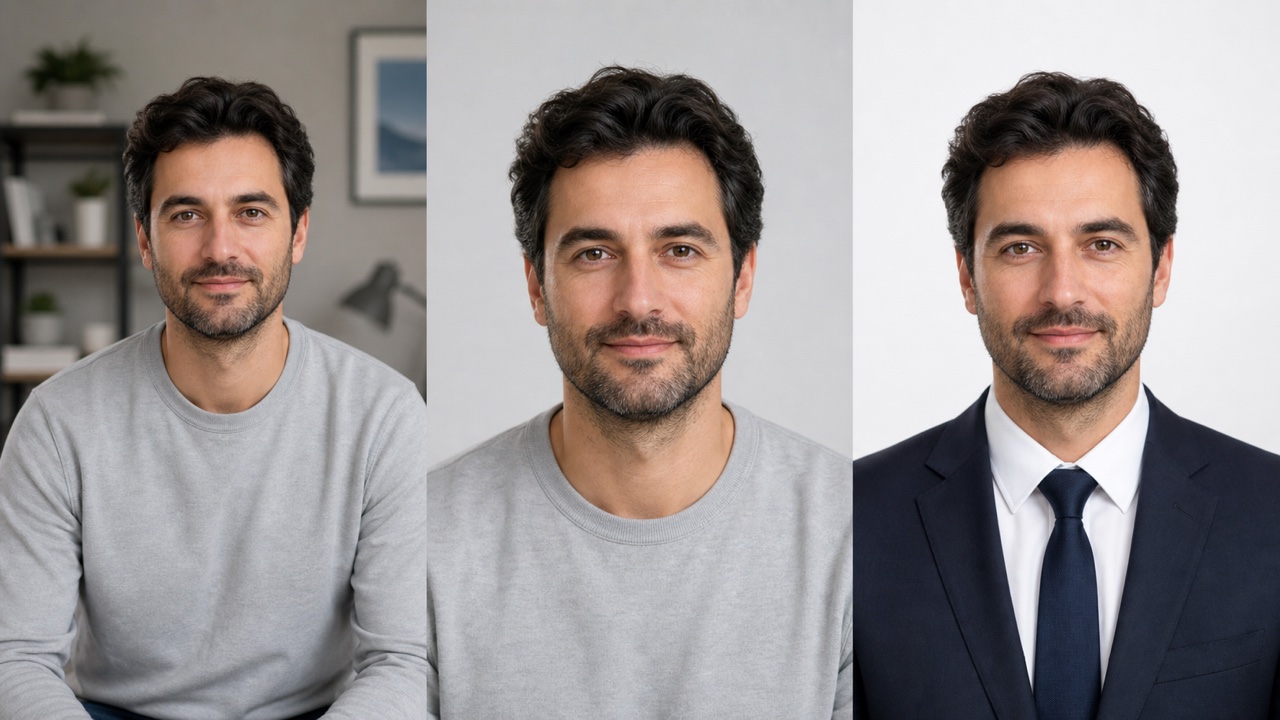
Messy rooms, uneven walls, and casual clothing can make an otherwise good portrait feel unsuitable. Passport Photo Maker lets you ask for a plain white, light gray, blue, or other appropriate background together with neat professional attire. The passport photo background changer should create a simple setting rather than a decorative scene. Passport Photo Maker also helps balance exposure and remove visual clutter while retaining realistic skin and fabric texture. Use the passport size photo maker to explore a restrained outfit or background option, then check the current specifications from the receiving authority. Passport Photo Maker provides the visual starting point; your document issuer remains the source of truth for accepted colors, clothing, and editing rules. Passport Photo Maker keeps these changes easy to compare.
Guide Crop, Position, and Lighting with Plain Language
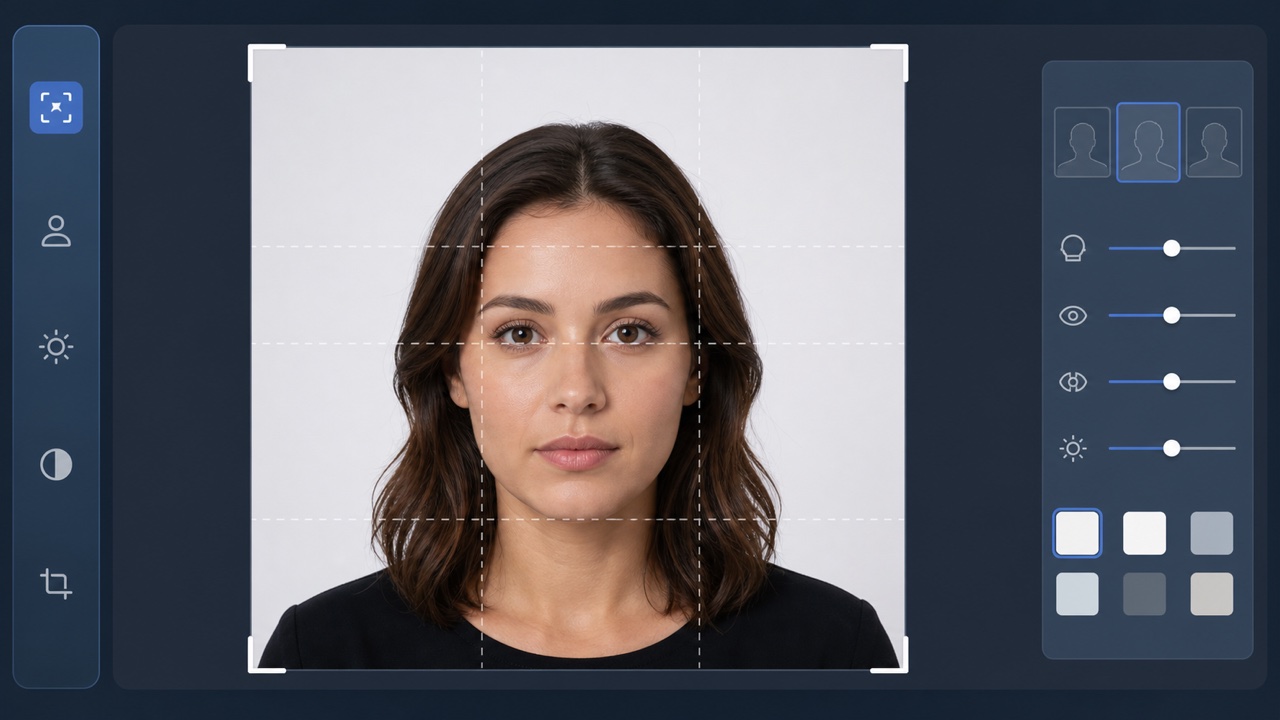
You do not need to understand advanced editing controls to explain the outcome. Ask Passport Photo Maker for centered head-and-shoulders framing, visible eyes, even lighting, a neutral expression, and comfortable spacing around the head. Passport Photo Maker interprets those directions as one coherent portrait edit. This makes the passport size photo maker convenient when you want to make passport photo online from a phone picture but still need a calm, professional appearance. If the first result feels too close, too bright, or too formal, change only that detail in the prompt. Passport Photo Maker supports fast visual iteration while keeping your original identity and the requested document context at the center of each result. Passport Photo Maker makes focused revisions straightforward.
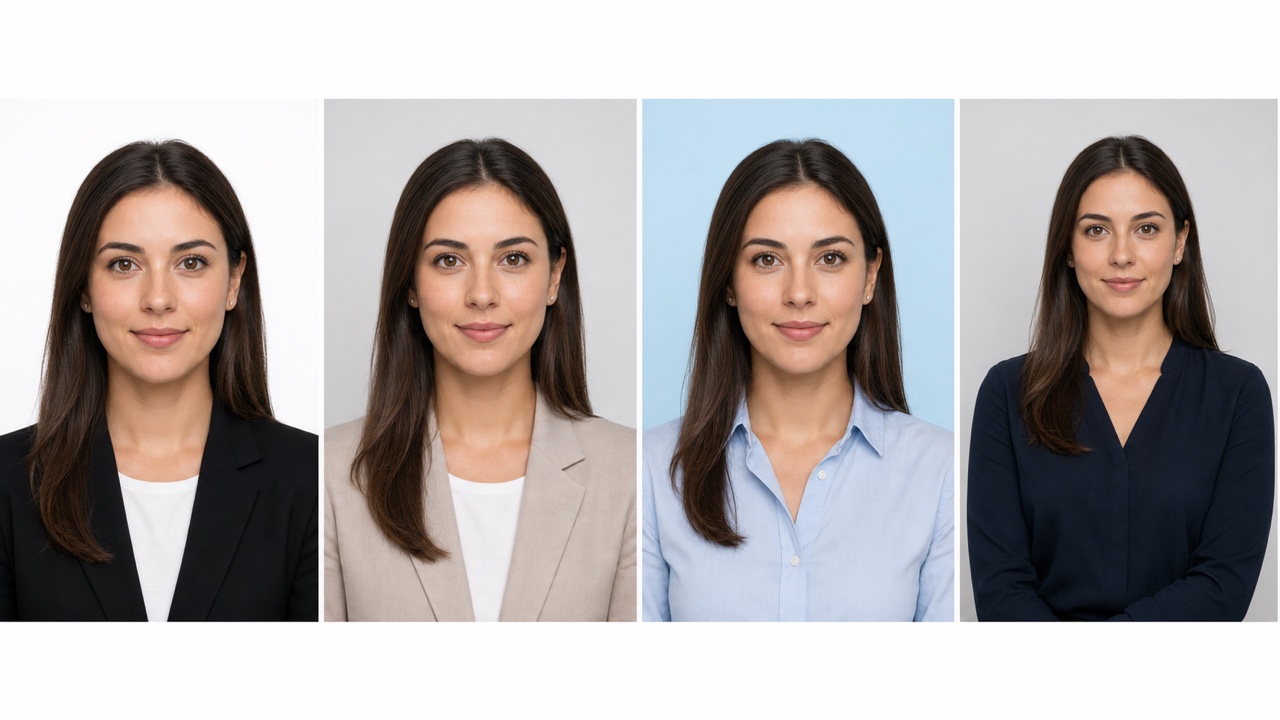
Create Practical Variations for Different ID Uses
One portrait may need several presentations across travel, work, education, or account records. Passport Photo Maker can help you create restrained variations with different plain backgrounds, crops, or attire while keeping the same person recognizable. Use Passport Photo Maker for a passport-style portrait, a visa application draft, an employee badge, a student card, or a professional directory image. The passport size photo maker is especially useful when you need to compare options before selecting one. Always review the final image at full size and verify external specifications separately. Passport Photo Maker accelerates preparation, but it should support your judgment rather than replace the instructions supplied by a government, school, employer, or platform. Passport Photo Maker keeps each variation tied to one clear purpose.
Practical Uses for Passport Photo Maker
Passport Photo Maker supports practical portrait preparation across travel documents, workplace systems, education records, memberships, licenses, and professional profiles. It is designed for people who want a focused result from one upload, not a complicated editing session. The passport size photo maker can shorten preparation time, while Passport Photo Maker keeps important decisions visible for your own review.

Passport and Visa Photo Preparation
Use Passport Photo Maker to turn a clear portrait into a clean passport- or visa-style draft with a simple background and centered composition. The passport size photo maker can help when you need a passport photo from selfie without arranging a studio visit. Ask Passport Photo Maker for the visual style you need, then confirm current size, head position, expression, recency, and editing policies with the official authority before submission. Passport Photo Maker helps you prepare before that final check.

Employee Badges and Professional Directories
Teams can use Passport Photo Maker to give staff portraits a more consistent visual presentation across badges, internal directories, visitor systems, and onboarding files. Request similar framing, plain backgrounds, and professional attire while preserving each person's identity. Passport Photo Maker reduces manual cleanup, and the passport size photo maker style provides a neutral starting point that administrators can review against organizational guidelines. Passport Photo Maker can make a mixed photo set feel more coherent.

Student Cards and Membership Records
Passport Photo Maker helps students, clubs, libraries, and associations prepare straightforward identification portraits from ordinary phone photos. A clear prompt can request balanced light, visible facial features, a tidy background, and a suitable crop. Use Passport Photo Maker to make passport photo online or prepare a card image, then compare the passport size photo maker result with the file, dimension, and presentation rules of the receiving institution. Passport Photo Maker keeps the workflow accessible for first-time users.

Professional Profiles and Application Photos
When an application, license, speaker page, or account asks for a neutral headshot, Passport Photo Maker can create a polished option without adding decorative scenery. Direct Passport Photo Maker to keep the person natural while refining clothing, light, crop, and background. The passport size photo maker workflow is useful for preparing consistent portraits, although every organization may apply different acceptance or disclosure rules. Passport Photo Maker supports a professional result without needless visual styling.
Why People Choose Passport Photo Maker
Passport Photo Maker is built for a task that should feel clear: upload one good portrait, describe the required presentation, review the result, and verify the external rules. Users value an passport size photo maker that improves practical details without replacing their identity or hiding the need for final document checks. Passport Photo Maker keeps that responsibility visible from start to finish.
I used Passport Photo Maker to clean up a phone portrait for a professional application. The background looked simple, my face still looked like me, and I could adjust the crop with one clearer prompt. The passport size photo maker gave me a useful draft to compare with the application guidance before I uploaded anything.
Our team needed consistent badge portraits from photos taken in different places. Passport Photo Maker helped standardize the framing and neutral backgrounds without making everyone look over-edited. I liked that the passport size photo maker workflow remained prompt based, so Passport Photo Maker was easy to explain to colleagues with no design experience.
Passport Photo Maker made it much easier to prepare a passport-style image from a clear selfie. I requested a plain background, even light, and formal clothing, then checked the result against the official rules. The passport size photo maker saved setup time, while Passport Photo Maker still left the final review in my hands.
I wanted a neutral portrait for a membership record, not a dramatic headshot. Passport Photo Maker kept the image restrained and recognizable. After one prompt revision, the passport size photo maker produced cleaner spacing around my head. Passport Photo Maker gave me a professional option quickly without requiring desktop editing software.


Passport Photo Maker FAQ
These answers explain how to get a useful result from Passport Photo Maker while keeping official requirements and responsible review in view.
Upload a clear portrait and describe the document style, background, clothing, crop, and lighting you want. Passport Photo Maker edits the image around those instructions while aiming to preserve your recognizable identity. Review the result carefully and revise the prompt if any detail needs correction.
No. Passport Photo Maker helps prepare a professional-looking image, but acceptance depends on the latest rules of the receiving authority. Check official requirements for dimensions, background, expression, head position, recency, file format, and permitted editing before you submit the result.
Use a sharp, front-facing photo with your full head and shoulders visible, even light, and minimal obstruction. Passport Photo Maker performs best when hair edges, eyes, and facial features are clear. Avoid heavy filters, motion blur, extreme angles, and cropped head shapes.
Yes. Ask Passport Photo Maker for a plain background color and restrained professional attire that fit your intended use. Keep requests realistic, then inspect identity, hair edges, fabric, and lighting. Confirm whether the destination allows background or clothing edits before using the image officially.
Yes, a clear selfie can be a practical starting point for Passport Photo Maker. The passport size photo maker can refine background, crop, light, and attire, but the source should remain natural and front facing. Always verify the finished image against the relevant document rules.
State the document or use case, country style if relevant, preferred plain background, clothing, crop, expression, and lighting. Passport Photo Maker responds better to concrete instructions than vague requests. Change one detail at a time when refining the output so you can compare results clearly.
Create a Professional Passport Photo from One Portrait
Upload a clear photo, describe the professional result you need, and let Passport Photo Maker prepare a polished option in moments. Use the passport size photo maker to refine background, attire, crop, and lighting, then review every detail and check the current requirements for your intended document.
