
More AI Image Generators
Explore our collection of specialized AI image generators designed for different creative needs and styles
















AI Pose Changer for Natural Photo Reposing
Change Body Poses Naturally with AI Pose Changer
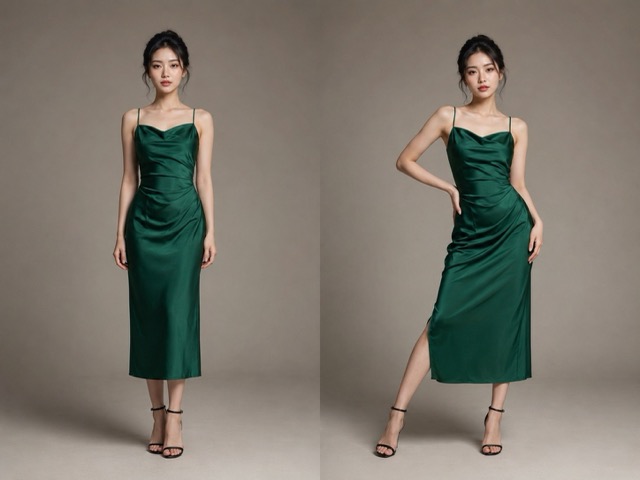
Use the AI Pose Changer to turn stiff or awkward body language into natural standing, seated, walking, or expressive poses. Upload a portrait, describe the movement or add a reference, and let the AI Pose Generator adjust posture while preserving the subject’s recognizable face, clothing, background, lighting, and overall visual style.
How to Use the AI Pose Changer
Use the AI Pose Changer to move from an awkward stance to a purposeful result through a clear three-step workflow for everyday photo editing.

Upload to AI Pose Changer
Choose a clear image with the full body or relevant limbs visible, giving the AI Pose Changer enough visual context to work responsibly.

Guide the AI Pose Changer
Tell the AI Pose Changer, functioning as an AI Pose Generator, how the subject should stand, sit, turn, or gesture, using physically plausible directions.

Review AI Pose Changer Results
Run the AI Pose Changer, compare the result with your source, and refine the instruction when posture or limb placement needs adjustment.
Best AI Image Tools for Creative Projects
Explore creative tools for image, learn tips and tricks, and see how AI can be your assistant in turning concepts into finished projects.


What the AI Pose Changer Helps You Control
Each AI Pose Changer feature addresses a practical reposing problem while keeping your edit focused on the person, movement, and intended visual story.
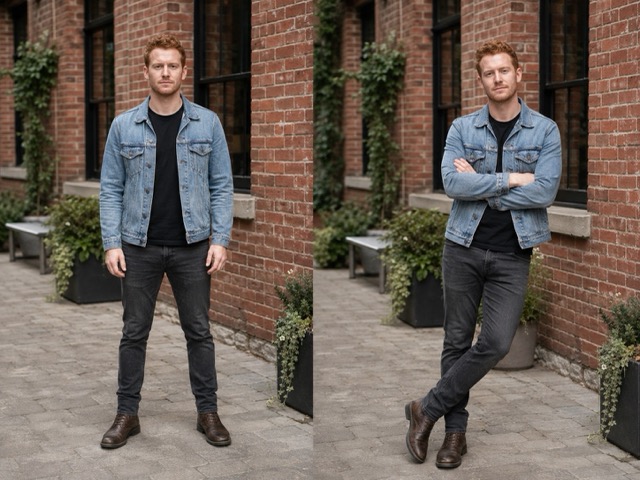
Guide Full-Body Posture with AI Pose Changer
The AI Pose Changer interprets practical directions such as standing with relaxed shoulders, sitting upright, turning slightly, or shifting weight to one leg. Begin with a photo where joints and body boundaries are easy to understand, then describe the intended posture without combining unrelated edits. The AI Pose Changer, functioning as an AI Pose Generator, works best when the request names the body direction, hand placement, and viewpoint in ordinary language. This approach makes Change Pose in Photo AI tasks easier to review because you can compare one clear movement decision at a time while checking that the person still looks coherent and recognizable.
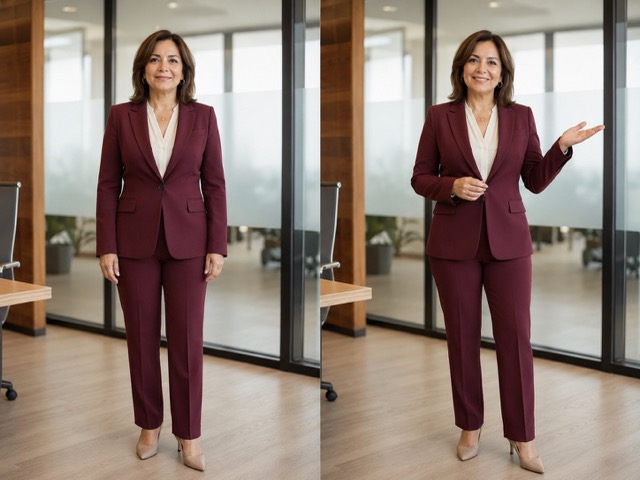
Transfer Reference Poses with AI Pose Changer
When words are not precise enough, give the AI Pose Changer a visual pose reference and ask it to follow the body arrangement rather than copy the reference person. A strong reference clearly shows the torso, arms, and legs with minimal obstruction. The AI Pose Changer, functioning as an AI Pose Generator, can then use that movement as guidance while the uploaded subject remains the visual source of identity, clothing, and scene details. This AI Pose Generator from Photo workflow is useful for editorial planning, portrait alternatives, and creative direction because the desired movement is visible before generation, reducing ambiguity in complex hand or seated positions.
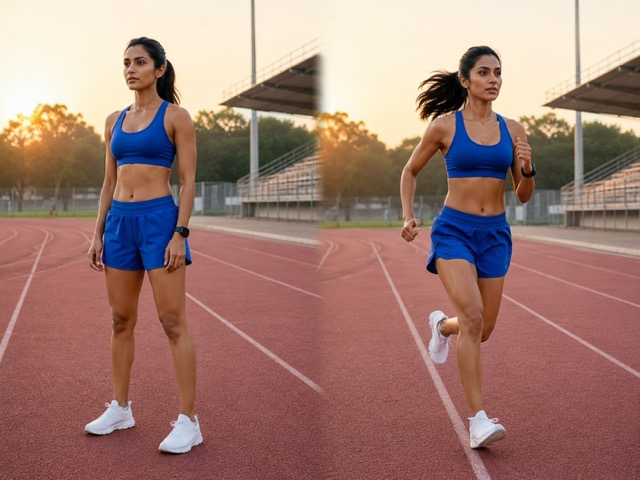
Protect Identity with AI Pose Changer
A useful AI Pose Changer should treat the uploaded person as the source of truth, not an invitation to redesign everything. The instruction can explicitly preserve facial identity, expression, hairstyle, outfit, colors, background, lighting, crop, and original proportions while changing only posture. The AI Pose Changer, functioning as an AI Pose Generator, still creates a new image, so careful review remains important, especially around fingers, logos, jewelry, and partially hidden limbs. By limiting the requested change, the AI Change Photo Pose process becomes more predictable and the final result stays connected to the photograph you selected rather than drifting into an unrelated portrait.
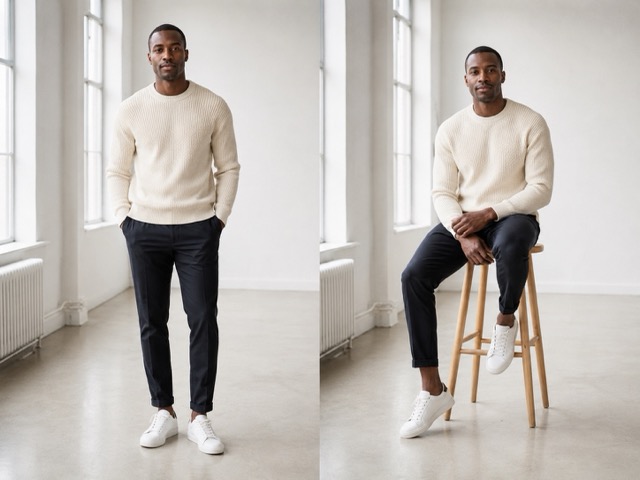
Refine Movement with AI Pose Changer
The AI Pose Changer supports focused iteration: adjust the shoulder angle, open a closed stance, reposition one arm, or make a seated pose more balanced. Instead of requesting a new location, outfit, expression, and posture simultaneously, keep the prompt centered on movement. The AI Pose Changer, functioning as an AI Pose Generator, then has a clearer editing goal and you have a simpler result to evaluate. For anyone searching Change Pose in Photo Online Free, the important lesson is not merely access; it is controlling scope. Small, explicit revisions help preserve continuity and prevent a useful posture edit from becoming a visually inconsistent redesign.
When an AI Pose Changer Is Most Useful
Use AI Pose Changer for focused reposing when the photograph is almost right but body language, balance, or gesture does not support your intended message.

Improve Portrait Body Language
A strong portrait can still feel stiff when shoulders, hands, or stance communicate the wrong mood. The AI Pose Changer lets you test relaxed shoulders, natural arm placement, or a subtle weight shift while preserving the original face, outfit, setting, and crop. Use the AI Pose Generator to create controlled alternatives, inspect anatomy and identity, and choose the version whose body language best matches the portrait’s intended personal or professional context. Keep each request limited to one posture change.
Explore Fashion and Lookbook Poses
Fashion images often need pose variety while garments and styling remain consistent. The AI Pose Changer can test a runway stance, relaxed editorial posture, or seated composition without rebuilding the entire scene. Ask the AI Pose Generator to preserve fabric color, garment structure, accessories, hair, expression, and background. This focused workflow helps creative teams compare how clothing reads through movement and refine a shot list before arranging another production session.

Create More Expressive Social Content
One strong photo can support several social concepts when only the posture needs to change. The AI Pose Changer can turn a neutral stance into a friendly wave, confident profile, or energetic gesture while keeping the person and setting recognizable. Generate a few candidates, then inspect hands, facial identity, edges, and background continuity. Clear instructions and careful selection produce more useful results than requesting a vague one-click transformation. Keep each revision limited to one visible movement.

Prototype Creative Direction Before a Shoot
Photographers and art directors can use the AI Pose Changer to make a written shot list more visual. Start with a representative image, test several realistic poses, and compare shoulder direction, hand placement, stance, and framing. Keep clothing, lighting, expression, environment, and proportions stable so feedback remains focused on body language. The generated drafts help collaborators align on movement before the final shoot without replacing the photographer’s judgment or subject consent.
How Creators Can Work with the AI Pose Changer
These illustrative AI Pose Changer scenarios show practical ways different creative roles can evaluate pose edits without relying on unverified performance claims.
As a portrait photographer, I would use the AI Pose Changer to explore subtle posture alternatives after a session. The most useful habit is requesting one movement at a time and comparing it against the source. The AI Pose Changer, functioning as an AI Pose Generator, then becomes a planning and selection tool, while I remain responsible for checking anatomy, identity, and whether the result feels respectful to the subject.
For a small fashion team, the AI Pose Changer can make pose discussions concrete before another shoot. I can show a standing, seated, and three-quarter idea while keeping the outfit visually consistent. An AI Pose Generator is most helpful when the prompt protects garment structure and styling instead of trying to redesign the entire scene.
When a campaign image feels too static, the AI Pose Changer gives me a controlled way to test more open body language. I still review every detail before use, but the AI Pose Changer, functioning as an AI Pose Generator, helps me communicate the intended gesture to collaborators without relying on a vague written description alone.
I use visual references when clients cannot explain how they want a subject to stand. The AI Pose Changer can translate that reference into a useful draft while preserving the uploaded person’s identity and outfit. Used carefully, it creates a shared starting point for feedback instead of pretending the first generated result is final.
For personal social photos, the AI Pose Changer lets me try a friendlier stance without changing the setting I like. I keep instructions simple, inspect hands and facial details, and choose only believable results. The tool feels most useful when it supports thoughtful editing rather than encouraging endless, unrelated transformations.




AI Pose Changer Questions Before You Generate
Understand AI Pose Changer inputs, prompt choices, preservation limits, and review practices before using reposed images in personal or professional projects.
An AI Pose Changer creates a new version of an uploaded photo with the person following a requested or referenced posture. You can ask it to preserve identity, expression, hairstyle, clothing, colors, lighting, background, crop, and proportions. Give the AI Pose Generator one focused movement instruction, then compare the result with the source and inspect hands, limbs, facial details, garment edges, and surrounding objects.
Yes. A clear reference communicates body arrangement more precisely than a long description. Tell the AI Pose Changer to use only the reference posture while preserving the uploaded subject’s face, expression, hairstyle, outfit, colors, background, lighting, crop, and proportions. Choose a reference where the torso and limbs are visible. The pose should guide movement; your uploaded photo should remain the source of identity and styling.
Start with a sharp photo and request a physically plausible posture. Describe the shoulder direction, torso turn, hand position, stance, and viewing angle without combining unrelated edits. Ask the AI Pose Changer to preserve expression, clothing, environment, lighting, and crop. Generate one candidate, inspect anatomy and continuity, then refine only the part that remains unnatural. Concrete movement instructions work better than broad requests such as make it better.
The prompt can require the AI Pose Changer to preserve the subject’s face, expression, hair, clothing design, colors, materials, accessories, background, lighting, composition, and proportions. However, generated images still need review. A new pose may reveal details hidden in the source, so verify logos, patterns, hands, garment edges, and facial features rather than assuming every element will remain exact automatically.
AI Pose Changer Free usually means users want to test the workflow before committing. Free access, quotas, download limits, and account requirements depend on the current product experience, so this page does not promise unlimited or permanent free generation. Evaluate the tool by its pose controls, preservation options, and output quality—not only by whether the word free appears in the search result.
Use a clear image where the subject is large enough to inspect and the body area you want to change is visible. Full-body photos support larger posture changes, while half-body portraits suit shoulder, arm, and torso adjustments. Avoid heavy blur or blocked limbs. Request a realistic movement, preserve everything outside the target pose, and review hands, facial identity, clothing, and background at full size.
Create a Better Pose with AI Pose Changer
Open the AI Pose Changer, describe one movement, and use the AI Pose Generator for a focused alternative. AI Pose Changer supports careful iteration.
