
More AI Image Generators
Explore our collection of specialized AI image generators designed for different creative needs and styles
























Open Eyes in Photo: Fix Closed Eyes Naturally
Open Eyes in Photo and save the moment you already love
One blink can spoil the only group picture where everyone else looks perfect. Open Eyes in Photo helps repair closed, half-closed, or squinting eyes without arranging another shoot. Upload a selfie, portrait, wedding picture, or family photograph and let AI Fix Closed Eyes in Photo while preserving the person’s identity, expression, eye color, gaze, and surrounding scene. The focused workflow makes it easy to Open Eyes in Photo without manual masking, copied eyes, or complicated retouching. Natural eyelids, realistic catchlights, and facial consistency help the corrected picture still feel like the moment you captured.
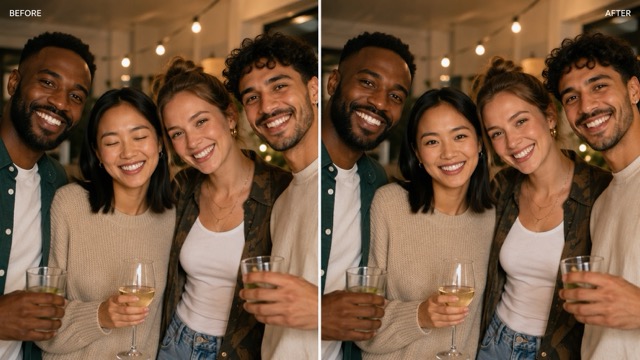
How to Open Eyes in Photo in Three Steps
Upload a clear photo, identify the affected person, and review the corrected eyes. An optional reference can improve eye color and shape matching.

1. Upload to Open Eyes in Photo
Upload the clearest original photo. A sharp, visible face helps Open Eyes in Photo with more natural eyelids, texture, and lighting.

2. Select a Face in Open Eyes in Photo
Identify the affected person by position or clothing. Add an optional open-eye reference and keep every other face unchanged.

3. Review Open Eyes in Photo Results
Check eye color, gaze, eyelids, and identity. If the eyes look too wide, request a subtler correction before downloading.
Best AI Image Tools for Creative Projects
Explore creative tools for image, learn tips and tricks, and see how AI can be your assistant in turning concepts into finished projects.





Open Eyes in Photo Without Changing the Person
Open Eyes in Photo matches facial angle, eye shape, gaze, color, and lighting to create a natural correction without changing the person.
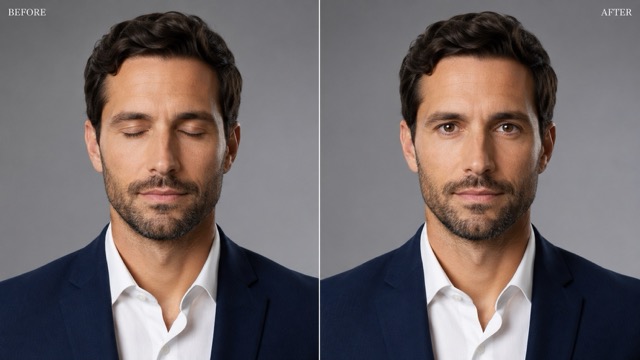
Open Eyes in Photo After an Accidental Blink
A blink can spoil an otherwise strong portrait. Open Eyes in Photo repairs the eye area while preserving the smile, posture, hairstyle, clothing, and background. Request a natural gaze that follows the head direction and retains the real eye color, spacing, makeup, skin texture, and catchlights. Avoid eyes that look unusually wide or perfectly symmetrical. This focused correction suits headshots, graduation photos, dating profiles, creator portraits, school pictures, and avatars. For partially closed eyes, use a subtle opening that follows the existing shape. When both eyes are fully closed, an optional reference of the same person can improve identity consistency. Review the result against another real photo before publishing it.
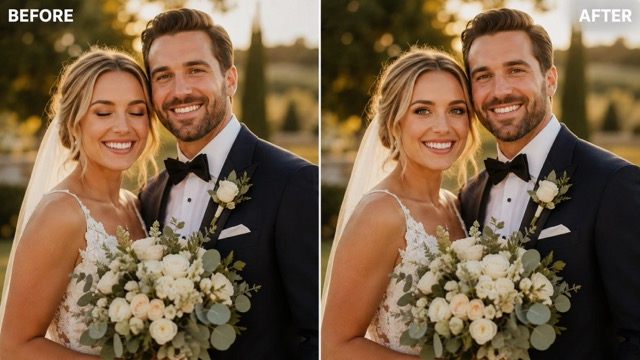
Fix One Blink in a Group Photo
Group photos are difficult to repeat when everyone else already looks right. Open Eyes in Photo lets you target one blinking person while preserving every other face, gaze, hand, outfit, pose, and background detail. Identify the subject clearly by position or clothing, then ask to Fix Closed Eyes in Photo for that person only. Use the highest-resolution source available because small faces contain limited eye detail. For weddings, reunions, team pictures, birthdays, and class photos, correct one subject at a time and review each result. Treat the edit as a focused repair, not a group beauty filter, so every person keeps their individual appearance.
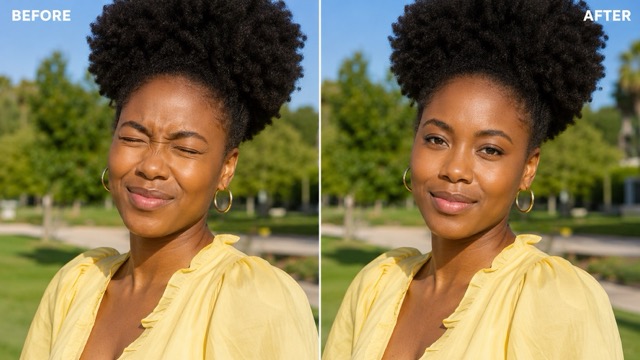
Correct Squinting and Half-Closed Eyes
Sunlight, flash, wind, or movement may leave eyes narrowed rather than fully closed. Open Eyes in Photo can soften the squint while preserving the original light and facial tension. Request a restrained correction that keeps the gaze, eyelid curve, eye color, makeup, and shadows intact. Eyes opened too far under direct sun will look disconnected from the scene. This approach works for beach portraits, travel photos, outdoor weddings, sports images, and spontaneous snapshots. Results are strongest when part of the iris or eyelid remains visible. Review the edited expression both at normal size and close zoom before downloading.
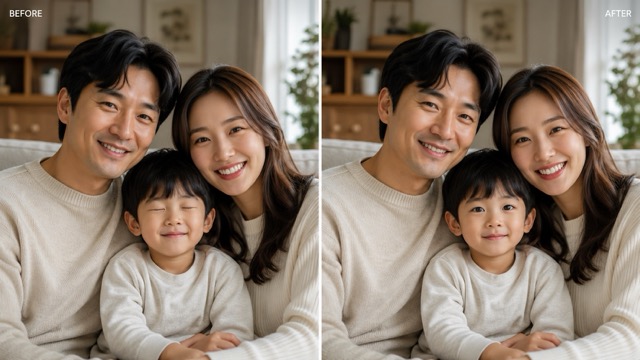
Match Real Eyes with an Optional Reference
Fully closed eyes hide the iris color, pupil position, and open eyelid shape. A clear reference of the same person can help Open Eyes in Photo maintain identity. Choose a photo with a similar head angle and comparable lighting, and use it only to guide the eye region. Preserve the target image’s expression, pose, face, hair, clothing, and background. Ask the tool to match the reference eye color and shape while following the target photo’s gaze and light. Avoid references with strong filters, colored contacts, extreme makeup, or a very different angle. Review the eyelids and catchlights carefully to ensure the result looks integrated rather than pasted on.
When to Open Eyes in Photo
Use Open Eyes in Photo to save meaningful event, family, professional, and travel photos while preserving each person’s expression and identity.

Open Eyes in Photo for Events
Important moments cannot always be repeated. Open Eyes in Photo can rescue a ceremony, first dance, toast, graduation, or birthday frame when one guest blinked. To Fix Closed Eyes in Photo professionally, preserve makeup, lashes, eye color, facial expression, and event lighting. Keep the untouched original in the archive and examine corrected faces at delivery or print size before including the result in a gallery.

Open Eyes in Photo for Families
Children rarely hold the same expression for long, making one blink capable of spoiling an otherwise joyful family picture. Open Eyes in Photo can correct the affected child or parent while preserving everyone else. Ask to Fix Closed Eyes in Photo with an age-appropriate, gentle gaze and natural eyelids. Do not enlarge the eyes, change the smile, smooth the skin, or modify family members who do not need correction.

Open Eyes in Photo for Headshots
A professional portrait needs clarity and connection, but reshooting may be inconvenient. Open Eyes in Photo can repair a blink in a business headshot, resume picture, author bio, speaker profile, or creator avatar. Use the original face and expression as the anchor. When you Fix Closed Eyes in Photo, compare the result with the person’s real eyes and avoid a beauty-filter appearance that changes how they look.

Open Eyes in Photo for Travel
Sunlight, wind, and camera flash can cause an involuntary blink during a trip or outdoor celebration. Open Eyes in Photo to keep the scenery and spontaneous pose while repairing the eyes. Ask to Fix Closed Eyes in Photo gently so the expression still responds to bright conditions. Preserve sun direction, shadows, skin tone, color, and the environmental mood rather than neutralizing the whole image.
How People Open Eyes in Photo Thoughtfully
See how focused eye correction can rescue a photo while keeping the person’s real identity, expression, and atmosphere intact.
The best frame from a graduation portrait had one quick blink. I used Open Eyes in Photo with another image from the sequence as a reference. It helped Fix Closed Eyes in Photo while matching the student’s real eye color and expression, and I still reviewed the result closely before delivery.
Our daughter blinked in the only family picture where everyone else looked relaxed. Open Eyes in Photo let me target her face alone. The instruction to Fix Closed Eyes in Photo gently kept her smile, hair, and the rest of us unchanged, so the photograph still felt like our real moment.
Bright coastal sun left my eyes almost closed in a travel portrait. I asked Open Eyes in Photo for a subtle correction that preserved the squint and warm light. It could Fix Closed Eyes in Photo without making me look surprised or detached from the sunny setting.
A team photograph is expensive to repeat when everyone works remotely. Open Eyes in Photo corrected one colleague’s blink while keeping the other people untouched. I used a precise description to Fix Closed Eyes in Photo and checked facial identity at full resolution before publishing.
My strongest profile selfie had a half blink. Open Eyes in Photo gave me a practical way to keep the expression I liked. I asked it to Fix Closed Eyes in Photo only slightly and preserve natural asymmetry, makeup, eye color, and skin texture.





Open Eyes in Photo FAQ
Find quick answers about natural eye correction, reference photos, group images, prompts, and result quality.
Upload a sharp version of the photograph, identify whose eyes are closed, and request a natural correction that preserves identity and expression. If available, add a clear open-eye reference of the same person. The tool can then Fix Closed Eyes in Photo while matching the face angle, lighting, iris color, eyelids, and gaze. Compare the result with the original and ask for a subtler opening if the eyes look unusually wide.
Yes. Describe the affected person by location or clothing and instruct the editor to leave every other face unchanged. Open Eyes in Photo works more reliably when the group image is high resolution and the subject’s face is not extremely small. Process one person at a time when possible. After you Fix Closed Eyes in Photo, inspect eye direction, facial identity, and surrounding people before saving.
Not always. Open Eyes in Photo can use facial context to generate a natural result, particularly when the eyes are partially visible. A reference becomes more helpful when both eyes are fully closed or when matching exact iris color and eyelid shape matters. Choose the same person at a similar angle, and use the reference only for the eye region while preserving the target photograph’s expression and light.
The intended change is limited to the eye region, but generative edits can affect nearby details. State that the smile, cheeks, eyebrows, nose, skin, head angle, and face shape must remain unchanged. To Fix Closed Eyes in Photo naturally, retain the original emotional intensity and avoid excessively widened eyes. Compare the complete face after processing, not only the irises.
Try: Open Eyes in Photo for the woman in the center; Fix Closed Eyes in Photo naturally using realistic brown irises, matching pupil direction, subtle catchlights, and relaxed eyelids; preserve her identity, smile, eyebrows, makeup, skin texture, head angle, hair, clothing, lighting, background, and every other person. If using a reference, explicitly say it should guide only eye color and shape.
Very small faces, heavy blur, opaque sunglasses, hair covering the eyes, extreme profiles, and severe compression provide less context. Open Eyes in Photo can still produce an interpretation, but the result requires closer review. To Fix Closed Eyes in Photo reliably, use the original high-resolution file and a compatible reference whenever the target image does not reveal enough facial or eye information.
Open Eyes in Photo and Keep the Moment
Upload your photo, identify the blinking subject, and Open Eyes in Photo while preserving the original smile, identity, and atmosphere.
