
More AI Image Generators
Explore our collection of specialized AI image generators designed for different creative needs and styles























Photo Emoji Remover: Remove Emojis and Stickers with AI
Clean Up Covered Photos Without Complicated Editing
Turn a distracting, sticker-covered picture into a cleaner image with Pixomi's online photo emoji remover. Upload a photo, mark the emoji or sticker you want to erase, and let AI reconstruct the selected area by studying nearby colors, lighting, edges, and textures. Review the generated result, refine the selected area when necessary, and save a more natural-looking version for sharing, archiving, designing, or listing online.

How to Use the Photo Emoji Remover
Remove unwanted emojis or stickers in three simple steps: upload, generate, and download.

Upload Your Photo
Upload the photo containing the emoji or sticker you want to remove.

Click Generate
Click Generate and let AI automatically remove the unwanted emoji or sticker.

Download Your Photo
Preview the cleaned result and download your finished photo.
Best AI Image Tools for Creative Projects
Explore creative tools for image, learn tips and tricks, and see how AI can be your assistant in turning concepts into finished projects.






Features of Photo Emoji Remover
A good photo emoji remover does more than delete a colorful shape. It must estimate what belongs in the selected space and blend that reconstruction with the visible image around it.
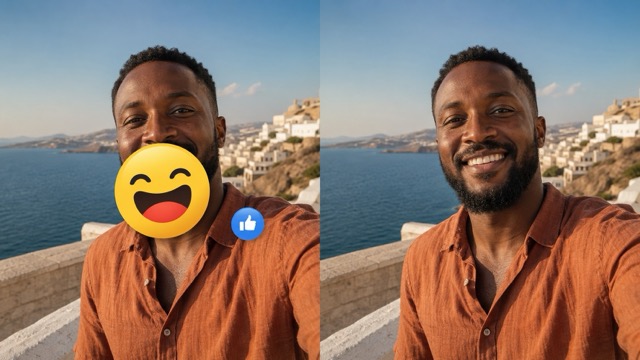
Rebuild the Covered Area with Visual Context
An emoji is usually added as a flat overlay, but removing it leaves a space where useful image information is no longer visible. Pixomi's AI photo emoji remover analyzes the surrounding scene and generates a plausible replacement based on nearby color, light, texture, and structure. On a wall, sky, table, fabric, or other repeating surface, it can extend visible patterns into the selection. On portraits and products, it uses nearby contours as context for a coherent edit. This is AI reconstruction, not recovery of the exact hidden pixels. Smaller overlays, sharp source images, and visible context give the model more evidence to work with. Preview important details and regenerate when the first result does not match your intention. This reviewable workflow keeps you in control of the final image.
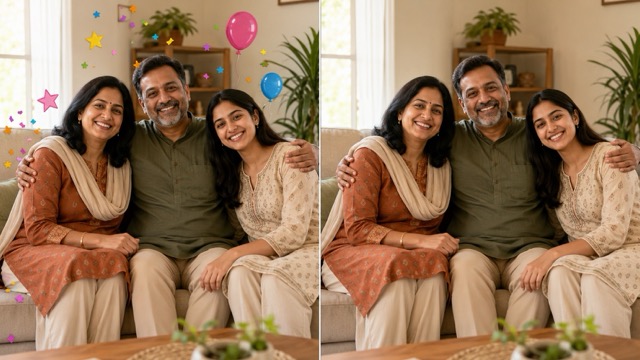
Select Precisely Instead of Redrawing by Hand
Traditional cleanup can involve sampling colors, cloning pixels, repairing borders, and matching texture one stroke at a time. The photo emoji remover simplifies that process: identify the unwanted overlay and let AI propose a replacement. Cover the complete emoji, including its outline, shadow, glow, transparent edge, or sticker border. When a sticker touches hair, clothing, packaging, or a straight line, select carefully instead of painting far beyond it. The AI can focus on the intended area while preserving more of the surrounding photo. Divide a large emoji into smaller passes so you can evaluate each section. This controlled approach helps beginners who want an easy online emoji remover and creators who need a faster first pass, while retaining the essential step of checking whether new detail looks believable.
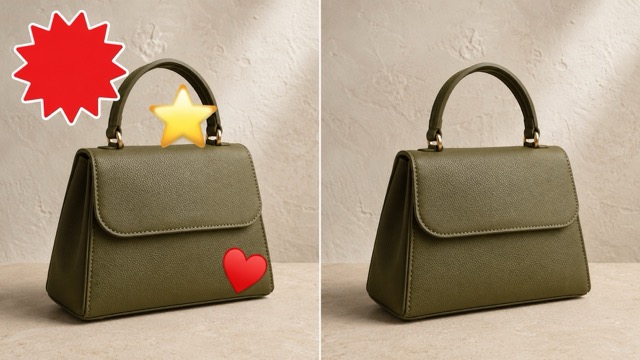
Clean More Than One Type of Graphic Overlay
Photos from social apps, chats, marketplaces, and old design files may contain more than a single smiley face. Use the AI emoji remover to target reaction icons, hearts, stars, speech bubbles, labels, and other small overlays that distract from the subject. The same selection-first workflow can remove stickers from photos when shapes are irregular or colors blend into the scene. Treat each item separately when overlays touch different textures; a sticker on the sky and an emoji on a jacket need different visual context. Focused passes give the photo emoji remover a clearer task and make comparison easier. Keep graphics that provide necessary meaning, ownership, safety, or attribution, and only edit images you may modify. The goal is a cleaner composition that respects the source and its intended use.
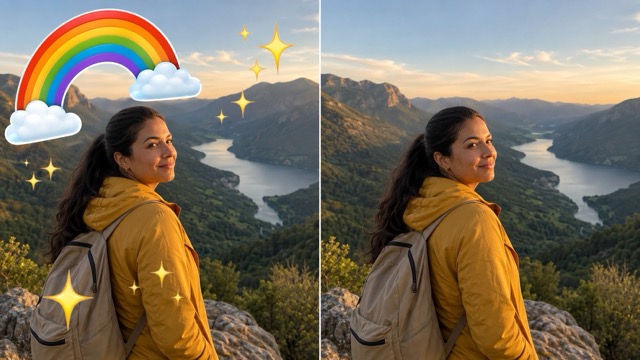
Refine Difficult Edges for a More Natural Result
No AI tool produces the same quality on every image. Results depend on the covered area, surrounding context, source resolution, and whether missing space contains unique details. Repeating textures are usually easier than eyes, hands, logos, small text, or complex patterns. Begin with a high-resolution photo, zoom in, include the full overlay edge, and avoid masking unrelated detail. If you notice blur, repeated texture, a broken line, or mismatched skin, try a tighter or slightly wider selection. You can remove a large emoji in two or three sections. The photo emoji remover works best as an iterative editor: generate, inspect, adjust, and compare. This rhythm helps you choose the version that looks consistent at normal size and close inspection.
Use Cases of Photo Emoji Remover
Use the photo emoji remover to clean social posts, family memories, product images, and creative assets for responsible reuse.

Refresh Social Media Photos
Reuse social photos without outdated reactions or decorative stickers. The photo emoji remover clears hearts, faces, arrows, and captured GIF-style overlays, then reconstructs nearby skin, hair, clothing, and backgrounds. When the original export is unavailable, it creates a cleaner version for profiles, carousels, recaps, or portfolios, although it cannot recover the exact hidden pixels.

Tidy Family and Travel Collections
Clean photos saved from chats or social apps before adding them to slideshows, collages, prints, or private archives. Start with the highest-resolution file and keep the original unchanged. Simple background stickers are easier to rebuild than large emojis covering faces or landmarks because the online emoji remover generates new detail rather than recovering historical evidence.

Improve Product and Marketplace Images
Remove temporary emojis, labels, or sticker overlays from approved product photos so shoppers can focus on the item. Check that reconstructed areas preserve product edges, color, texture, and proportions. Never erase required disclosures, authenticity marks, safety labels, ownership information, or unauthorized watermarks, and never use cleanup to hide damage or misrepresent product condition.
Prepare Cleaner Creative Assets
Create a cleaner base for posters, thumbnails, presentations, and campaign drafts when a layered source is unavailable. The AI emoji remover clears outdated decorations while preserving useful negative space for new content. Keep the untouched original and confirm that every edit follows the image license, brand rules, and project requirements.
What Users Say About Photo Emoji Remover
These illustrative scenarios show how different users can fit a photo emoji remover by Photo Emoji Remover; they are examples, not verified customer endorsements.
I keep both the untouched file and a cleaned copy. For a small sticker on a plain travel background, selecting the full edge and regenerating once gave me a much more reusable image.
The most useful part is the focused workflow. I mark one overlay, inspect the product outline, and only move on when the rebuilt area still looks accurate at full size.
I had an old family picture saved from a chat with a decorative heart in the corner. The online Photo Emoji Remover helped create a cleaner slideshow copy while I preserved the original.
For presentation graphics, I need a clean base before adding new labels. Removing small stickers individually makes it easier to catch uneven edges before the asset reaches the final layout.
I like treating Photo Emoji Remover as a draft rather than a magic reveal. When an emoji covers a detailed area, a second, tighter selection often produces a more believable reconstruction.





Photo Emoji Remover FAQ
Learn what AI emoji removal can do, its limits, and how to improve results.
Yes. A photo emoji remover erases the selected overlay and generates replacement pixels from nearby colors, lighting, edges, and textures. It reconstructs a plausible continuation rather than uncovering the exact original pixels hidden beneath the emoji. Smaller overlays, sharp source images, and clear surrounding patterns usually produce better results.
No. When an emoji is flattened into an image, the real facial pixels underneath are unavailable. A face emoji remover may generate a plausible eye, cheek, mouth, hair section, or skin texture, but the result is an AI-created estimate.
Use the highest-resolution source and zoom in before selecting. Cover the complete sticker, including outlines, shadows, glow, and transparent edges, while protecting nearby details.
It can target emojis, reaction icons, decorative stickers, hearts, stars, arrows, speech bubbles, labels, and similar graphic overlays. Results depend on their size, transparency, edges, and surrounding detail. instead.
Quality varies with the source and covered area. Small emojis on simple backgrounds may blend naturally, while large stickers over detailed content can produce softer or invented texture.
Yes, when you own the image or have permission to edit and publish it.
Remove Unwanted Emojis from Photo Emoji Remover
Upload an image, select the distracting emoji or sticker, and let Photo Emoji Remover generate a cleaner version from the surrounding visual context. Preview the reconstruction, refine difficult areas, and keep the result that best fits your photo.
