
More AI Image Generators
Explore our collection of specialized AI image generators designed for different creative needs and styles






















Free Sepia Filter for Warm, Timeless Photos
Upload a picture and create a warm sepia tone photo online in seconds, with no complicated editing software.
Use our free sepia filter to turn an everyday upload into a refined sepia tone photo. The simple online workflow adds nostalgic warmth while keeping faces, details, composition, and the character of your original picture clear.
How to Use the Free Sepia Filter
The free sepia filter turns a simple upload into a polished sepia tone photo through four clear steps. Upload, describe the finish, generate, and download—no manual color grading or complex controls required.

Upload Your Picture
Choose a portrait, landscape, travel shot, product image, or family memory. The free sepia filter starts with one uploaded image and prepares it for a balanced sepia tone photo conversion.

Describe the Look You Want
Add an optional prompt for softer warmth, deeper brown shadows, faded paper character, or subtle contrast. The free sepia filter uses your direction to shape the sepia tone photo without changing the main subject.

Generate the Sepia Effect
Choose an output size and click generate. The free sepia filter processes the upload and creates a sepia tone photo with warm highlights, controlled shadows, and a natural vintage mood.

Review and Download
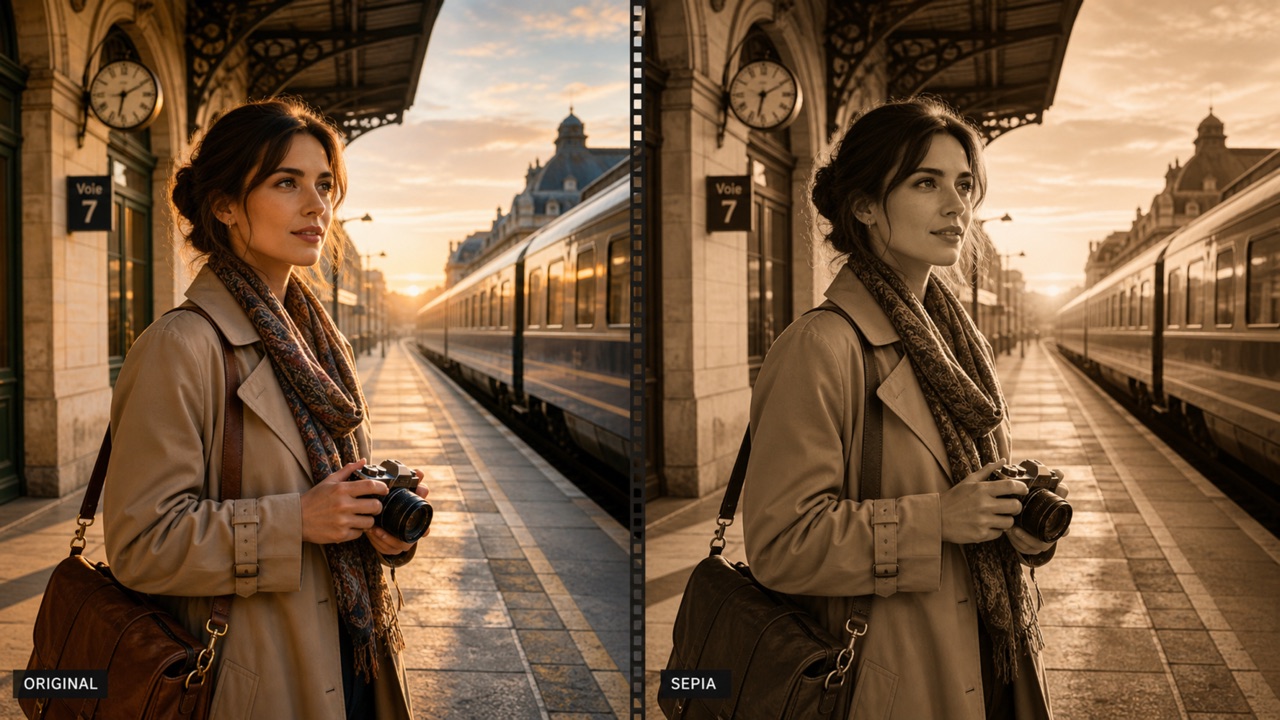
Compare the result with your original, then download the finished image. The free sepia filter makes every sepia tone photo easy to save for personal, creative, or professional use.
Best AI Image Tools for Creative Projects
Explore creative tools for image, learn tips and tricks, and see how AI can be your assistant in turning concepts into finished projects.
Free Sepia Filter Features for Better Vintage Results
The free sepia filter combines quick online editing with a controlled vintage look. It helps you make a detailed sepia tone photo, preserve the original scene, guide the mood with a prompt, and prepare attractive visuals for real projects. The free sepia filter keeps that process approachable.
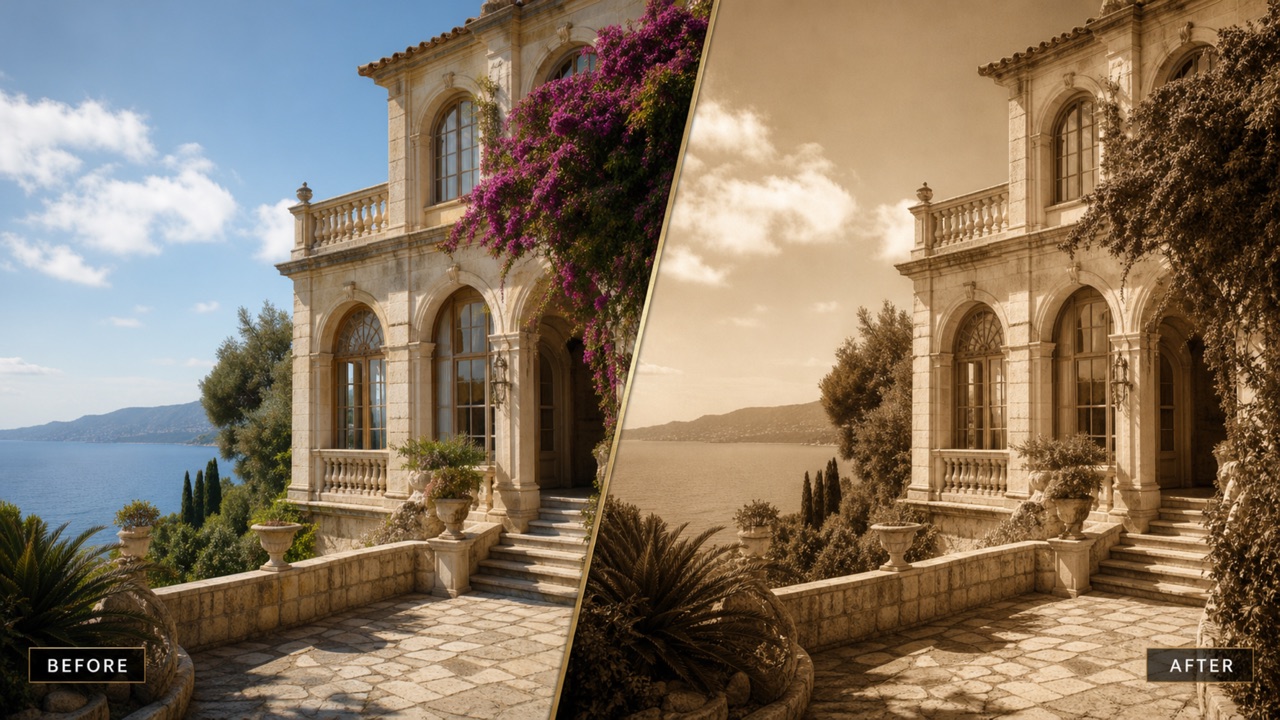
Create Authentic Vintage Warmth
- The free sepia filter replaces distracting modern color with warm brown, cream, and muted gold tones.
- Each sepia tone photo gains an aged mood while important facial features, textures, and edges remain recognizable.
- Use the free sepia filter for portraits, architecture, street scenes, or family memories that deserve a classic finish.
- A balanced sepia tone photo feels nostalgic rather than muddy, orange, or artificially faded.
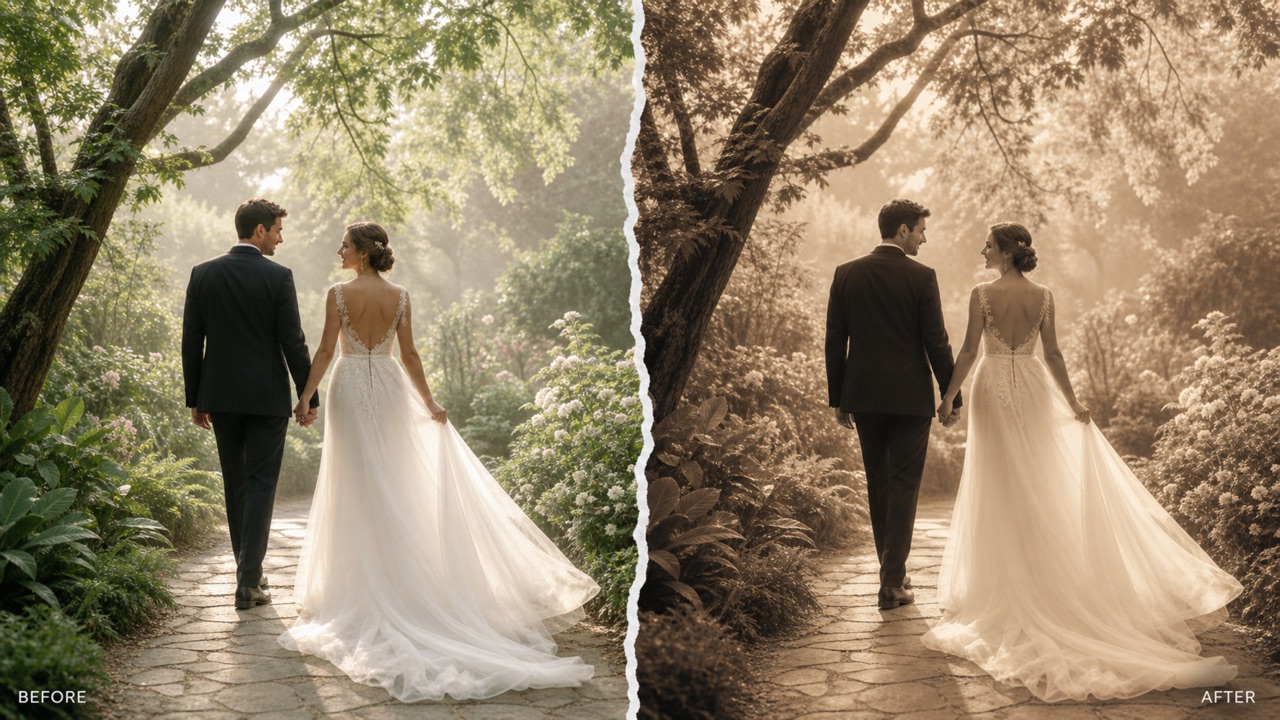
Preserve Details and Natural Contrast
- The free sepia filter is designed to keep the original subject, framing, lighting structure, and fine detail stable.
- Your sepia tone photo retains readable highlights and shadows instead of becoming a flat brown wash.
- Apply the free sepia filter to hair, fabric, buildings, clouds, or product textures where clarity matters.
- The finished sepia tone photo keeps visual depth, so it works for both screen viewing and printed keepsakes.
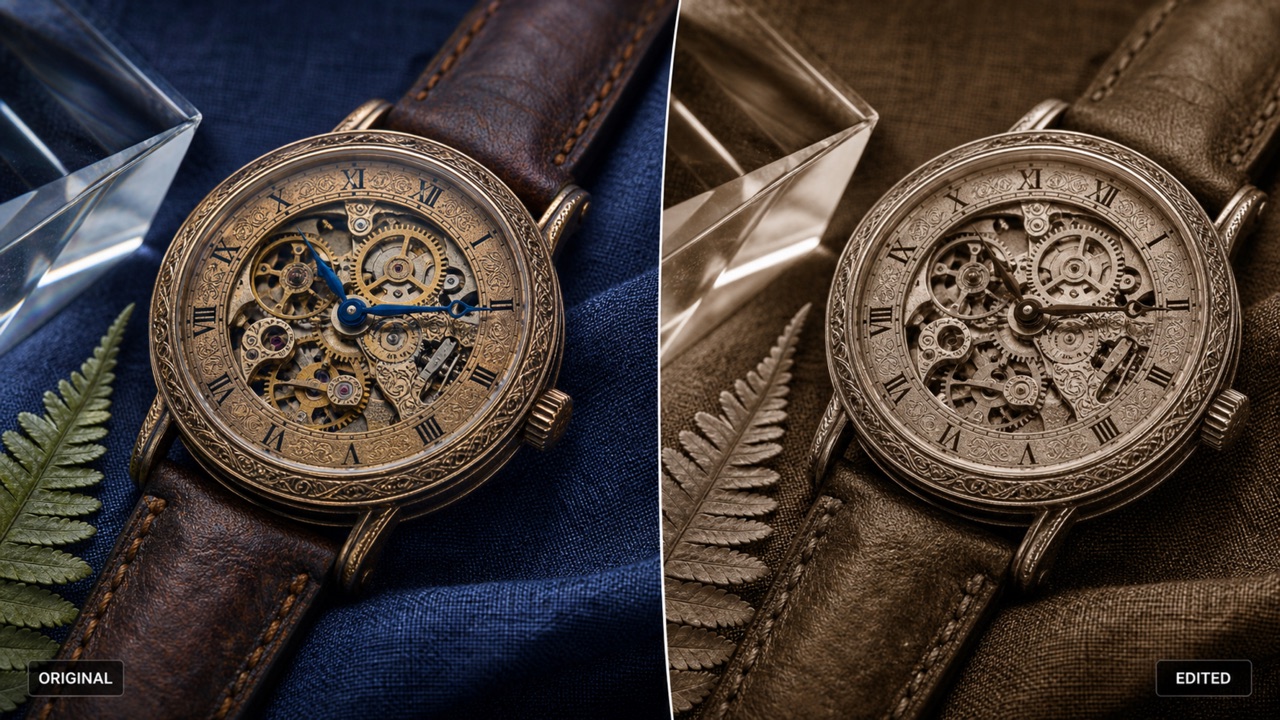
Shape the Mood with Simple Prompts
- Tell the free sepia filter whether you want gentle warmth, stronger antique contrast, faded album character, or a cinematic brown tone.
- A short prompt can guide how subtle or dramatic your sepia tone photo should feel.
- The free sepia filter keeps control approachable for beginners while giving creators useful direction over atmosphere.
- Build a sepia tone photo that matches a wedding memory, historical concept, editorial story, or social post.
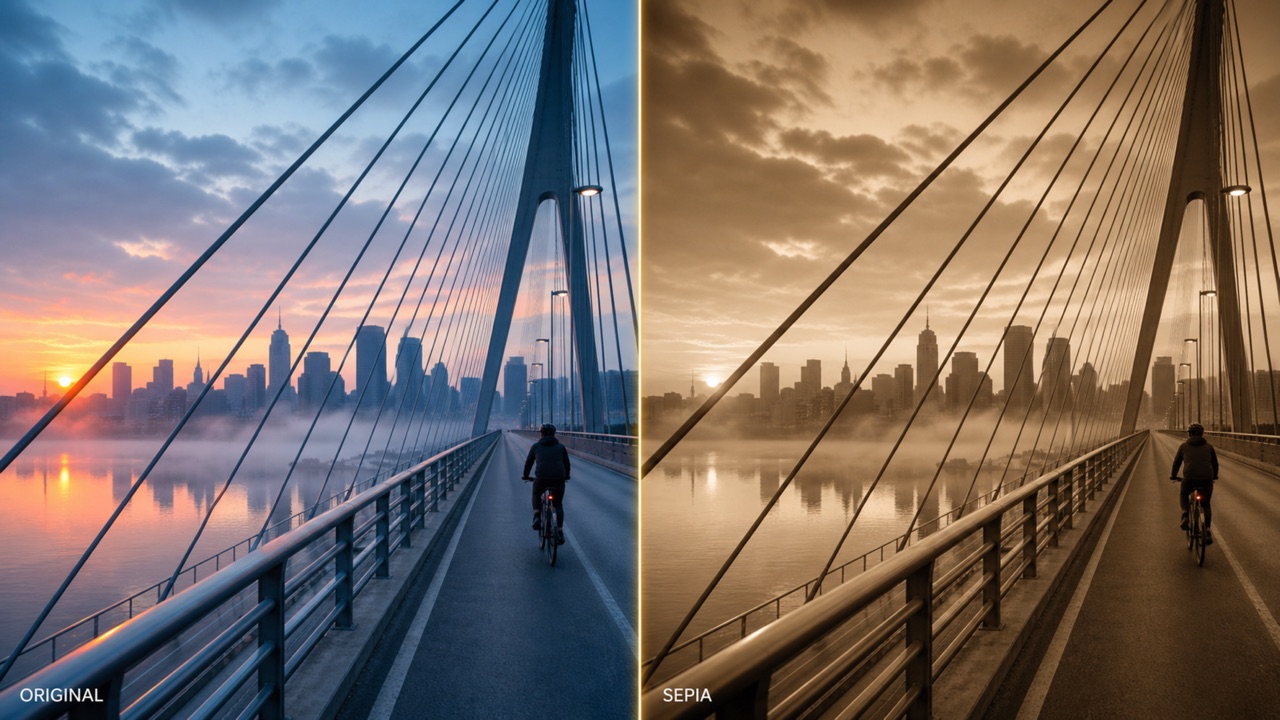
Make Sepia Images for Any Project
- The free sepia filter supports a fast image-to-image workflow for personal albums, posters, websites, mood boards, and campaigns.
- Export a sepia tone photo in the size that fits your publishing need.
- Use the free sepia filter when you need a consistent vintage direction across several visual ideas without learning advanced color tools.
- Every sepia tone photo is ready for further layout work, sharing, archiving, or creative presentation.
What You Can Make with a Free Sepia Filter
From personal memories to polished visual campaigns, the free sepia filter gives many image types a cohesive historical mood. Create a sepia tone photo for portraits, travel, publishing, social media, education, or any story that benefits from warmth. The free sepia filter adapts to each purpose.

Portraits with Timeless Character
Use the free sepia filter to soften modern colors in portraits and give expressions a classic, intimate mood. A sepia tone photo can make headshots, wedding portraits, and candid faces feel warm and enduring.

Family Photos and Memory Albums
The free sepia filter gives family moments the atmosphere of a treasured archive. Turn birthdays, reunions, childhood pictures, or scanned memories into a sepia tone photo that fits printed albums and digital collections.

Travel and Architecture Stories
Apply the free sepia filter to old streets, landmarks, trains, cafes, or quiet landscapes. The resulting sepia tone photo can connect contemporary travel photography with the visual language of historical journals.

Posters and Editorial Artwork
Create a strong base image for book covers, posters, invitations, articles, or mood boards with the free sepia filter. A focused sepia tone photo adds visual unity without distracting from typography or layout.

Social Posts with a Vintage Mood
Use the free sepia filter to give feeds, stories, profile posts, and campaign teasers a recognizable nostalgic style. One sepia tone photo can bring calm warmth to fast-moving social content.

Historical and Educational Concepts
The free sepia filter helps teachers, students, museums, and storytellers create period-inspired visuals from modern source images. A sepia tone photo can support timelines, exhibits, presentations, and documentary-style concepts.
Why Creators Choose Our Free Sepia Filter
Photographers, designers, educators, archivists, and storytellers use the free sepia filter when they want a fast but thoughtful transformation. Their sepia tone photo projects stay detailed, warm, consistent, and ready for meaningful presentation. The free sepia filter suits varied creative workflows.
I used the free sepia filter on a wedding portrait series and loved how it preserved lace, skin detail, and soft window light. Each sepia tone photo looked warm and intentional rather than like a heavy preset.
The free sepia filter gave our museum concept images a believable period mood in minutes. The sepia tone photo results kept architectural lines clear, which made them easy to use in an educational display.
For a historical novel campaign, the free sepia filter helped every visual feel connected. I could create a sepia tone photo for teasers, quote cards, and headers without rebuilding my color treatment.
I like that the free sepia filter keeps the scene readable. My street photograph became a sepia tone photo with rich atmosphere, but the people, signs, pavement, and distant buildings still had useful contrast.
The free sepia filter made it easy to give a set of family scans one consistent finish. Each sepia tone photo felt gentle and archival, and I did not need to learn complicated adjustment layers.
Our campaign needed a quiet vintage direction, and the free sepia filter delivered it quickly. The sepia tone photo outputs worked beautifully behind product headlines and kept the visual system cohesive.



Free Sepia Filter Frequently Asked Questions
Learn how the free sepia filter converts uploads, preserves important detail, and helps you direct the warmth of each sepia tone photo before you generate and download the result. The free sepia filter stays simple from start to finish.
A free sepia filter transforms the colors in an uploaded image into a warm brown monochrome style inspired by vintage photography. It creates a sepia tone photo while preserving the subject, composition, and important detail of the original.
Upload one image, add an optional prompt describing the mood, choose an output size, and click generate. The free sepia filter processes the picture and returns a sepia tone photo that you can review and download.
Yes. The free sepia filter is built to keep faces, objects, framing, textures, and lighting structure recognizable. Only the color mood should change, giving you a sepia tone photo that remains faithful to the source.
You can use the free sepia filter with portraits, travel images, architecture, landscapes, scanned memories, product scenes, or editorial artwork. Any clear source can become a sepia tone photo with a timeless visual direction.
Use a short prompt with phrases such as soft antique warmth, faded album look, deep brown contrast, or subtle vintage finish. The free sepia filter uses that guidance to shape the character of your sepia tone photo.
Yes, you can prepare visuals for personal albums, websites, presentations, social media, or commercial design concepts. Check any applicable platform and project terms before final use. The free sepia filter makes a versatile sepia tone photo for many creative layouts.
Turn Your Photo into a Timeless Sepia Image
Upload one picture and use the free sepia filter to create a warm, detailed sepia tone photo online. Choose your mood, generate the result, and give your visual story a classic finish today. Open the free sepia filter and begin.
