
More AI Image Generators
Explore our collection of specialized AI image generators designed for different creative needs and styles

















Goth Baddie Makeup: Create a Dark Glam Look from Your Photo
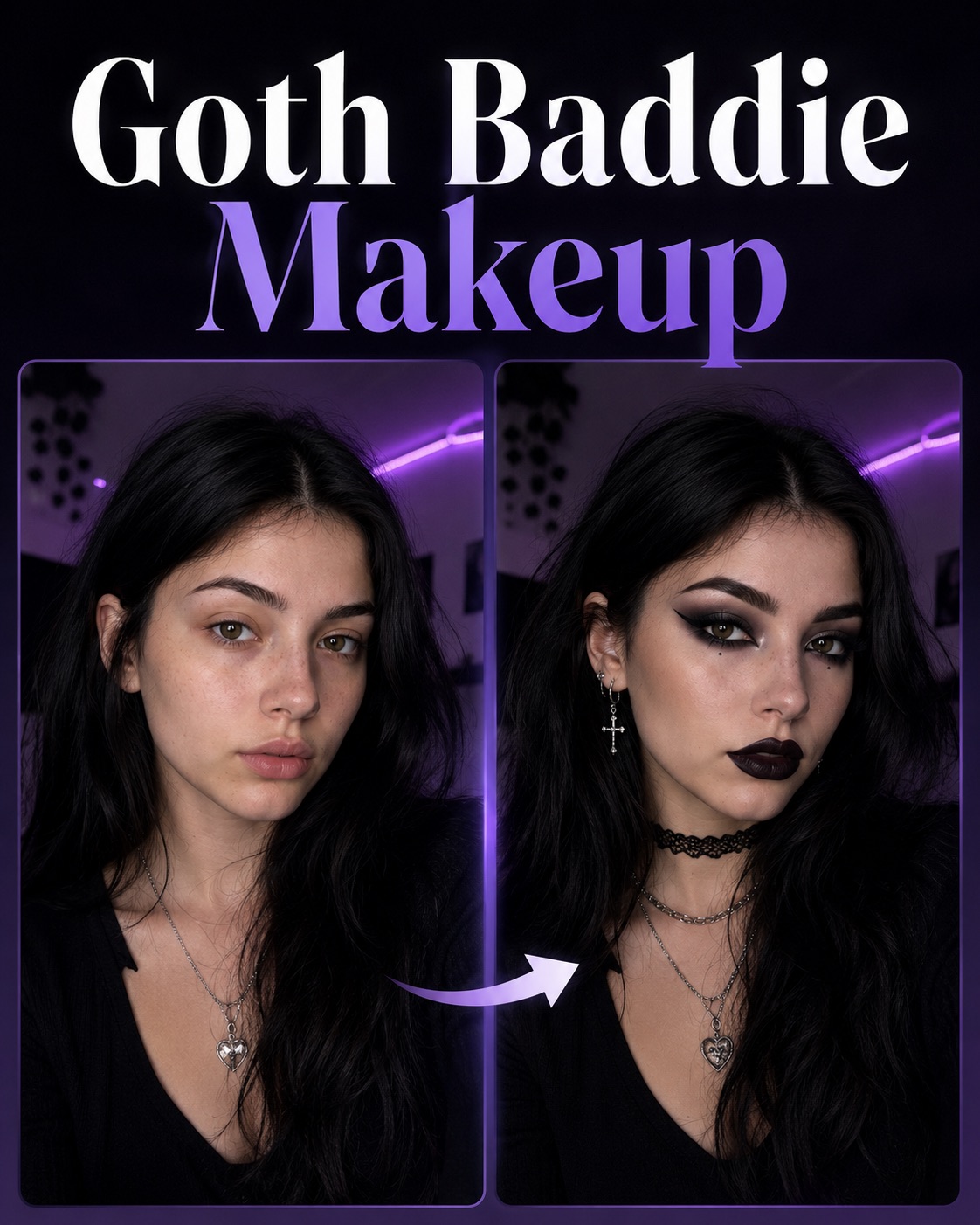
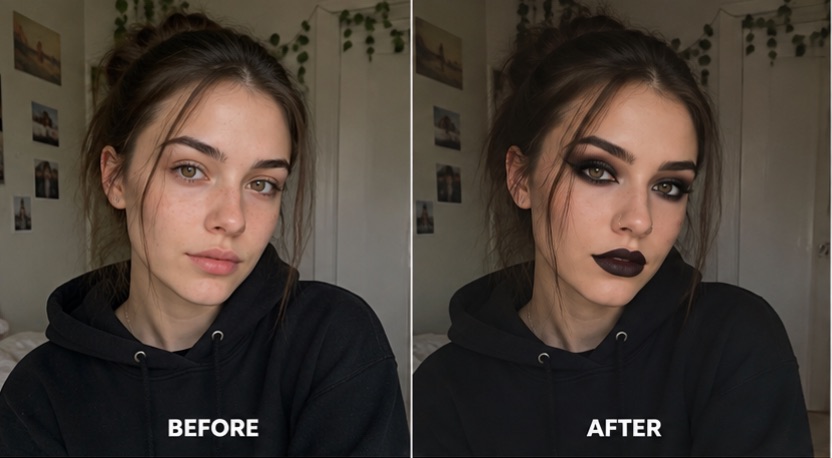
Upload one photo and turn it into Goth Baddie Makeup with smoky eyes, sharp liner, dark lips, sculpted definition, and a polished alt-glam finish. Explore Soft Goth Makeup and Goth Girl Makeup aesthetics without manually editing every detail.
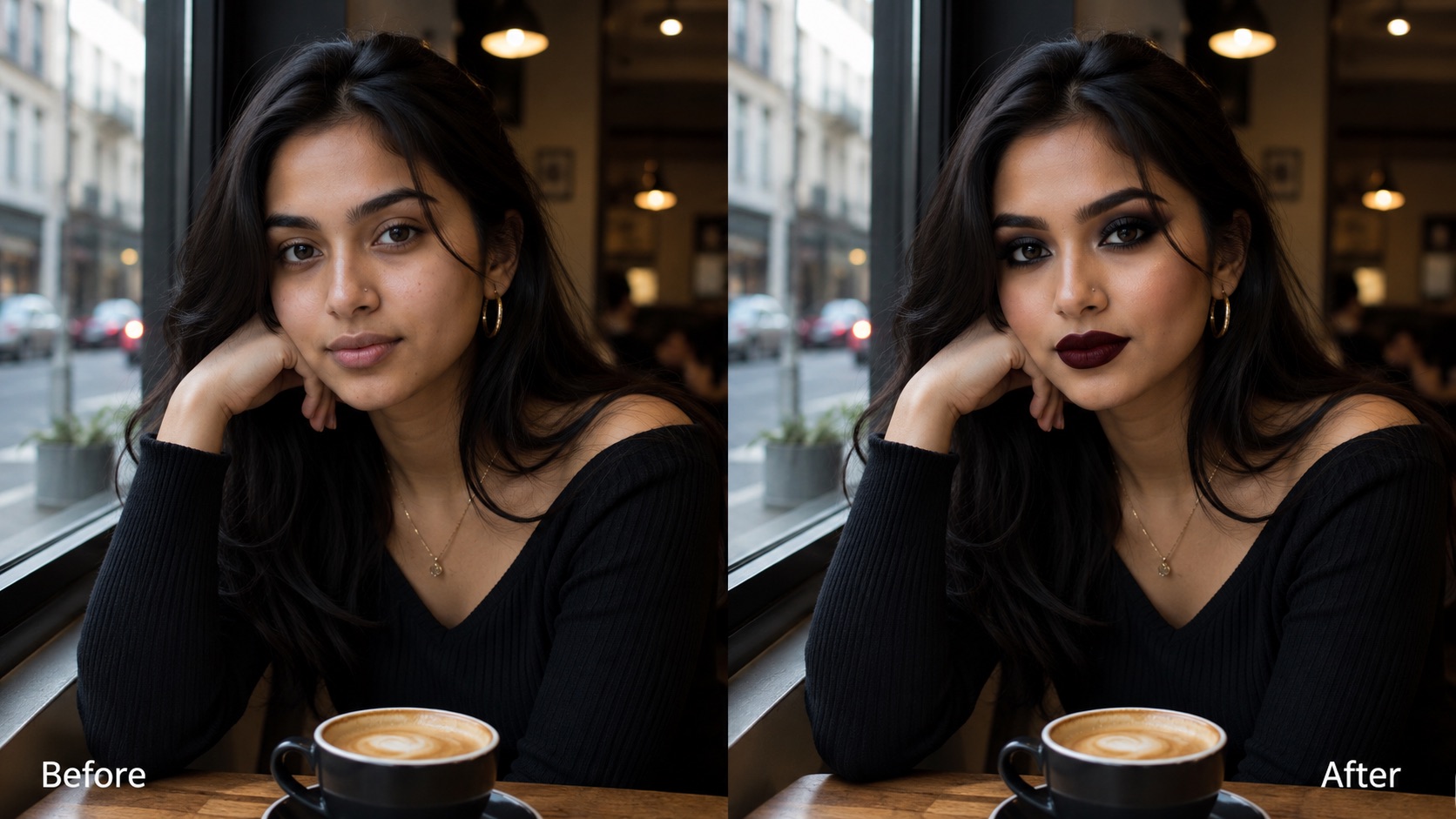
Create Goth Baddie Makeup from a selfie in one click. The AI Goth Makeup Generator keeps your face recognizable while adding dark glam details, making it easy to preview a goth baddie makeup look, a goth girl makeup look, or goth makeup without white base.
How to Create Goth Baddie Makeup in 3 Simple Steps
Turn a regular portrait into Goth Baddie Makeup without manual retouching. Upload your image, click Generate, and receive a finished dark-glam transformation from the AI Goth Makeup Generator.

Upload Your Photo
Upload a clear portrait or selfie with your face visible. Goth Baddie Makeup works best when the eyes, lips, and facial contours are easy to see. A natural front-facing photo gives the AI Goth Makeup Generator enough detail to create Soft Goth Makeup or Goth Girl Makeup while keeping your original identity recognizable.

Click Generate
Click Generate and let the Goth Makeup Filter reinterpret your photo. You do not need to write a prompt or choose complicated settings. Goth Baddie Makeup automatically applies a balanced dark-glam direction with smoky eyes, defined liner, deeper lip tones, and alt-inspired details suited to a goth baddie makeup look.

Get Your Goth Look
Preview the generated image and save the version you like. Goth Baddie Makeup can produce a polished result for social posts, profile images, style inspiration, or personal experimentation. Try another photo whenever you want a different Soft Goth Makeup mood, Goth Girl Makeup finish, or goth girl makeup look.
Best AI Image Tools for Creative Projects
Explore creative tools for image, learn tips and tricks, and see how AI can be your assistant in turning concepts into finished projects.


What You Can Create with Goth Baddie Makeup
Use Goth Baddie Makeup to explore wearable dark glam, Soft Goth Makeup, Goth Girl Makeup, and natural-skin goth styling from one uploaded photo.
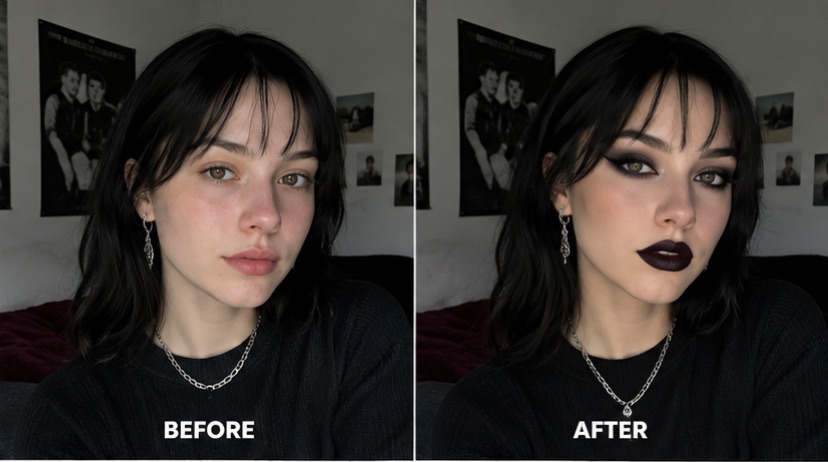
Turn a Regular Selfie into a Polished Goth Baddie Look
Goth Baddie Makeup helps you explore a complete dark-glam transformation from a photo you already have. Instead of adding one isolated eyeliner or lipstick effect, the Goth Makeup Filter coordinates eye makeup, lip color, contour, contrast, and overall mood so the result feels visually consistent. The generated goth baddie makeup look can stay polished and wearable rather than costume-like. If you prefer softer contrast, the same photo can also inspire a Soft Goth Makeup direction with gentler smoky eyes and muted dark tones. This makes Goth Baddie Makeup useful for testing a new aesthetic before recreating it with real cosmetics.
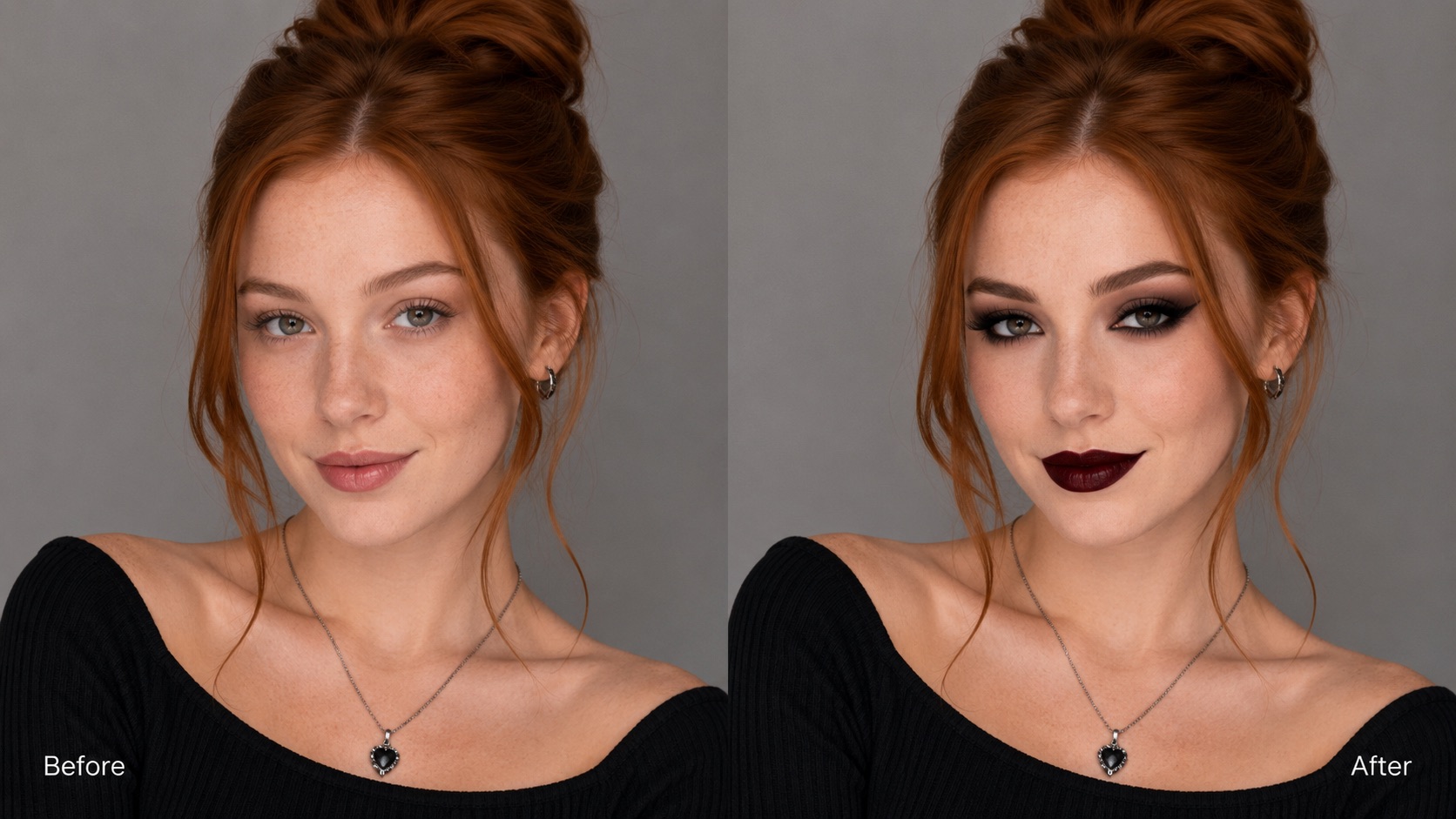
Keep Your Natural Skin Tone with Dark Makeup Details
Not every goth look needs a pale or theatrical base. Goth Baddie Makeup can emphasize liner, lashes, lips, brows, and sculpted facial definition while allowing your natural complexion to remain central. This is especially useful if you are searching for goth makeup without white base and want a modern result that still feels dark, expressive, and wearable. Goth Girl Makeup can look dramatic without changing the person into a completely different character. The AI Goth Makeup Generator focuses on the makeup language of the style rather than forcing one traditional complexion treatment, giving goth makeup without white base a more personal and contemporary finish.
Explore Soft Goth, Classic Dark Glam, and Baddie-Inspired Results
Goth Baddie Makeup is broad enough to support different dark beauty moods while keeping the result cohesive. One portrait may lean toward Soft Goth Makeup with diffused smoky eyes and understated lips, while another can create stronger Goth Girl Makeup with sharper liner and richer contrast. The Goth Makeup Filter can also produce a more glamorous goth baddie makeup look that blends alt styling with a clean social-media-ready finish. Because the transformation is generated as a whole image, these variations feel integrated rather than layered on as separate stickers. Goth Baddie Makeup gives you a quick way to compare which dark aesthetic feels most like you.
Who Can Use Goth Baddie Makeup?
Goth Baddie Makeup is useful for style exploration, profile images, makeup references, and creative content. It also gives Soft Goth Makeup fans and dark-beauty creators a simple way to visualize new looks.

Preview a New Makeup Direction
Use Goth Baddie Makeup when you are curious about darker beauty styling but do not want to buy products or redo your makeup just to test an idea. The AI Goth Makeup Generator can turn one selfie into a goth baddie makeup look with coordinated eyes, lips, and facial definition. You can also compare the feel of Soft Goth Makeup and Goth Girl Makeup before deciding which direction you would actually wear. Goth Baddie Makeup also gives you a stable reference for comparing eye shape, lip depth, and overall intensity across different photos before you settle on a final direction.

Create a Goth-Inspired Profile Picture
A strong profile photo often needs a clear visual identity. Goth Baddie Makeup can transform a simple portrait into a darker, more distinctive image for social profiles, avatars, or creative accounts. The Goth Makeup Filter can add enough contrast and attitude to support a goth girl makeup look without making the face unrecognizable. Soft Goth Makeup works well when you want a subtler profile image, while Goth Girl Makeup suits a bolder result. For a cleaner avatar, crop around the face after generation and keep the makeup as the main visual focus rather than adding extra decorative elements.

Build Makeup References for a Real Look
Goth Baddie Makeup can act as a visual reference before you recreate the look with real cosmetics. Use the generated image to study eyeliner shape, smoky-eye placement, lip depth, brow definition, or the balance between dark details and natural skin. This is especially helpful for goth makeup without white base, where the goal is to keep the complexion familiar while introducing stronger alt makeup. A Soft Goth Makeup reference can also make an everyday version easier to plan. Goth Baddie Makeup is also useful when you want to compare a bold reference with a more restrained Soft Goth Makeup version before choosing products, colors, or techniques.

Experiment with Dark Beauty Content
Creators can use Goth Baddie Makeup to explore visual directions for beauty posts, mood boards, character concepts, or themed content. The AI Goth Makeup Generator makes it easy to test several portraits without manually editing each feature. One image can suggest a goth baddie makeup look, another can lean into Goth Girl Makeup, and another can show a softer goth girl makeup look. This gives you more creative range while keeping the underlying face consistent. Goth Baddie Makeup can also help keep a themed content series visually connected when you start from portraits with similar lighting, framing, and facial visibility.
What Users Say About Goth Baddie Makeup
See how people use Goth Baddie Makeup to explore dark-glam styling, Soft Goth Makeup, natural-skin dark glam, and new creative directions.
I wanted Goth Baddie Makeup that still looked like me, not a Halloween filter. The result kept my skin tone and face shape while changing the eyes and lips in a way I could actually imagine wearing. I also liked that the Soft Goth Makeup version felt subtle enough for everyday inspiration. I saved the image as a makeup reference because the eyeliner placement and lip color gave me a clear starting point instead of a vague mood-board idea.
I had been searching for goth makeup without white base because I wanted dark makeup without covering my natural complexion. Goth Baddie Makeup gave me exactly that direction. The Goth Makeup Filter created a clean goth girl makeup look with sharp liner and deeper lips, but my face still looked familiar. I also tested Soft Goth Makeup on a second selfie, which made it easier to compare a subtle everyday version with a stronger dark-glam result.
I used Goth Baddie Makeup before trying a darker look for a photo shoot. Seeing Goth Girl Makeup on my own face helped me decide how bold I wanted the liner and lip color. The AI Goth Makeup Generator was especially useful because I could compare a goth baddie makeup look with a softer alternative. Goth Baddie Makeup made the planning stage much faster because I could show the image to the makeup artist and discuss specific details before the shoot.
What I liked most about Goth Baddie Makeup was the balance. It looked dramatic, but it did not erase my features. I tried another image for Soft Goth Makeup and got a more muted result that worked well as a profile picture. It was an easy way to explore two different dark beauty moods. Goth Baddie Makeup also worked well across two different selfies, so I could decide which lighting and face angle suited the style before posting anything.




Goth Baddie Makeup FAQ
Find quick answers about Goth Baddie Makeup, Soft Goth Makeup, Goth Girl Makeup, photo choice, natural skin tones, and generated dark-glam results.
Upload a clear portrait, click Generate, and wait for Goth Baddie Makeup to transform the image. The AI Goth Makeup Generator handles the dark-glam styling automatically, so you do not need to write a prompt.
Yes. Goth Baddie Makeup is designed to keep the person recognizable while changing makeup styling, contrast, and mood. A clear photo gives the Goth Makeup Filter the best chance of preserving your facial identity.
Yes. Goth Baddie Makeup can create a dark look while preserving a natural complexion. This makes it suitable for goth makeup without white base and for users who prefer modern Goth Girl Makeup over a theatrical pale base.
Soft Goth Makeup usually uses gentler contrast, diffused eye makeup, and more muted dark tones. Goth Baddie Makeup generally adds sharper definition and a more polished baddie influence while staying recognizably goth.
Yes. A generated goth girl makeup look or goth baddie makeup look can work well for profile pictures, social posts, beauty inspiration, or themed content. Choose a clear portrait with enough space around the face.
Use a clear, well-lit portrait with visible eyes, lips, and facial contours. Goth Baddie Makeup can work with different angles, but front-facing or slightly turned photos usually give the Goth Makeup Filter more facial detail to work with.
Create Your Goth Baddie Makeup Look
Upload a portrait and create Goth Baddie Makeup in one click. Try a polished goth baddie makeup look, a softer Soft Goth Makeup direction, or a bold Goth Girl Makeup transformation.
