
More AI Image Generators
Explore our collection of specialized AI image generators designed for different creative needs and styles
















Eye Direction Changer: Fix Eye Gaze Naturally
Redirect a distracted gaze without losing the person behind the portrait
A portrait can have perfect lighting and expression while the eyes miss the camera by a few degrees. Eye Direction Changer helps you correct that small but important detail without arranging another shoot. Upload a selfie, headshot, family picture, or group photo, then describe where the subject should look. Use Eye Direction Changer to create natural eye contact, redirect a creative gaze, or fix someone looking at the screen instead of the lens. The guided workflow makes it easy to Change Eye Direction in Photo while protecting facial identity, iris color, eyelids, catchlights, expression, and the rest of the composition.
How to Use Eye Direction Changer in Three Steps
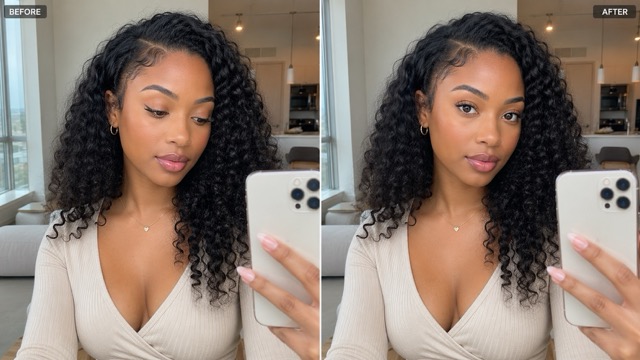
Eye Direction Changer simplifies portrait adjustments into an easy workflow. Start with a sharp image where the eyes are clearly visible, then choose your desired gaze direction—direct eye contact or a controlled glance. For natural results, request subtle movements that match the head angle while preserving the original expression and lighting. Finally, review the output at full size to ensure natural alignment and symmetry.

1. Upload a Portrait to Eye Direction Changer
Choose a high-quality image with visible eyes and a recognizable face. Eye Direction Changer needs more reliable context when the subject is looking far away, wearing glasses, standing in a group, or photographed in low light. Use the original file rather than a compressed screenshot whenever possible. A clear source makes it easier to Change Eye Direction in Photo while keeping iris detail and skin texture coherent.

2. Choose a Gaze in Eye Direction Changer
Tell Eye Direction Changer exactly where the eyes should point. Try: make the subject look naturally into the camera; preserve the smile, eye color, eyelids, eyebrows, glasses, head angle, and lighting. For a creative portrait, ask to Change Eye Direction in Photo slightly toward an object already in the scene. Precise direction creates better visual logic than a vague request to fix the eyes.

3. Compare Eye Direction Changer Results
Review the output beside the original. Eye Direction Changer should redirect the gaze without reshaping the whole face. Zoom in to check matching pupil size, natural catchlights, consistent eye color, believable eyelids, and alignment with the head pose. If the movement looks exaggerated, ask to Change Eye Direction in Photo more subtly. Download only after the portrait still feels like the same moment and person.
Best AI Image Tools for Creative Projects
Explore creative tools for image, learn tips and tricks, and see how AI can be your assistant in turning concepts into finished projects.


Eye Direction Changer That Respects the Whole Expression
Eye Direction Changer uses the complete portrait as context, helping you Change Eye Direction in Photo without treating the eyes like isolated stickers. The best correction is often small: enough to clarify attention, but restrained enough to preserve the personality and atmosphere of the original image.
Create Natural Eye Contact for Headshots
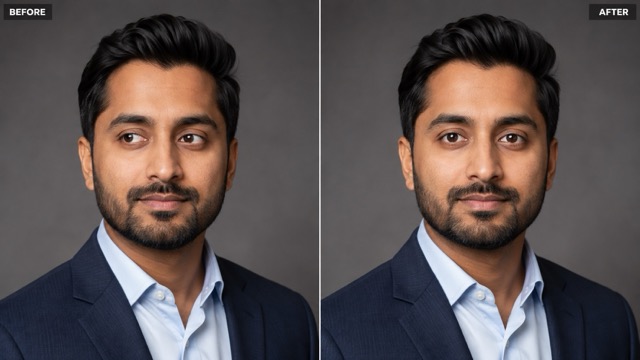
Eyes drifting away from the camera can make subjects seem disengaged in professional headshots. Eye Direction Changer redirects near-camera gazes to the lens while retaining the original smile, lighting, and posture. To Change Eye Direction in Photo convincingly, match the correction to the head angle and ensure pupil size, catchlights, and eyelashes are preserved. This tool is perfect for LinkedIn, resumes, and portfolios. Inspect facial details to ensure the attention feels clear and natural. A subtle correction can rescue an otherwise perfect frame.
Fix Distracted Eyes in Group Photos
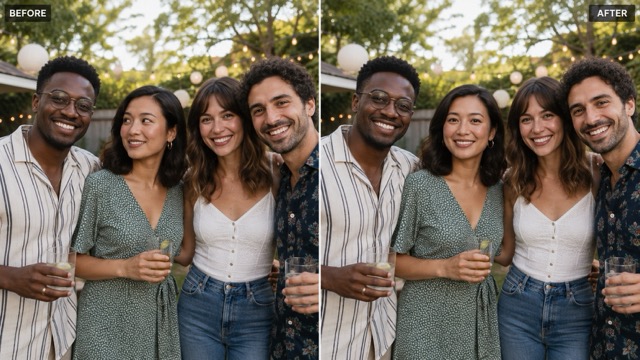
Group pictures are challenging since everyone rarely looks perfect simultaneously. Eye Direction Changer lets you fix a distracted subject without altering the entire image. Simply request to Change Eye Direction in Photo for a specific person while keeping other faces, poses, and backgrounds unchanged. Align the corrected gaze with the shared point of attention. For families, weddings, or team portraits, this restrained edit saves meaningful moments. Process small faces carefully and adjust one person at a time for best results.
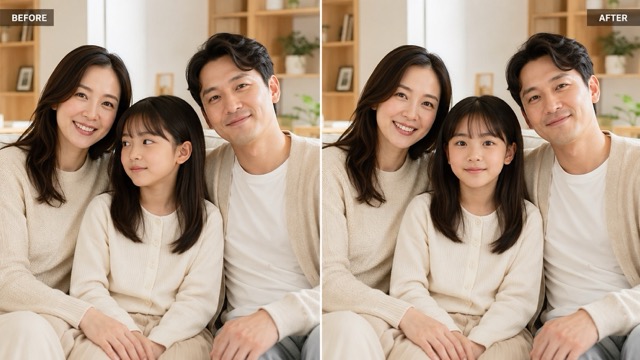
Correct Selfies Taken While Watching the Screen
In selfies, people often watch their screen instead of the lens. Eye Direction Changer helps Change Eye Direction in Photo toward the lens while keeping informal expressions and perspectives intact. Instruct the tool to preserve natural asymmetry, avoid enlarging eyes, and maintain the original background. This is ideal for dating profiles, avatars, and creator thumbnails. You can also redirect attention slightly away for a candid effect. Compare the revised portrait at normal and zoomed sizes to ensure a natural gaze.
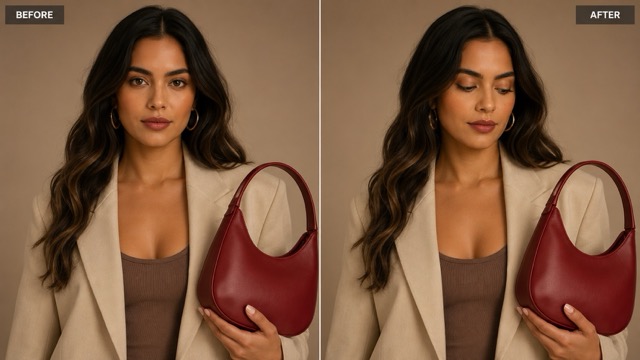
Direct Attention for Creative Storytelling
Not every portrait needs direct eye contact. A gaze toward a product, headline, or empty space can strengthen visual storytelling. Eye Direction Changer allows creators to Change Eye Direction in Photo to support the composition. Ask for a slight glance toward a visible object while preserving the head angle and surrounding features. Ensure the intended target makes spatial sense. Use small adjustments and keep catchlights consistent to improve editorial portraits, posters, and campaign images before finalizing the design.
Who Can Use Eye Direction Changer
Eye Direction Changer is useful whenever the image is strong but the gaze does not support its purpose. Professionals may want confident camera contact, families may need to repair a missed moment, and designers may want attention directed across a layout. In every case, use Eye Direction Changer to Change Eye Direction in Photo with consent, restraint, and a clear visual goal.
Professionals and Job Seekers
A headshot often needs an attentive, approachable connection with the viewer. Eye Direction Changer can correct a near-camera glance for resumes, LinkedIn profiles, company biographies, conference pages, and press kits. Ask to Change Eye Direction in Photo toward the lens while protecting the existing expression and facial structure. Eye Direction Changer works best as a subtle finishing step after you have already selected a sharp, well-lit portrait that genuinely represents the person.

Families, Couples, and Event Guests
The emotional value of a family or event photograph can outweigh a small technical mistake. Eye Direction Changer helps rescue a frame in which one person looked away while the rest of the group was ready. Identify the exact subject, then Change Eye Direction in Photo without altering other faces or interactions. Eye Direction Changer can support wedding groups, reunions, birthdays, graduations, and candid memories when repeating the moment is impossible.

Creators, Designers, and Marketers
Gaze is a compositional signal. Eye Direction Changer can direct a subject toward a product, logo, headline, button, or empty text area, helping the design feel intentional. Use Eye Direction Changer to Change Eye Direction in Photo only when the new line of sight makes sense with the head pose and layout. It can support social posts, channel thumbnails, editorial graphics, posters, landing-page visuals, album covers, and campaign concepts.

Portrait Editors and Photographers
A photographer may capture the best smile just before the subject meets the lens. Eye Direction Changer offers a focused alternative to discarding the frame or rebuilding the eyes manually. To Change Eye Direction in Photo responsibly, keep the original file, use a restrained correction, and inspect the result at print size. Eye Direction Changer is a finishing tool, not a reason to ignore lighting, focus, posing, or authentic expression during the shoot.
Eye Direction Changer in Everyday Portrait Workflows
These perspectives illustrate thoughtful ways to use Eye Direction Changer: make a small correction, protect the original face, and check whether the revised gaze still matches the scene.
My strongest headshot had me looking at the interviewer beside the lens. Eye Direction Changer helped me Change Eye Direction in Photo toward the camera without changing my smile or face shape. I kept the movement subtle and checked the catchlights closely, so the final portrait still felt like the original moment.
In a family group, our youngest child looked away during the only frame where everyone else was smiling. Eye Direction Changer let me focus on that one face and Change Eye Direction in Photo gently. The correction saved a meaningful picture without requiring broader edits to the group.
I often need portrait subjects to lead attention toward a headline. Eye Direction Changer gives me a way to test that composition after selecting the best expression. I Change Eye Direction in Photo only a little, then confirm that the gaze target and head angle make visual sense.
Phone selfies make me look at my screen instead of the lens. Eye Direction Changer helped me Change Eye Direction in Photo for a profile image while keeping natural asymmetry and makeup. The result worked because I asked for a tiny correction rather than a dramatic forward stare.
When I edit an event portrait, identity preservation matters more than perfect symmetry. Eye Direction Changer helps me Change Eye Direction in Photo while I specify unchanged eyelids, eyebrows, glasses, and expression. I still compare every result with the source before including it in a client gallery.





Eye Direction Changer FAQ
Learn how Eye Direction Changer redirects gaze, which source images work best, and how to keep the final portrait natural and recognizable.
Upload a clear portrait, describe your intended gaze, and list the features to protect. The tool uses your face, head pose, and lighting as context. Request a specific direction (e.g., 'look at the camera'), generate the result, and refine the movement if needed.
Yes. Redirecting a near-camera gaze to the lens is a primary feature. Ask to Change Eye Direction in Photo toward the camera while preserving iris color, expression, and head angle. It works best if the original eyes are already looking near the lens.
Yes, but small faces have less detail. Identify the specific person and request that everyone else remains unchanged. It is safest to Change Eye Direction in Photo for one person at a time and review the results closely.
The edit is localized, but tell the tool to preserve surrounding details like eye shape, eyebrows, expression, and background. Always compare the whole face after editing, not just the pupils, to ensure nothing else shifted.
Name the subject, new gaze, and protected features. For example: 'Make the woman on the left look at the camera; preserve her identity, eye color, glasses, smile, and lighting.' This provides much better control than a vague request.
Sharp, well-lit, front-facing or three-quarter portraits where both eyes are clearly visible work best. Heavy blur, opaque sunglasses, hair covering eyes, closed eyelids, or extreme profiles will reduce accuracy.
Use Eye Direction Changer to Complete the Portrait
Keep the expression, lighting, and moment you already love; correct only the gaze that missed its mark. Upload a clear image, tell Eye Direction Changer where the subject should look, and protect every feature that defines the face. Whether you need camera contact or a creative glance, Change Eye Direction in Photo with a subtle instruction, compare the result carefully, and choose the version that still feels honest and natural.
