
More AI Image Generators
Explore our collection of specialized AI image generators designed for different creative needs and styles























AI Colorizer: Bring Black-and-White Photos Back to Life
Add Natural, Believable Color Without Manual Editing
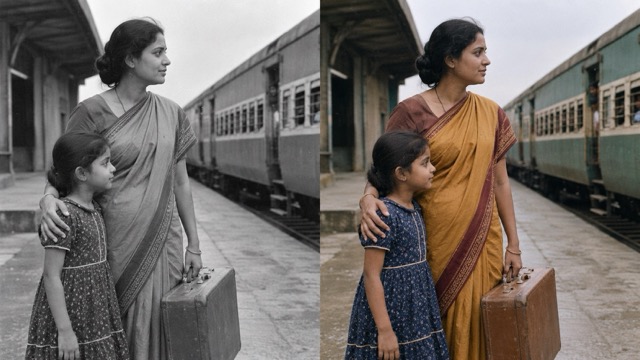
Turn a monochrome portrait, faded family snapshot, or vintage scene into a vivid color image with an AI Colorizer built for simple online use. Upload your photo and let AI interpret faces, clothing, skies, plants, buildings, and lighting as one connected scene. Instead of painting every area by hand, you receive a complete colorized version that keeps the original composition at the center. Use it to rediscover personal memories, create more engaging historical visuals, or explore how a familiar photograph might feel in color. AI colorization is an informed visual interpretation rather than proof of the original colors, so you remain in control of how the result is presented and used.
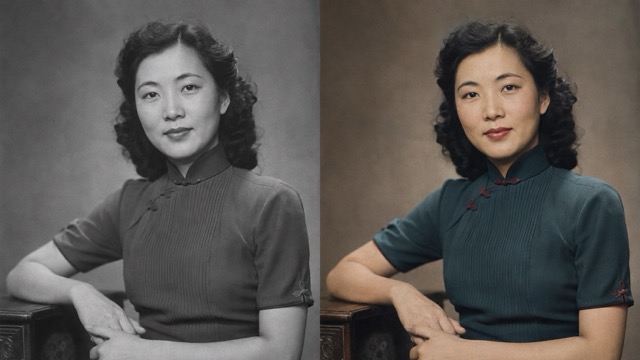
How to Use the AI Colorizer
Use the AI Colorizer in three simple steps while keeping technical choices out of the way and focusing on the photograph.

1. Upload Your Image
Upload a black-and-white, grayscale, sepia, or faded photo. A clear scan gives the AI Colorizer better context for faces, edges, shadows, and objects. Save a separate copy of treasured originals and crop distracting empty borders. No masks, brushes, selections, or color layers are required.

2. Let AI Add Color
Start the AI Colorizer and let it examine the complete scene. It reads brightness, texture, objects, and familiar photographic patterns to suggest natural colors for people and surroundings. The automatic process gives beginners a useful first interpretation without complex retouching.

3. Review and Download
Review the AI Colorizer result, checking faces, hands, clothing, signs, and background objects. Compare it with the monochrome source to confirm that identity, pose, composition, and mood remain consistent. Download the finished image while keeping the original as your archival reference.
Best AI Image Tools for Creative Projects
Explore creative tools for image, learn tips and tricks, and see how AI can be your assistant in turning concepts into finished projects.






What Makes This AI Colorizer Useful
The AI Colorizer reads the complete scene, preserves recognizable details, and creates balanced color that is easy to review, share, or refine.
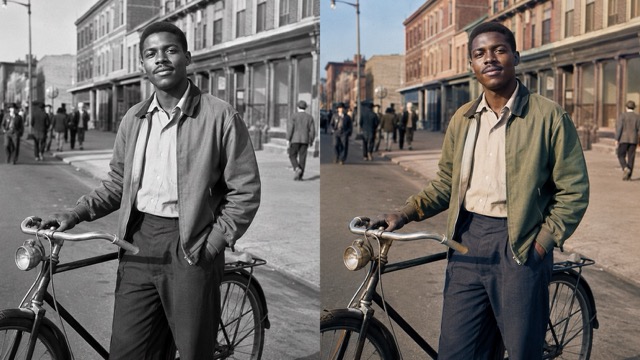
Context-Aware Color for Complete Scenes
Manual colorization requires decisions about skin, clothing, foreground objects, lighting, and background tones. The AI Colorizer evaluates these relationships together before generating a full-color interpretation. It can separate skin, hair, fabric, sky, plants, roads, and architecture instead of placing one tint over everything. Although the result is not a factual record of missing colors, it can provide a coherent and believable reconstruction. This makes the tool useful for colorizing black-and-white photos without brushes, layers, masks, or complex desktop software.
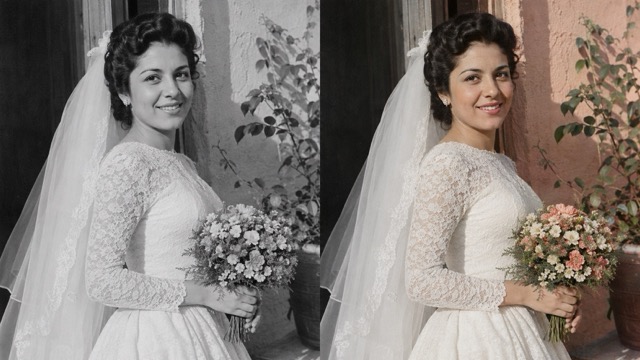
Natural Tones Without a Flat Color Wash
Grayscale photographs preserve brightness, not a unique answer for hue. The AI Colorizer therefore proposes a plausible palette instead of revealing hidden color data. It uses scene context to balance skin, clothing, landscapes, interiors, highlights, and quieter background tones. Review the result at normal size, then zoom in on faces and important details. Natural color is usually more convincing than maximum saturation, especially for prints, archives, lessons, or images displayed beside the original. The result remains restrained and readable.
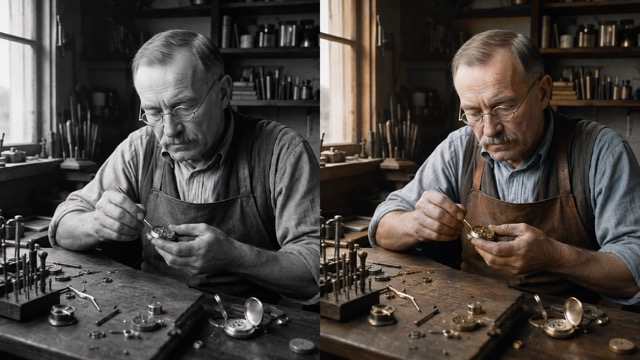
Preserve the Photograph’s Original Story
People choose automatic colorization because the original image already matters. Faces, expressions, poses, framing, and relationships should remain recognizable while color supports the story. This image-to-image workflow is useful for weddings, childhood pictures, ancestry images, military portraits, school photos, and travel snapshots. Compare facial features and small objects after processing. The AI Colorizer adds color but may not repair scratches, missing areas, or heavy blur. Restoration and colorization are separate tasks, and keeping them separate prevents the result from being mistaken for a complete archival restoration.
A Faster Starting Point for Creative Work
Hand-coloring can require research, adjustment layers, detailed masks, and repeated corrections. An online AI Colorizer provides a faster starting point when complete manual control is unnecessary. Use the first output to test a portrait, establish a documentary palette, or compare color with the original vintage mood. It reduces blank-canvas work without removing editorial judgment. Review important details, disclose AI assistance when appropriate, and verify uniforms, flags, vehicles, or historical objects before presenting their colors as authentic.
Ways to Use an AI Colorizer
Use the AI Colorizer for personal memories, historical learning, or creative work while respecting the photograph, its context, and its audience.

Family Photos and Personal Archives
Colorize a grandparent's portrait, childhood snapshot, wedding picture, or scanned family album. The AI Colorizer helps relatives notice expressions, clothing, and surroundings. Use results in albums, slideshows, keepsakes, or family-history comparisons. Keep original scans untouched and treat generated colors as interpretations unless reliable references confirm them.
Historical Learning and Visual Storytelling
Teachers, students, museums, and researchers can use the AI Colorizer to support lessons and stories. Color can clarify people, terrain, architecture, and objects. Keep the original available, label the result AI-colorized, and verify uniforms, flags, vehicles, and materials with primary sources. The AI Colorizer supports discussion but does not replace evidence.

Editorial, Documentary, and Social Content
A colorized archive image can open a documentary, article, timeline, or tribute. The AI Colorizer lets creators test this direction. Pair the result with the source, disclose AI assistance, and never use generated color as evidence. Choose restrained tones that keep attention on the subject.

Portrait, Travel, and Creative Experiments
Use the AI Colorizer on modern portraits, travel photos, architecture, or monochrome artwork to explore a different mood. One image can support plausible palettes for retouching, costume design, illustration, or campaigns. When accuracy is not essential, the AI Colorizer helps you discover a direction to accept, adjust, or reinterpret.
What People Want From an AI Colorizer
Across family archives, classrooms, documentary research, photography, and content creation, people look for the same balance: faster colorization, a recognizable source image, and room for human review.
I want to show younger relatives the family album in a way that feels immediate, while still keeping every original scan beside the colorized version.
I need a fast first color pass for archive images, followed by enough time to check important objects against documented references.
I want historical photos to hold attention in class, but I also need students to understand that generated color is an interpretation.
I am looking for a visual starting point that preserves the portrait and helps me decide whether a full manual retouch is worth doing.
I want to compare monochrome and color versions before choosing the strongest image for an article, tribute, or social story.



AI Colorizer Questions, Answered Clearly
Learn what the AI Colorizer does, where uncertainty remains, and which photos create convincing results.
An AI Colorizer generates a color version of a black-and-white, grayscale, sepia, or faded photograph. It examines faces, objects, textures, brightness, and scene context before predicting plausible colors. Unlike a simple tint, it assigns different tones to skin, clothing, sky, plants, and walls. No manual masks or painting are required. Because undocumented colors cannot be recovered with certainty, the output remains an AI-generated interpretation.
The AI Colorizer combines remaining grayscale information with visual patterns learned from color photographs. It recognizes subjects and estimates how colors may relate across the scene while preserving light and shadow. Because one grayscale value can represent several hues, the system cannot uncover a hidden original palette. It generates a believable possibility instead. Different attempts may therefore create different but visually reasonable results from the same photograph.
Not automatically. The AI Colorizer can create realistic-looking color, but realism is not historical verification. A gray uniform, vehicle, flag, or dress could have several original colors. For accuracy, compare results with written records, surviving objects, period catalogs, or documented color photographs. Label outputs as AI-colorized in archives, classrooms, documentaries, or news. Plausible color is acceptable for personal projects when it is not presented as evidence.
Clear images with recognizable subjects, useful contrast, and visible edges give the AI Colorizer stronger context. Portraits, family groups, streets, landscapes, and buildings are good candidates. Scan prints evenly, avoid glare, rotate correctly, and preserve real detail. Heavy blur, scratches, tears, underexposure, or tiny faces can weaken color boundaries. Restore severe damage before colorization, and avoid excessive sharpening or grain removal that erases useful texture.
Yes. Sepia and faded images can work when subjects and structure remain visible. The AI Colorizer may reinterpret them as a fuller color scene, although stains and yellowing can confuse context. Faded color prints also differ from true black-and-white photographs because original color clues may survive. Keep an untouched scan, compare results carefully, and decide whether the goal is recoloring, cleanup, or documented restoration.
No. The AI Colorizer adds a plausible palette; restoration repairs scratches, tears, dust, stains, fading, blur, missing areas, or low resolution. Some workflows combine both, but they remain separate operations. Restore badly damaged structure first so the AI Colorizer receives clearer information. Clean monochrome images may need only colorization. Separating the tasks makes evaluation easier: first confirm that details remain faithful, then judge whether generated colors support the photograph and its intended use.
See a Familiar Photo in AI Colorizer
Choose one black-and-white image and discover how an AI Colorizer can transform its atmosphere while keeping the original story in view. Upload, colorize, compare, and save a new version for your album, lesson, archive, or creative project.
