
More AI Image Generators
Explore our collection of specialized AI image generators designed for different creative needs and styles






















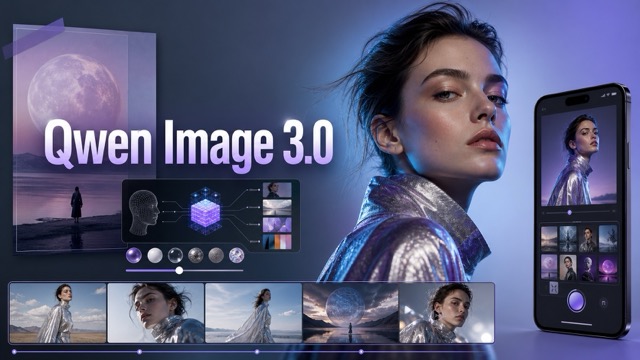
Camera Roll: Turn One Photo Into a Day of Real-Life Moments
Create an AI Camera Roll that feels spontaneous, personal, and ready to share.
Camera Roll turns one clear reference photo into a full day of casual, story-rich images. Generate a believable mix of selfies, candid portraits, coffee stops, street scenes, mirror shots, food, sunsets, and small everyday details—then receive them in a realistic iPhone-style gallery. No complicated editing, no manual collage, and no need to plan a photoshoot. Make a Camera Roll that feels like a memory, not a marketing campaign.
Create Your Camera Roll in Three Simple Steps
Turn one photo into a complete AI Camera Roll in seconds. No prompt-writing skills, manual collage work, or complicated editing tools are required. Upload your photo, click generate, and download a share-ready gallery filled with spontaneous-looking daily moments.

1. Upload Your Photo
Upload a clear photo with one main person, character, or pet. Camera Roll uses it as the visual reference for your gallery, helping keep recognizable facial features, hair, style, and personality consistent across the generated photos. For the best result, choose a well-lit image where the subject is clearly visible.

2. Click Generate
Click Generate and let Camera Roll create a full day of casual, connected moments from your photo. The AI builds a varied collection of selfies, candid portraits, everyday details, outdoor scenes, food, mirror shots, and changing light—so the final gallery feels personal rather than repeated.

3. Download and Share
Preview your finished Camera Roll in a tall phone-gallery layout, then download it in seconds. Your final image is ready to share as a photo dump, social post, Story visual, character profile, creative moodboard, or a memorable surprise for someone special.
Best AI Image Tools for Creative Projects
Explore creative tools for image, learn tips and tricks, and see how AI can be your assistant in turning concepts into finished projects.






Why Camera Roll Feels Like a Real Day, Not a Repeated Prompt
The best Camera Roll is more than a grid of near-identical portraits. It feels like a visual diary: a quick selfie, a coffee stop, a walk outside, a small detail, a sunset, and a low-light moment at night. Camera Roll balances identity consistency with natural variety, so every gallery feels warm, believable, and personal.
Build a Full Camera Roll From One Photo
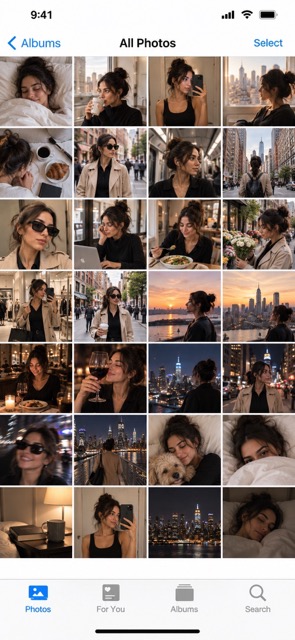
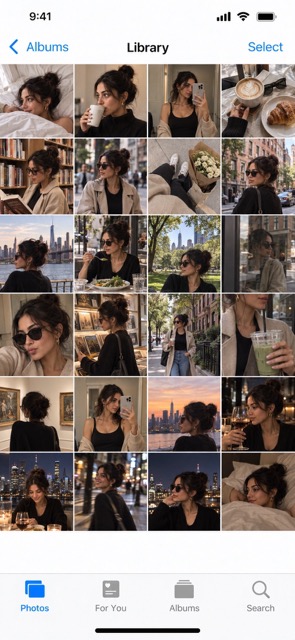
One AI portrait can look impressive, but it does not tell a complete story. Camera Roll creates the moments around it. Upload one reference image and generate 24–32 connected lifestyle photos, including close-up selfies, candid portraits, outdoor scenes, food, personal objects, city details, mirror shots, travel moments, and evening snapshots. The result is a shareable day-in-the-life story for creators, character accounts, social posts, and moodboards.
Keep the Same Person, Change Every Moment
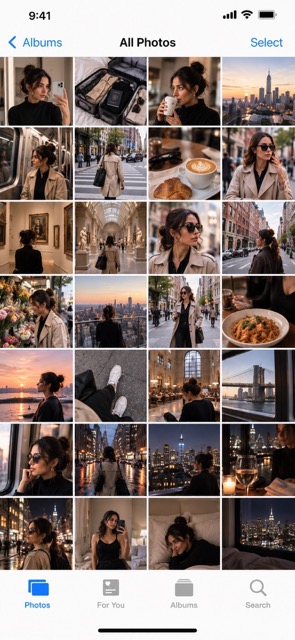
Camera Roll keeps the subject recognizable while changing expressions, angles, distance, lighting, locations, and activities. A gallery can move from a close selfie to a café moment, a city view, a mirror photo, or a quiet detail. That variety makes the result feel like one person’s real day, not duplicated AI portraits.
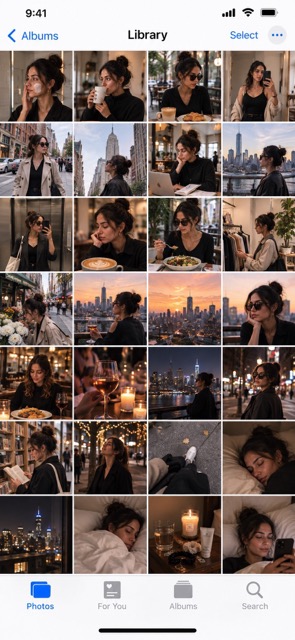
Make an AI Photo Dump With Natural Variety
A memorable photo dump needs more than repeated faces. Camera Roll mixes portraits with food, hands, objects, architecture, scenery, motion, and changing daylight. These relaxed details make the gallery more enjoyable to browse and more believable for Instagram, TikTok, Reels, and Stories.
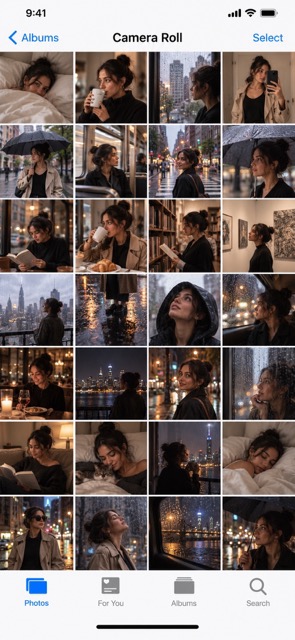
Get an iPhone-Style Gallery Ready to Share
Camera Roll presents your story in a familiar smartphone-gallery format. The tall layout and dense thumbnail grid make it instantly easy to browse. Use your AI Camera Roll as a social post visual, Story opener, character profile, moodboard, or a personal surprise worth sharing.
Camera Roll Ideas for Every Kind of Story
Camera Roll gives one image a fuller life. Create content with emotional continuity—the kind of visual sequence that makes people pause, browse, and imagine the moments between the photos. Use an AI Camera Roll for social content, virtual storytelling, creative planning, character building, or a fun new take on a familiar photo.
Create an AI Photo Dump for Social Media
Turn one reference image into a photo dump for Instagram, TikTok, Reels, Stories, and everyday posts. Camera Roll blends portraits, food, streets, details, scenery, and candid moments for an easy, unplanned feel. Create a city weekend, beach afternoon, café date, concert night, cozy Sunday, or vacation recap in seconds.
Build a Day in the Life for an AI Character
Give a virtual influencer, original character, gaming avatar, or fictional persona a life beyond one profile image. Camera Roll can show everyday moments like getting ready, exploring, meeting friends, eating out, traveling, relaxing at home, or ending the night under city lights.

Explore a Travel, Fashion, or Lifestyle Mood
Visualize a complete mood before planning a shoot or campaign. Create a Paris café diary, Seoul street-style recap, tropical beach afternoon, cozy autumn weekend, festival lookbook, or minimalist city routine. Quickly see how locations, outfits, light, and daily moments work together.

Make a Personal, Unexpected Gift
Turn a favorite photo of a friend, partner, family member, or pet into a playful imagined day. Create a pet’s secret weekend, a funny vacation recap, a dream-date diary, or a nostalgic photo story. A full Camera Roll feels more thoughtful than a single AI portrait.
Made for Moments People Want to Browse
Camera Roll helps creators turn one image into a fuller, warmer visual story. These examples show how people use an AI Camera Roll to make social content, develop characters, test campaign ideas, and create playful personal moments.
I wanted a weekend recap that looked casual instead of overly polished. Camera Roll gave me the small details that made it believable: the coffee photo, the street view, the mirror selfie, and the sunset. It felt like a real sequence of memories, not one AI image copied twenty times.
The Camera Roll format changed how I use AI visuals for my character projects. Instead of trying to generate one perfect portrait, I can make a full day of different moments and angles. It gives every character a stronger personality and makes my posts much easier to plan.
I used Camera Roll to explore a lifestyle campaign concept before booking a real shoot. Seeing the locations, color palette, outfits, and photo types together helped our team align much faster. It was a simple way to turn an early idea into a clear creative direction.
The mix of close-ups, food, scenery, objects, and candid frames makes the output feel much more human than a standard AI portrait. My Camera Roll posts get people to pause and browse because they feel like there is a genuine story behind every thumbnail.
I created a Camera Roll for my dog and it became the funniest thing I posted all week. The gallery included a morning walk, snack time, a couch nap, and a sunset scene. It turned one favorite pet photo into a small story that felt unexpectedly personal.




Camera Roll FAQ
Learn what Camera Roll creates, how the AI Camera Roll Generator uses your image, and how to make every gallery look more natural. Camera Roll is designed for simple creation, but a few practical choices can make your final photo story feel even more personal.
Camera Roll is an AI image effect that turns one reference photo into a collection of everyday-looking images arranged in a tall smartphone-gallery layout. Rather than producing one standalone portrait, Camera Roll creates a visual day-in-the-life story. The gallery can include selfies, candid portraits, outdoor scenes, food, places, objects, mirror photos, and small personal details. The purpose is to create a Camera Roll that feels spontaneous, varied, and connected to the original person, character, or pet.
Start by uploading a clear reference image. Camera Roll uses that image to understand the main subject’s recognizable appearance, then generates a varied set of lifestyle moments around a chosen vibe or story. Instead of giving every photo the same pose and background, the AI Camera Roll Generator creates different framing, activities, locations, lighting, and image types. It then composes the results into a single iPhone-style Camera Roll gallery that is easy to save and share.
Yes. Camera Roll is designed to create a complete photo story from one reference photo. For the best result, use an image with one clearly visible subject, good lighting, and minimal obstruction. The uploaded photo helps guide identity consistency across the generated gallery, while the AI adds realistic variation through candid angles, daily activities, environmental scenes, and detail photos.
A typical Camera Roll includes approximately 24–32 visible thumbnails in a dense four-column gallery. This range creates the feeling of a full day of photos while keeping the final image easy to browse on a tall smartphone screen. The gallery is designed to include enough variety for a believable story, from portraits and selfies to scenery, food, objects, and casual in-between moments.
Choose a clear single-person reference photo and start with one coherent theme, such as a city day, beach trip, café date, travel weekend, concert night, or cozy day at home. The most natural Camera Roll combines close-up selfies, candid portraits, wider location shots, personal details, food, and changing light. Avoid asking for every image to be glamorous or perfectly posed; a little variety and imperfection make the story feel more personal.
No. Camera Roll creates an AI-generated, smartphone-gallery-inspired visual layout. It is designed to evoke the familiar feeling of browsing a personal phone gallery, but it is not an official Apple Photos app product, screenshot, or Apple-affiliated service. The result is a creative visual composition made for storytelling and sharing.
Make One Photo Feel Like a Whole Day
Bring more personality, variety, and story to a single image. Upload a photo, create your Camera Roll, and share a gallery of everyday moments that feels spontaneous enough to be real and original enough to be yours.
