
More AI Image Generators
Explore our collection of specialized AI image generators designed for different creative needs and styles






















Free ChatGPT Image Editor: Edit Photos with Words
Turn the photo you have into the image you imagined with a free chatgpt image editor workflow.
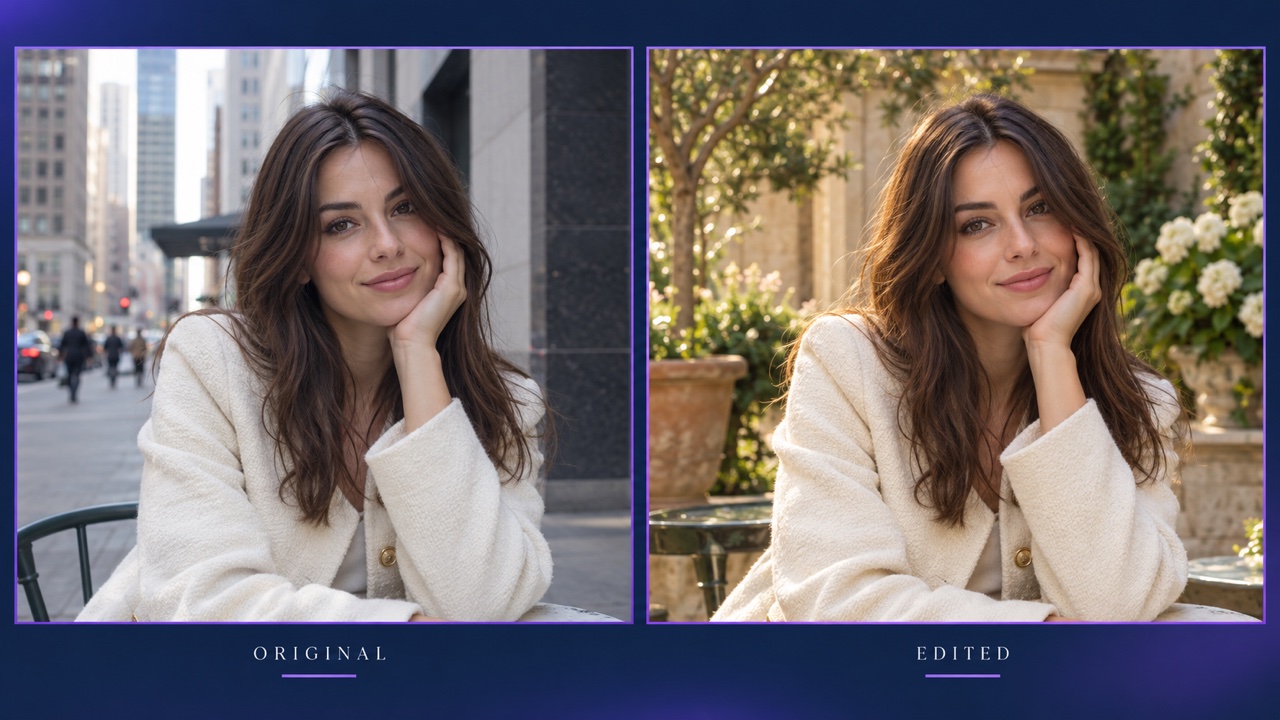
Upload a picture, describe a change, and explore a new version. This free chatgpt image editor page makes background swaps, object cleanup, and creative restyling approachable through an AI photo editor built around everyday language.
How to Use the Free ChatGPT Image Editor
A useful free chatgpt image editor session starts with a clear photo and a specific goal. Treat the AI photo editor as a visual collaborator: explain what should change, identify what should stay, and review the result against your original. The free chatgpt image editor workflow below helps turn a broad idea into an instruction you can actually test.

Upload to the Free ChatGPT Image Editor
Open the free chatgpt image editor and upload one image with a visible subject. An AI photo editor has more useful information when edges and textures are easy to distinguish. Before using the free chatgpt image editor, decide whether you want a subtle correction or a completely different creative treatment.

Describe Your Free ChatGPT Image Editor Changes
Tell the free chatgpt image editor exactly what to edit: replace the background, remove an object, change a color, or restyle the scene. Add a preservation instruction such as keep the face, pose, and clothing unchanged. This makes the AI photo editor brief easier to follow. For your first free chatgpt image editor attempt, request one main change rather than combining unrelated edits.

Generate, Inspect, and Refine
Generate a version with the free chatgpt image editor, then compare the subject, edges, shadows, and small details with your source. If something drifts, narrow the instruction and try again. The AI photo editor can interpret a request creatively, so inspection is part of the process. Use the free chatgpt image editor to explore alternatives, then download the version that meets your goal.
Best AI Image Tools for Creative Projects
Explore creative tools for image, learn tips and tricks, and see how AI can be your assistant in turning concepts into finished projects.




Make Specific Changes with a Free ChatGPT Image Editor
The free chatgpt image editor is most useful when your edit has a clear purpose. Change the setting without losing the subject, clean a distracting corner, or preview a different visual mood. An AI photo editor lets you describe those decisions directly. These free chatgpt image editor examples focus on the choices that make a photo communicate better, with practical instructions you can adapt to your own image.
Replace the Setting, Keep the Subject
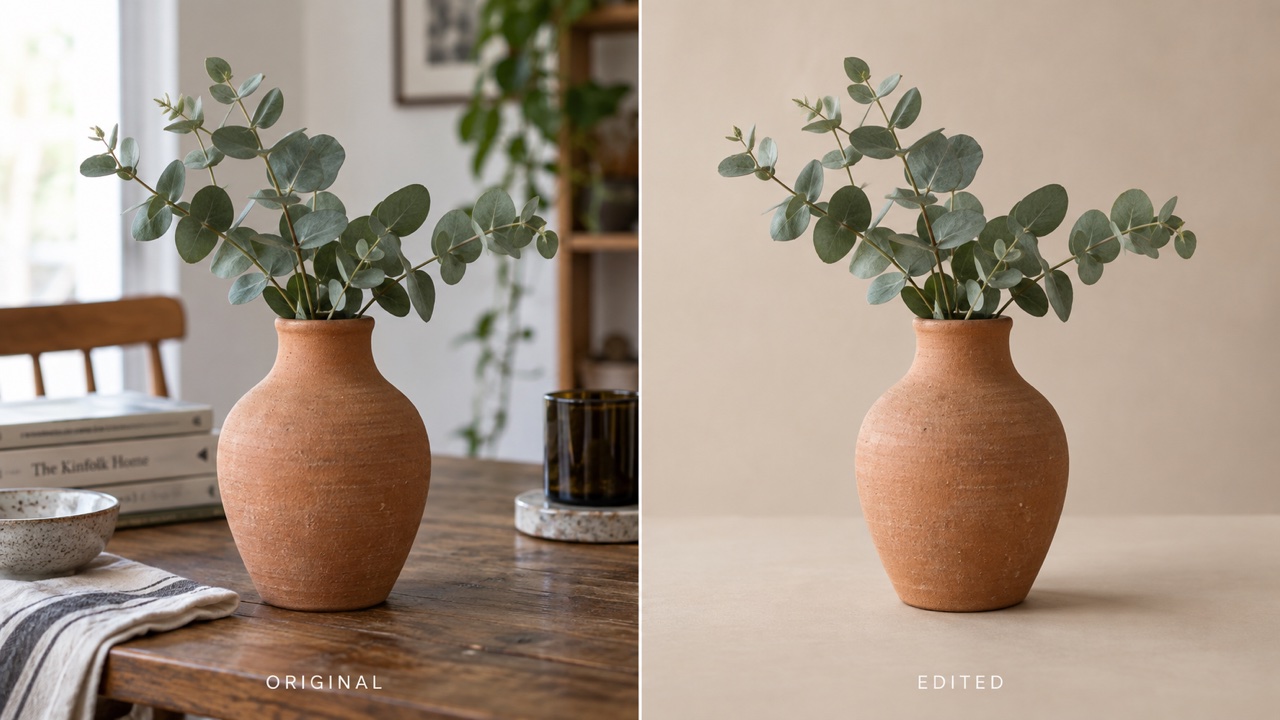
Use the free chatgpt image editor to change photo background with AI while keeping the person or product central. Describe the new environment, its light direction, and the mood you want: a warm studio wall, a quiet garden, or a clean tabletop. Ask the AI photo editor to preserve the original subject proportions and recognizable details. With the free chatgpt image editor, a background request works best when it also mentions contact shadows and perspective. Review hair, transparent materials, and reflective edges closely. The free chatgpt image editor can help you explore a new setting before arranging another shoot, while your source photo remains the reference for what should stay recognizable.
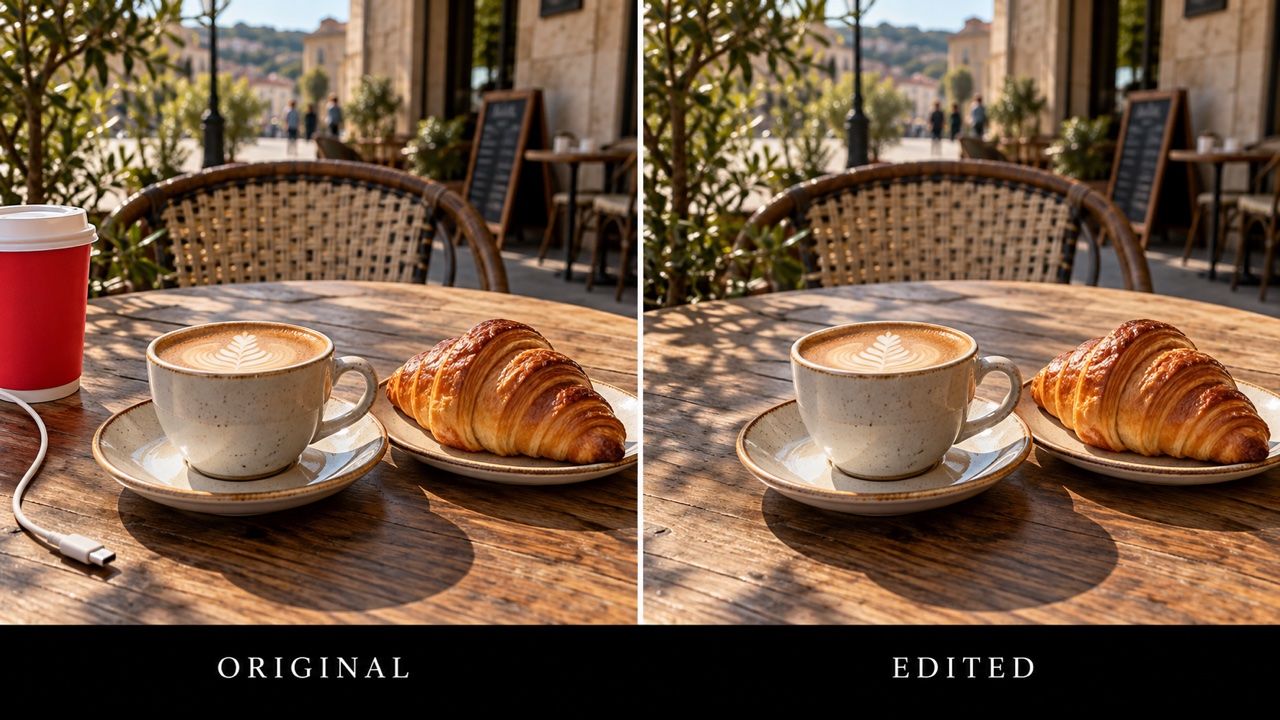
Remove Distractions from the Frame
A bin, stray cable, or small background object can pull attention away from an otherwise useful photo. Tell the free chatgpt image editor which object to remove and what surrounding surface should continue through the gap. The AI photo editor can attempt to rebuild that area using nearby visual context. For a focused free chatgpt image editor request, identify the object by appearance and position, such as the red cup on the left. Check repeating tiles, straight lines, and shadows afterward. The free chatgpt image editor is a practical way to remove unwanted objects from photos when you are comfortable reviewing generated details rather than expecting an exact reconstruction of hidden scenery.
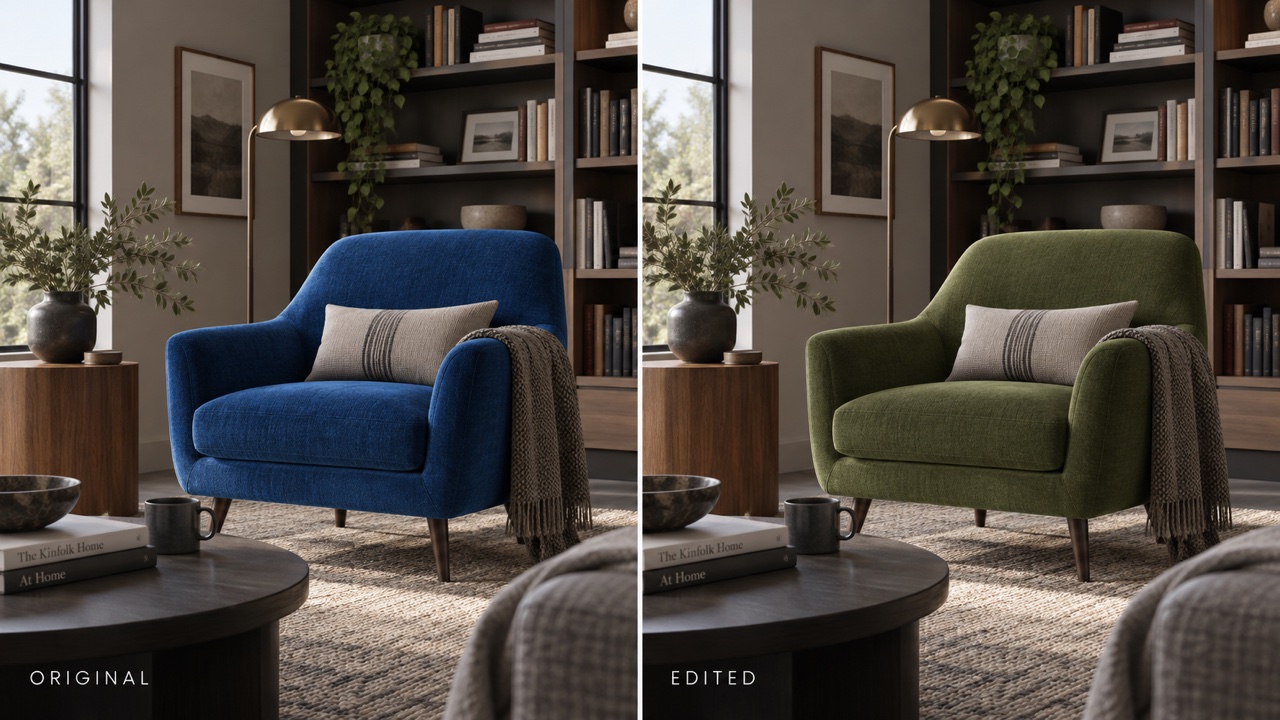
Explore Colors Before You Commit
Try the free chatgpt image editor when you want to see how a jacket, chair, or background feels in another color. Name the target precisely and ask to retain its texture, folds, highlights, and material. An AI photo editor brief such as change only the blue chair to olive green is easier to judge than make the room better. Use the free chatgpt image editor to compare a few directions before choosing your favorite. Color previews are creative approximations, so confirm real product colors separately. The free chatgpt image editor helps you evaluate visual balance and mood without asking you to repaint a room or buy a different prop first.
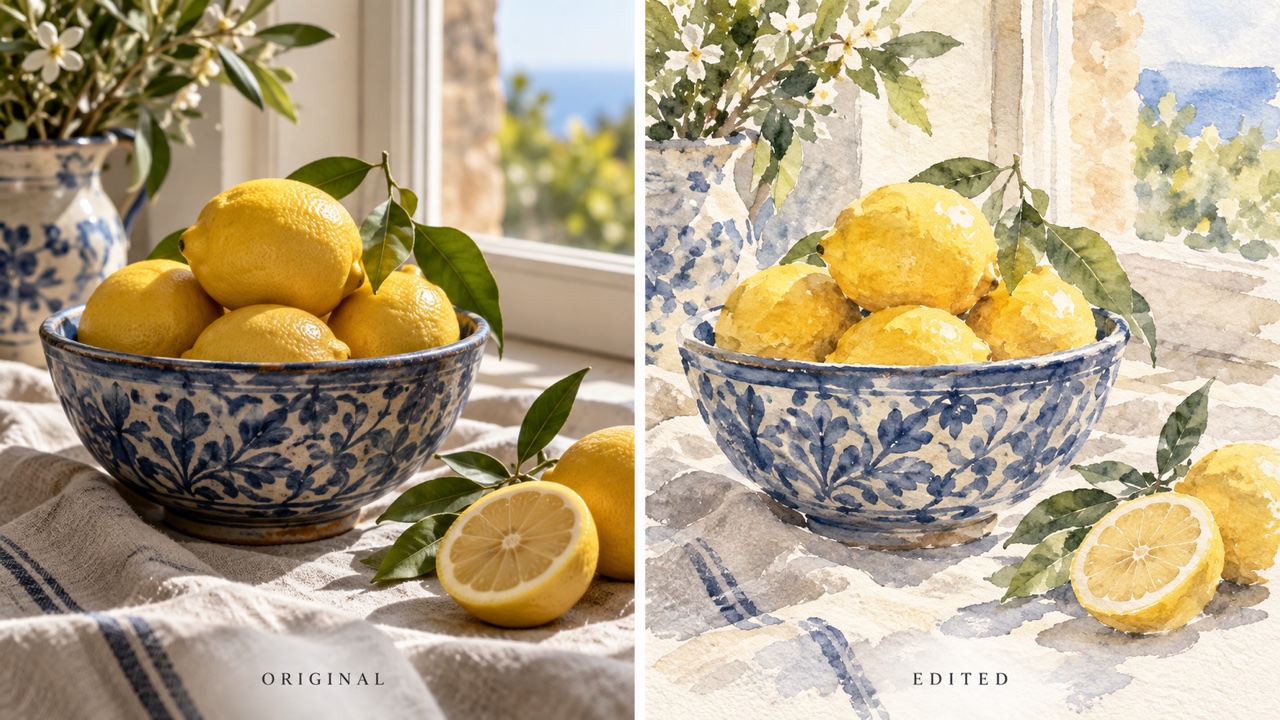
Restyle a Photo with a Clear Direction
Give the free chatgpt image editor a concrete style goal, such as a soft watercolor illustration or a cinematic evening portrait. Specify whether the composition and subject identity should remain close to the original. Your AI photo editor prompt can describe brushwork, lighting, palette, and atmosphere without an elaborate technical vocabulary. The free chatgpt image editor makes it possible to explore expressive versions of a familiar picture. Review the result for changes to faces, hands, text, and meaningful objects. For predictable comparisons, keep the same starting photo and change one style instruction per attempt. The free chatgpt image editor then becomes a way to test an artistic direction rather than surrender every creative decision.
Everyday Projects for a Free ChatGPT Image Editor
You do not need a complicated design project to benefit from the free chatgpt image editor. Start with an image you already want to improve and choose one visible outcome. The AI photo editor can support personal experiments and work drafts alike. Match your free chatgpt image editor request to the purpose of the photo, and keep factual details accurate wherever the image represents something real.

Free ChatGPT Image Editor for Products
Use the free chatgpt image editor to explore a simple studio setting for a handmade mug, bag, or accessory. Ask the AI photo editor to keep shape, material, markings, and color consistent. A free chatgpt image editor draft can help you decide how much styling supports the item without competing with it. Inspect the output against the real product before using it in a listing; decorative changes should never imply a feature the product does not have.

Free ChatGPT Image Editor for Portraits
Try the free chatgpt image editor for a portrait with softer light or a calmer setting. Explain which facial features, hairstyle, clothing, and pose must stay recognizable. The AI photo editor works from your brief, but generated edits can still alter identity details. Compare the free chatgpt image editor result with the original before sharing. A precise request for gentle lighting is often easier to control than a broad request to make someone look perfect.

Free ChatGPT Image Editor for Social Posts
Bring a travel shot or everyday scene to the free chatgpt image editor and test a more expressive color palette. Ask the AI photo editor to preserve the part that makes the picture yours, such as a landmark, outfit, or composition. Use the free chatgpt image editor to develop a visual theme across individual posts by reusing a consistent editing brief. Leave space for captions where needed, and check that any generated lettering is readable and correctly spelled.

Free ChatGPT Image Editor for Creative Drafts
A free chatgpt image editor experiment can turn an abstract suggestion into a visual direction that teammates can discuss. Describe a scene change or styling idea, then label the output as a concept when you share it. The AI photo editor helps make feedback concrete: warmer lighting, less clutter, or a different background. Keep the original alongside your free chatgpt image editor draft so everyone can distinguish the starting photograph from the proposed creative treatment.
Ways to Approach the Free ChatGPT Image Editor
These fictional example perspectives illustrate how different people might use the free chatgpt image editor; they are not verified customer reviews. Each scenario shows a practical AI photo editor brief and a detail worth checking. Use them as inspiration for your own free chatgpt image editor experiment, then judge the result against the needs of your actual project.
My example brief for the free chatgpt image editor starts with one ceramic bowl and a distracting kitchen background. I would ask for a pale studio surface while keeping the glaze and handmade rim intact. The AI photo editor is useful for exploring presentation ideas, but the product details still need a careful check. With the free chatgpt image editor, I can compare a quiet backdrop with a styled table before deciding which direction deserves a real product shoot.
For my travel journal concept, I would use the free chatgpt image editor to remove a small distraction from the edge of a scenic photo. My instruction would preserve the landscape and the light that made the moment special. The AI photo editor should support the story, not invent a different location. A free chatgpt image editor result would only make the final selection after I checked the horizon, foreground textures, and any recognizable buildings against the original.
I would use the free chatgpt image editor to compare a watercolor interpretation with a more graphic illustration of the same still life. Keeping the composition stable makes the style differences easier to discuss. An AI photo editor can help me express a visual hypothesis before I develop it further. The free chatgpt image editor would be one part of that exploration, with my own choices about palette, contrast, and subject emphasis guiding the next version.
My imagined free chatgpt image editor task is a welcoming event image made from a photo of our venue. I would request warmer light and a cleaner background while preserving the room layout. An AI photo editor draft could make the direction easier to explain to a designer. Before sharing any free chatgpt image editor result publicly, I would check that it does not imply facilities, decorations, or accessibility features that the actual venue cannot provide.




Free ChatGPT Image Editor Questions
Get practical answers before your first free chatgpt image editor attempt. A clear prompt and a careful review usually matter more than a long list of instructions.
No. This free chatgpt image editor page is provided by Pixomi and is separate from the official ChatGPT website. Use the controls and account information shown on Pixomi for this editing workflow.
Check the current allowance and any credit requirement shown before generation. The free chatgpt image editor page does not promise unlimited edits or permanent free access; available usage can depend on your account and the options selected.
Upload one photo and describe a specific change plus the details to preserve. For example, ask the free chatgpt image editor to replace a busy background with a beige wall while keeping the person, clothing, and pose unchanged.
You can request it explicitly, but perfect preservation is not guaranteed. Tell the free chatgpt image editor to keep facial features, expression, hair, and pose unchanged, then compare those details with your original before choosing the result.
Generative editing can reinterpret nearby areas or ambiguous instructions. Give the free chatgpt image editor a narrower request, specify what must stay, and try one change at a time. Check small text, fingers, reflections, and patterned surfaces especially closely.
Name the target, the desired change, and the details to retain. A useful free chatgpt image editor prompt is concrete: change only the red jacket to navy, preserve fabric texture, and leave the person and background unchanged.
Put Your Next Idea into the Free ChatGPT Image Editor
Choose one photo and one change you want to see. Give the free chatgpt image editor a clear brief, inspect the result, and refine the details that matter. Your next useful image can begin with a simple sentence and the picture already in your camera roll.
