
More AI Image Generators
Explore our collection of specialized AI image generators designed for different creative needs and styles






















Change Number in Photo with Natural AI Editing
Replace an existing number while keeping the surrounding photo, style, placement, perspective, and surface details visually consistent.
Change Number in Photo helps you replace a visible number without recreating the whole image. Upload a reference photo, tell the model which number should become which new number, and generate the edit. Change Number in Photo AI follows the original font, angle, texture, lighting, and surface so the replacement fits naturally.
How to Change Number in Photo in 3 Steps
Change Number in Photo follows the workflow shown in the editor: upload a reference image, enter the exact number replacement in Prompt, then click Generate Image. Edit Number in Photo keeps the request simple, while Photo Number Editor handles the visual integration of the new digits.

Upload Your Reference Image
Upload the photo that contains the number you want to replace in the Reference Images area. Change Number in Photo uses this image as the visual source for the edit, so choose a photo where the target digits are readable. Edit Number in Photo works for jerseys, signs, posters, labels, decorations, packaging mockups, game props, and other everyday visuals. Change Number in Photo keeps the uploaded image as the main reference instead of rebuilding the scene from scratch.

Enter the Number Change in the Prompt
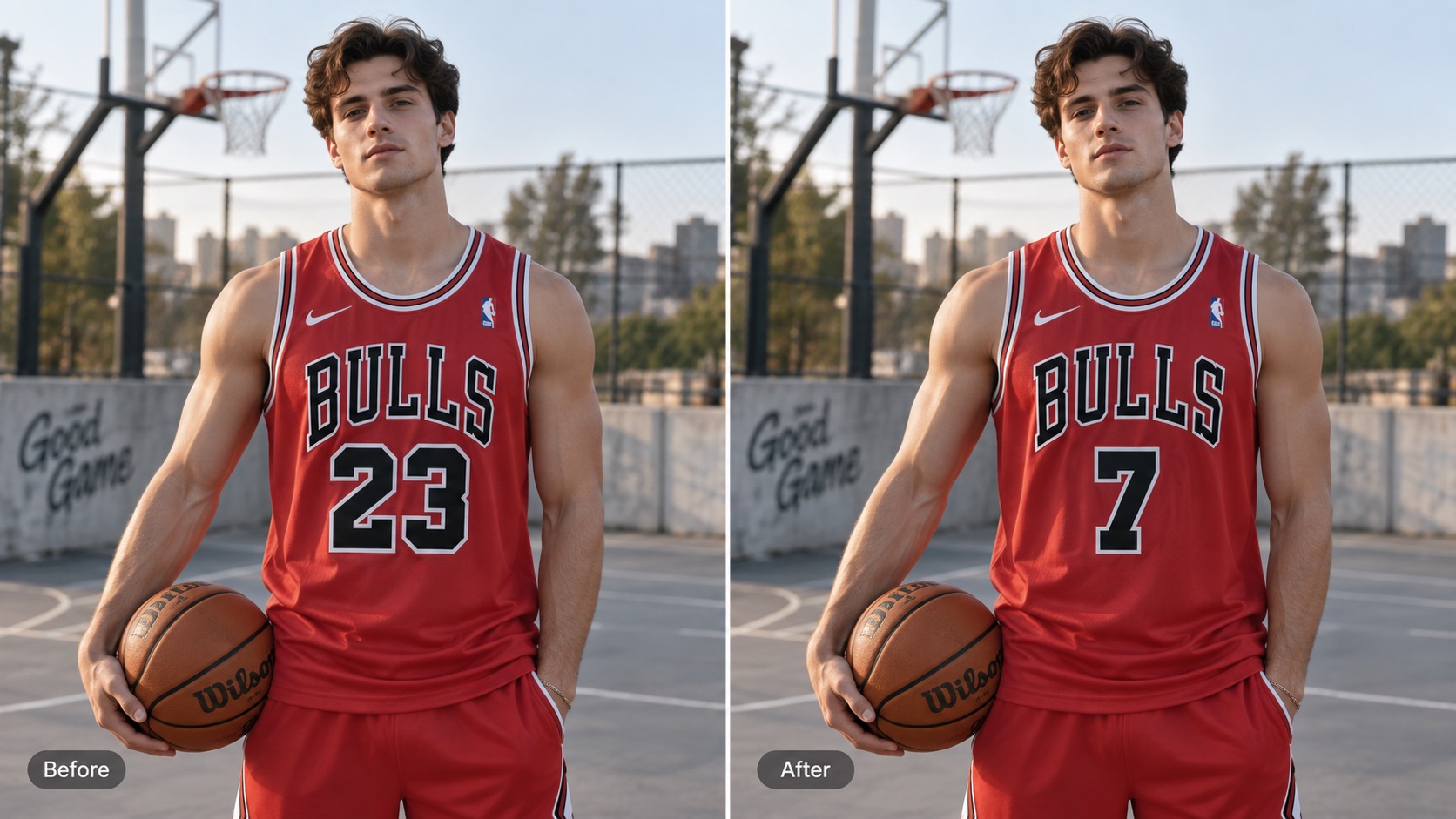
In the Prompt box, write the old number and the new number you want, for example, Change 23 to 7. Change Number in Photo works best with a short, direct instruction. Edit Number in Photo Online lets you state the replacement in plain language, while AI Photo Number Editor uses the image to understand how the original digits look. Change Number in Photo with AI then matches details such as size, color, spacing, angle, and texture around the target.

Choose Settings and Click Generate Image
Leave Aspect Ratio on Auto and keep the default settings if you simply want to preserve the uploaded photo. You can adjust available options when needed, then click Generate Image. Change Number in Photo applies the requested edit and returns the generated result. Photo Number Editor Online helps keep unrelated text, objects, and background details stable. Change Number in Photo AI is designed to change the intended number rather than redesign the full image.
Best AI Image Tools for Creative Projects
Explore creative tools for image, learn tips and tricks, and see how AI can be your assistant in turning concepts into finished projects.





Why Use Change Number in Photo for Focused Edits
Change Number in Photo is designed for a simple job: replace a visible number while preserving the image around it. Edit Number in Photo when the numerical content needs correction, and use Photo Number Editor when matching the original visual style matters. Change Number in Photo with AI combines both needs in one targeted workflow.
Change One Number Without Rebuilding the Image
When only one numerical detail is wrong, rebuilding the full photo wastes time and can introduce unwanted changes. Change Number in Photo focuses on the number you specify and preserves the surrounding image as closely as possible. Edit Number in Photo can be useful when a jersey number, sign number, age, score, label, or decorative digit needs a quick correction. Change Number in Photo Free Online gives you a focused workflow for these small edits. Instead of covering the old digits with a flat text layer, Photo Number Editor uses the original image as context. Change Number in Photo keeps the correction localized so the rest of the composition can remain familiar. Change Number in Photo is especially practical when the existing image already has the composition you want. Change Number in Photo lets you correct the digits while preserving that original visual structure.
Match the Original Number Style More Naturally
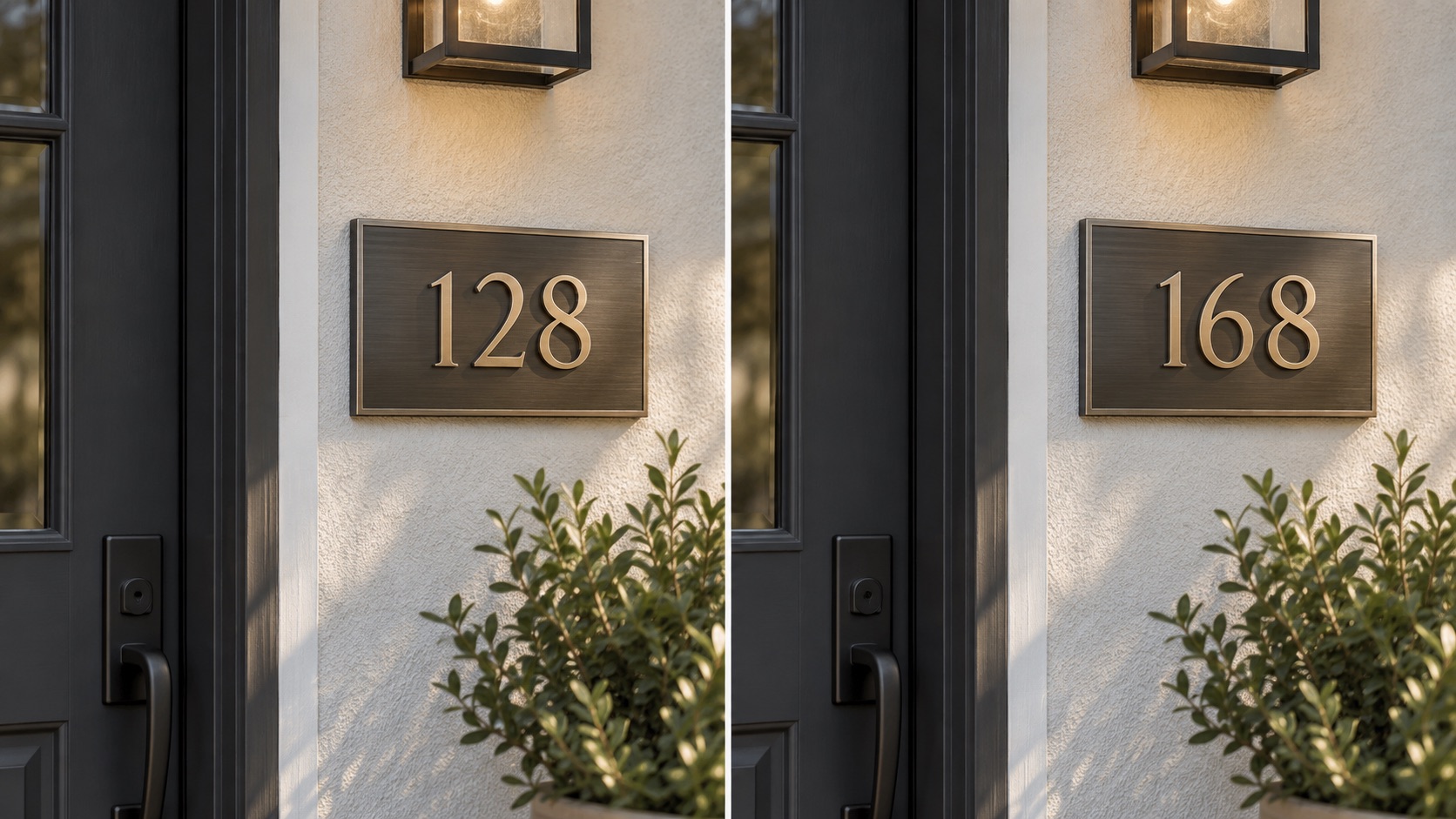
A believable replacement needs more than the correct digits. Change Number in Photo with AI can follow the original font shape, thickness, color, spacing, perspective, shadows, reflections, curvature, and surface texture visible in the photo. Edit Number in Photo AI is especially useful when numbers are printed on fabric, painted on a sign, wrapped around packaging, or photographed from an angle. AI Photo Number Editor helps the replacement belong to the same scene rather than look pasted on top. Change Number in Photo AI uses surrounding visual cues to guide the edit, while Photo Number Editor keeps nearby elements visually consistent. Change Number in Photo also helps keep the replacement aligned with nearby visual details. Change Number in Photo makes this especially useful when the number follows a complex surface or perspective.
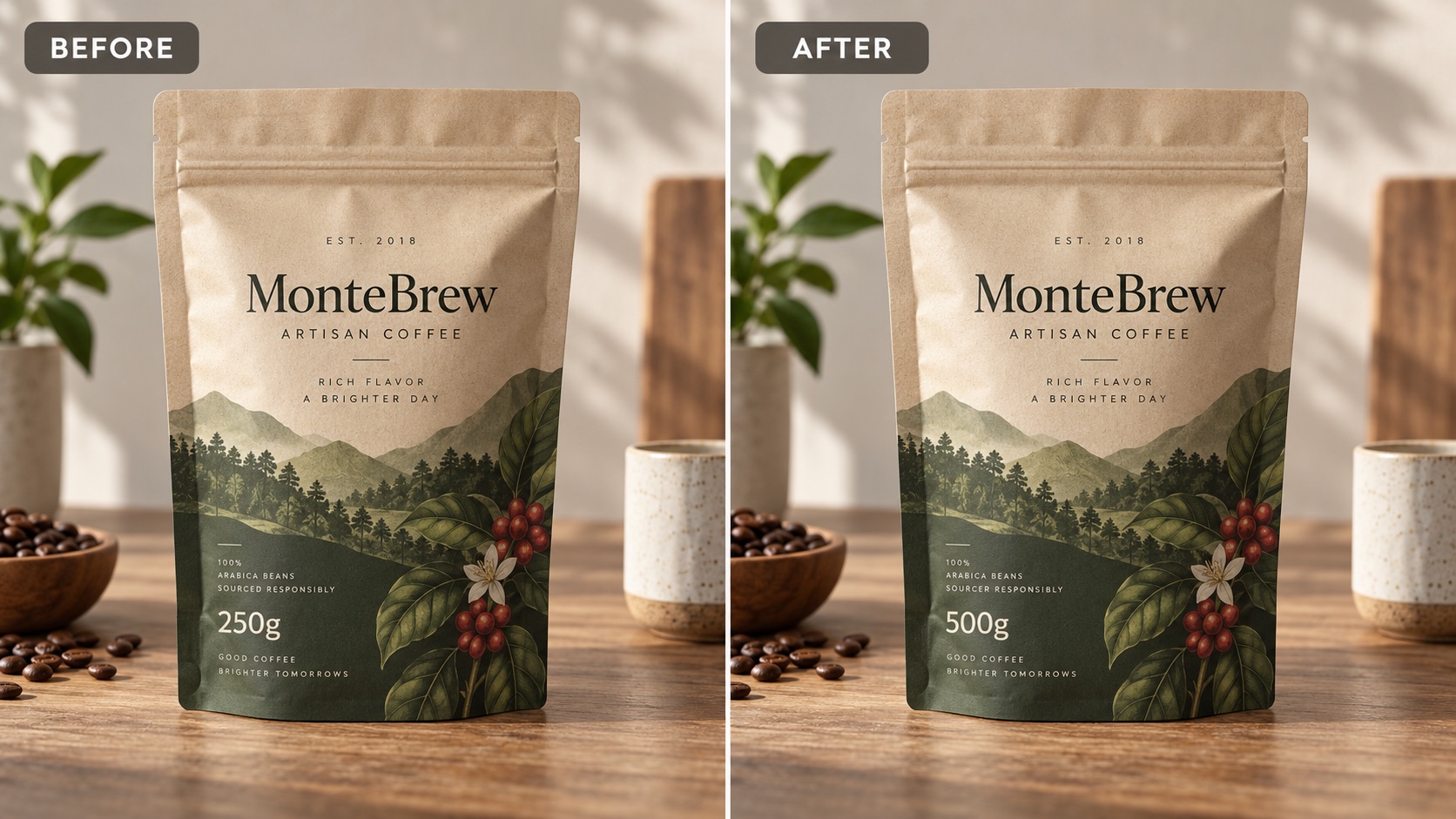
Keep Unrelated Text and Visual Details Intact
A number often sits beside words, logos, patterns, or other digits that should not change. Change Number in Photo is built around a precise replacement instruction, helping the edit stay centered on the intended target. Edit Number in Photo Online is useful when the rest of the design is already correct. Change Number in Image Online can preserve the larger composition while updating a selected numerical element. Photo Number Editor Online is helpful for images where nearby details matter as much as the replacement itself. Change Number in Photo Free Online reduces the need for manual masking, repainting, and type matching when you only need one focused numerical change. Change Number in Photo keeps the edit focused when only one numerical detail needs correction.
Ways to Use Change Number in Photo
Change Number in Photo fits everyday creative tasks where one numerical detail needs to change but the rest of the image should stay recognizable. Edit Number in Photo for a direct correction, or use Photo Number Editor for a replacement that needs to match the photographed surface. Change Number in Photo supports both workflows.

Sports Jerseys and Team Graphics
Change Number in Photo can preview a different jersey number while keeping the player, uniform, fabric folds, lighting, and team design in place. Edit Number in Photo is useful for fan graphics, lineup concepts, personalized sports visuals, and mockups where only the digits should change. Change Number in Photo AI can adapt the replacement to printed or stitched lettering. AI Photo Number Editor helps the new number follow the same scale and placement, and Change Number in Photo Free Online makes it easier to create a quick variation from an existing sports image. Change Number in Photo makes it easy to test another jersey number from the same source photo.

Birthday, Event, and Decorative Numbers
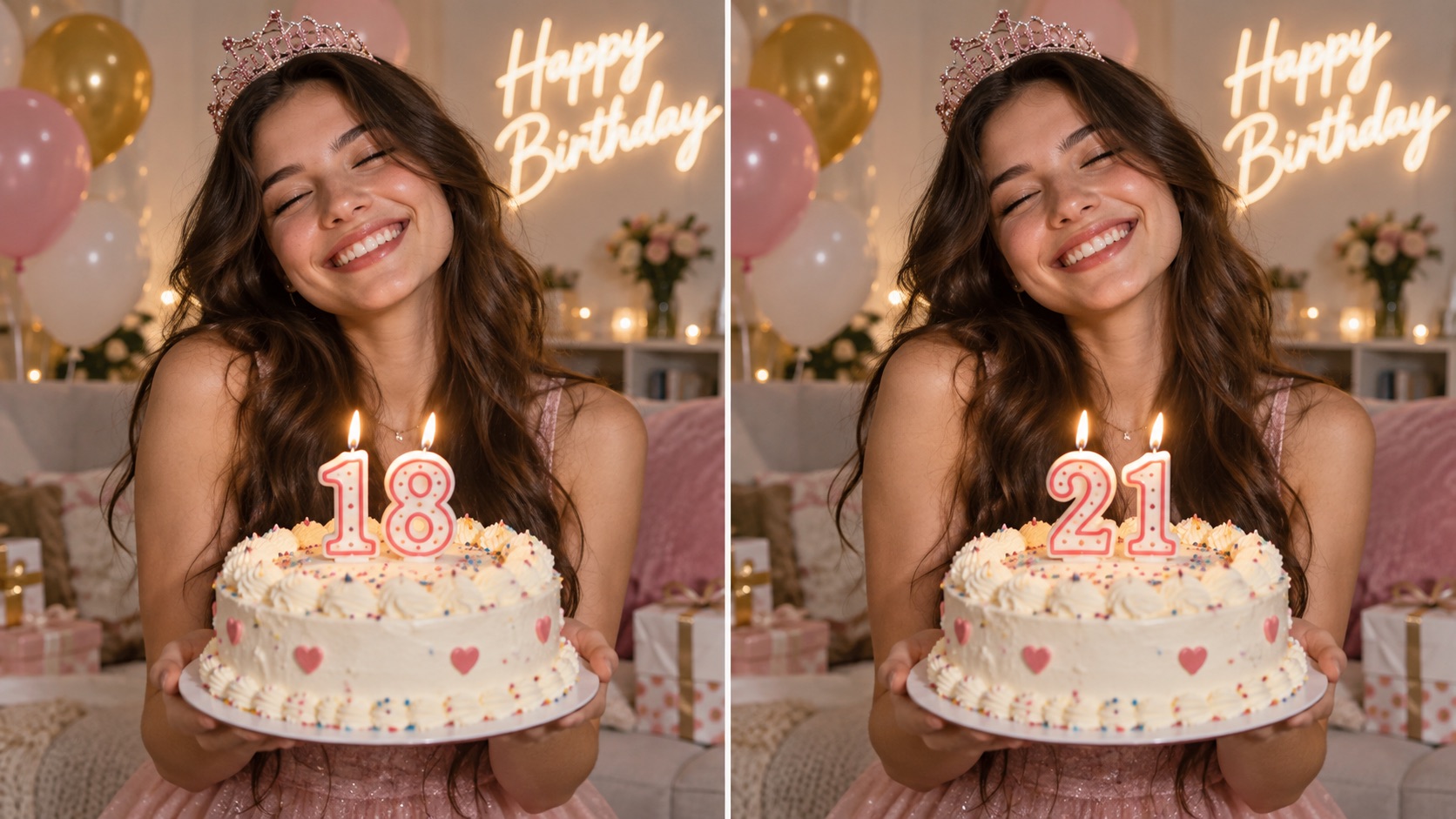
Use Change Number in Photo to update an age, table number, event year, countdown, room number, or other decorative digit in a photo. Edit Number in Photo Online is helpful when the new number must stay consistent with nearby balloons, signs, props, or printed text. Photo Number Editor can follow the original styling, while Change Number in Image Online keeps the broader scene intact. Change Number in Photo with AI is particularly useful when the number is part of a photographed decoration rather than a clean digital text layer. Change Number in Photo is useful when you want the decoration to stay visually unchanged apart from the digits. Change Number in Photo keeps the new number consistent with the original event design.

Packaging, Labels, and Product Mockups
Change Number in Photo helps designers test a different number on packaging concepts, labels, boxes, bottles, tags, and other product mockups. Edit Number in Photo AI can work with numbers that appear printed, stamped, embossed, or slightly distorted by a curved surface. Photo Number Editor Online is useful when the rest of the packaging design should remain unchanged. Change Number in Photo Free Online lets you create numerical variations quickly, while AI Photo Number Editor uses the original surface and surrounding design as references for a more natural replacement. Change Number in Photo lets you test different visible numbers without rebuilding the mockup.

Game Props and Creative Visuals
Change Number in Photo can update numbered props, fictional scoreboards, game assets, costume details, scene decorations, and social graphics. Edit Number in Photo lets you request a specific replacement without manually painting over the old digits. Change Number in Image Online is useful when the number is only one part of a larger composition. Photo Number Editor preserves surrounding artwork, while Change Number in Photo AI helps the replacement inherit the scene's lighting and texture. Change Number in Photo keeps creative iteration focused on the number you actually want to change. Change Number in Photo helps creators make another version while preserving the original art direction.
What Users Say About Change Number in Photo
Users choose Change Number in Photo when a small numerical edit needs to blend into an existing image. Edit Number in Photo keeps the instruction direct, while Photo Number Editor helps the new digits match the original photo instead of looking added afterward. Change Number in Photo keeps these small replacements focused and visually consistent.
I used Change Number in Photo for a jersey mockup where only the player number needed to change. Edit Number in Photo was much quicker than rebuilding the lettering manually, and the new digits followed the fabric angle well. Change Number in Photo with AI kept the rest of the uniform and background consistent. Change Number in Photo gave me a clean variation from the same source image.
I needed to update the age on a birthday decoration photo. Photo Number Editor kept the balloons, colors, and surrounding text in place. Change Number in Photo AI matched the new digits to the original sign, and Edit Number in Photo Online made the instruction as simple as writing the old and new number. Change Number in Photo made the correction feel like part of the original decoration.
For a packaging concept, AI Photo Number Editor helped me create several number variations from the same source image. Change Number in Photo Free Online saved time because I did not need to repaint the label for every version. Photo Number Editor Online also kept the surrounding package design consistent.
I tried Change Number in Image Online for a numbered game prop and got the edit I needed without changing the rest of the artwork. Change Number in Photo was easy to understand, and Edit Number in Photo AI handled the perspective better than a basic text overlay would have.




FAQs About Change Number in Photo
Learn how Change Number in Photo handles targeted number replacement, style matching, prompts, and different surfaces. Edit Number in Photo works best when you clearly identify the old number and the new number you want.
Upload a reference image, enter a prompt such as Change 23 to 7, then click Generate Image. Change Number in Photo uses the uploaded photo to guide the replacement.
Yes. Edit Number in Photo AI can match visible traits such as font style, size, color, perspective, texture, lighting, and placement when the original number is clear.
Yes. Photo Number Editor is designed for targeted replacement. State the old number and new number clearly so unrelated digits and text are less likely to change.
A clear image with readable digits works best. Change Number in Photo AI may be less consistent when the target number is heavily blurred, blocked, or extremely small.
Yes. Change Number in Photo with AI can adapt numbers to angled signs, curved fabric, labels, and textured surfaces when enough visual information is available.
Yes. Change Number in Image Online can replace multi-digit values. Enter the complete old number and the complete new number in the prompt for a clearer instruction.
Use a more specific prompt that names the exact digits to replace. Edit Number in Photo Online works best when the instruction is short, direct, and unambiguous.
Yes. AI Photo Number Editor can be used with jerseys, signs, event decorations, packaging mockups, props, and other ordinary photos containing visible numbers.
Change Number in Photo Without Recreating the Whole Image
Upload your image, tell Change Number in Photo which number should change, and generate the result. Photo Number Editor helps preserve the surrounding scene, while Edit Number in Photo keeps the replacement request simple and specific. Change Number in Photo is useful when the rest of the image already looks right. Change Number in Photo lets you update only the numerical detail you need.
