
More AI Image Generators
Explore our collection of specialized AI image generators designed for different creative needs and styles




















AI Image To Image Generator
Your Photo, Your Direction, A New Possibility
Use our image to image generator to transform an existing photo with clear creative direction. Change a background, refresh a portrait, or explore an artistic style while keeping the details that matter to your idea.
How The Image To Image Generator Works
Start with a picture and a purpose. The image to image generator follows your source image and written direction, giving you a practical way to explore an edit. Searching for an AI image editor free workflow? Check your available credits, choose a model, and work through these four steps.

Upload A Clear Source Image
Give the image to image generator a sharp photograph with the subject fully visible. A portrait, product shot, interior, or travel photo can provide the starting point. Keep the original file so you can compare changes later. For an AI image editor free experiment, begin with a simple image rather than a crowded scene. The upload allowance follows the selected model, so use the references its current controls support.

Describe What Should Change
Tell the image to image generator exactly what you want to edit and what should stay. Try: replace the grey background with a sunlit garden, keep the bottle shape and mint color unchanged. That instruction is more useful than simply asking for something better. An AI image editor free search often starts with a small correction; focus your first request on one visible change.

Choose A Model And Generate
Choose from the Google, OpenAI, and Seedream options configured for this image to image generator. Keep the same source and prompt when comparing models so you can judge the differences clearly. Review the generation cost shown before you proceed. An AI image editor free workflow depends on the access or credits available to your account; model selection does not mean every run is free.

Compare And Refine The Result
Review the image to image generator result alongside your original. Check the main subject, edges, facial details, product shape, and any area you asked to preserve. If the background works but the color feels too strong, request only that adjustment next. This measured approach makes an AI image editor free trial more informative.
Best AI Image Tools for Creative Projects
Explore creative tools for image, learn tips and tricks, and see how AI can be your assistant in turning concepts into finished projects.








An Image To Image Generator For Meaningful Edits
Use the image to image generator for a specific visual goal, from subtle lighting changes to a complete artistic treatment. Each example below illustrates an editing direction, not a benchmark from a named model. If you are comparing AI image editor free options, judge the result against your actual source and instructions.
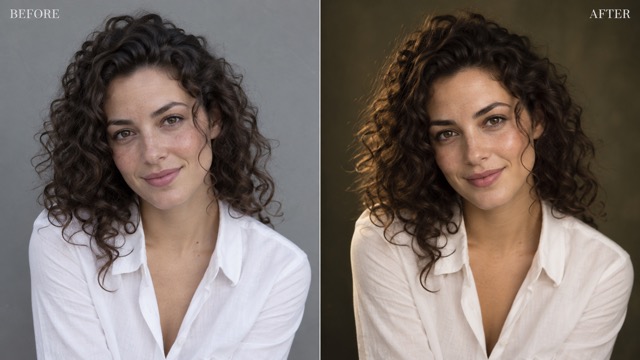
Refine Portraits With The Image To Image Generator
A useful portrait edit should still feel connected to the person in the original photograph. Ask the image to image generator for softer light, a quieter background, or a warmer color balance while keeping facial structure, expression, hair, and clothing consistent. Describe the intended mood: natural window light feels different from a dramatic studio portrait. When evaluating an AI image editor free option, inspect the eyes, skin texture, hairline, and small accessories instead of judging only the overall effect. The image to image generator aims to follow preservation instructions, but results need review. For an AI image editor free test, avoid stacking a new pose, outfit, background, and art style into one request. A focused first edit makes it easier to see what improved and what needs another pass.
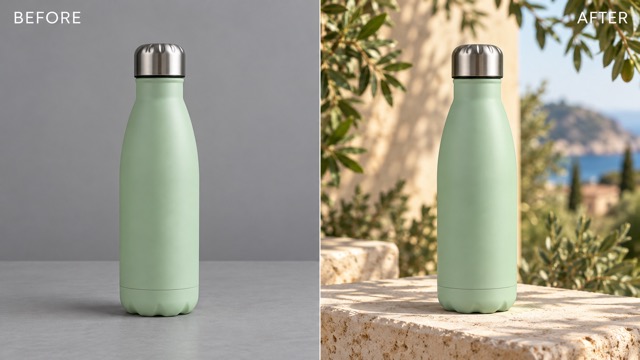
Change Backgrounds With The Image To Image Generator
Give an existing product or portrait a more suitable setting without planning a new photograph. Tell the image to image generator where the subject belongs, how the light should fall, and which physical details must stay unchanged. A reusable bottle can move from a plain tabletop to a limestone surface surrounded by greenery. Check that the new scene has believable scale, perspective, reflections, and contact shadows. An AI image editor free experiment is most useful when the replacement setting supports a real purpose, such as a seasonal campaign concept or a cleaner profile image. Use the image to image generator to explore that direction, then inspect the subject boundaries. Comparing AI image editor free results should include the fine edges around hair, handles, transparent surfaces, and other difficult shapes.
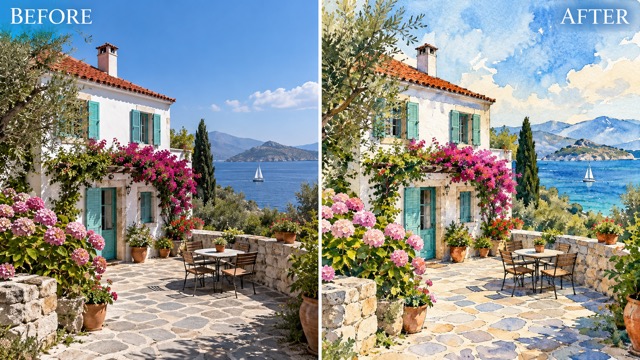
Explore Styles With The Image To Image Generator
Turn a familiar photograph into a watercolor study, a textured illustration, or another visual treatment you can describe clearly. The image to image generator starts from the scene you provide, so name the landmarks, objects, and composition you want it to retain. Ask for luminous watercolor washes and restrained ink outlines when you want a travel image to feel like a handmade postcard. For an AI image editor free style experiment, choose one medium and a small color palette before adding extra effects. The image to image generator can interpret the same brief differently across models, making comparison useful. An AI image editor free evaluation should consider both artistic appeal and how well the output preserves the parts of the source that give the image its meaning.
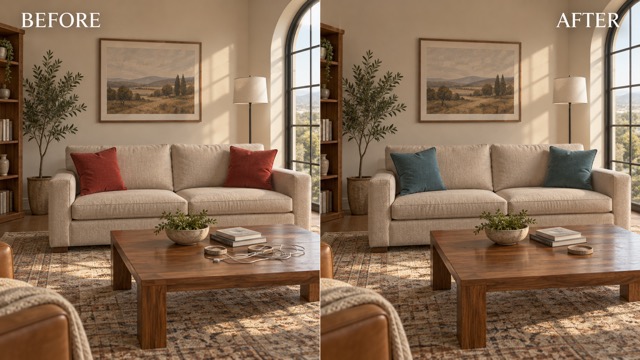
Make Focused Changes With The Image To Image Generator
Sometimes a better picture needs a smaller change. Ask the image to image generator to recolor cushions, remove a distracting cable, or simplify an object in the background while preserving the room layout and camera angle. Specify location with plain language, such as the two cushions on the sofa or the cable on the coffee table. An AI image editor free task becomes easier to assess when the requested change has a clear boundary. Compare the result carefully for unintended changes in nearby textures and objects. Use the image to image generator again with a narrower instruction if necessary. When trying an AI image editor free workflow, keep a copy of the original and decide whether each revision improves the picture before spending another generation on it.
Put The Image To Image Generator To Work
Different projects need different kinds of changes. Use the image to image generator to explore a practical direction before refining the final details. These five starting points can help you turn an AI image editor free search into a focused creative brief.

Portraits And Profile Pictures
Use the image to image generator to explore a calmer background or a more flattering lighting direction for an existing portrait. Keep the expression and recognizable features central to the request. For an AI image editor free trial, compare the result at a comfortable viewing size and then zoom into facial details. A natural finish can be more useful than an exaggerated transformation, especially when the picture needs to represent you accurately.

Product And Campaign Concepts
Give a product photograph a different setting with the image to image generator while asking it to preserve the product shape, material, and color. Explore a seasonal scene or a quieter arrangement for a campaign concept. If you are researching AI image editor free tools, test with a product whose details you can check closely. Review the result against the real item before using it to communicate a product offering.

Travel Photos And Personal Art
Explore a painterly interpretation of a favorite place using the image to image generator. Identify the building, coastline, street, or landscape feature that makes the memory special and ask for it to remain recognizable. Try an AI image editor free workflow with one clearly described medium, such as watercolor or pencil. Compare the treatment with your original to see whether the new image keeps the atmosphere you wanted to preserve.
Interiors And Design Ideas
Use the image to image generator to visualize a different cushion color, wall mood, or simpler arrangement in an interior photograph. Keep the architecture and furniture positions fixed in your instruction. An AI image editor free concept can support a conversation about preferences, but inspect proportions and materials before treating it as a reliable design reference. Make one change at a time so each version answers a useful visual question.
Creative Perspectives On The Image To Image Generator
The following fictional personas illustrate possible creative priorities. These are sample reactions, not verified customer reviews or measured outcomes. Each perspective shows what someone exploring an AI image editor free workflow might look for in an edit.
For a portrait concept, I would use the image to image generator to explore softer light while keeping the original expression. My AI image editor free comparison would focus on natural skin texture, believable eyes, and whether the picture still feels like the same person.
I would ask the image to image generator to place a product in a cleaner setting without changing its silhouette. When comparing AI image editor free options, I would look closely at materials and shadows before deciding which concept deserves further refinement.
A familiar street could become a watercolor illustration with the image to image generator. For my AI image editor free experiment, I would want the architecture and composition to remain recognizable while the texture and palette take on a more expressive character.
I would use the image to image generator to make a visual brief easier to discuss. An AI image editor free test would be valuable if it helped separate a promising lighting direction from a background idea that distracts from the main subject.
The image to image generator would help me explore a more consistent palette for an existing photo. My AI image editor free checklist would include subject clarity, room for a headline, and whether the image still reads well at a small size.
I would try the image to image generator for a small change, such as recoloring cushions while keeping the room intact. An AI image editor free comparison would be most useful when each version changes only one decision I need to make.






Image To Image Generator Questions
Find practical answers before your first image to image generator edit, including how to guide changes, compare models, and understand an AI image editor free offer.
An image to image generator uses an existing picture as a visual starting point and interprets your written instructions to produce a new version. You can request changes to the background, lighting, colors, objects, or overall style. Unlike starting only with a text description, you have a source image to guide the subject and composition. An AI image editor free search usually reflects the same goal: try an edit without committing to an unfamiliar workflow. Results vary with the source, prompt, and selected model, so compare the output with your original rather than assuming every detail will stay identical.
If you are looking for an AI image editor free option, check the current account access, credit balance, and generation cost shown in Pixomi before starting. This page does not promise unlimited free use or free access to every model. The image to image generator brings the configured model choices into one editing workflow, but the available allowance can depend on your account and selection. For a useful AI image editor free evaluation, prepare one clear source image and one focused instruction. Review that first result before deciding whether you need more variations.
This image to image generator is configured with the available Google, OpenAI, and Seedream image models observed in the editor. Google choices include Gemini 2.5 Flash Image, Gemini 3 Pro Image, Gemini Nano Banana 2.1, Gemini 3.1 Flash Image, and Gemini 3.1 Flash Lite. OpenAI choices include GPT-4o Image, GPT Image 2, GPT Images 2.5 Flare, and GPT Images 2.5 Sunburst. Seedream choices include 4.0, 5.0 Lite, 5.0 Flash, and 5.0 Pro. For an AI image editor free comparison, check each choice in the live tool rather than assuming identical controls or costs.
Tell the image to image generator which details are essential: facial identity, expression, clothing, product shape, object position, or camera composition. Then describe the change separately. For example, ask for a warmer background while preserving the person and pose. Clear source images and focused instructions make comparison easier, although exact preservation is not guaranteed. An AI image editor free test should include close inspection of the areas you wanted to protect. If you spot drift, simplify the request and begin again from the original image instead of adding more changes to a flawed result.
A useful image to image generator prompt names the subject, specifies the change, and states what should remain. Instead of saying make it beautiful, try change the two red cushions to muted teal, keep the sofa, room layout, and afternoon light unchanged. Describe materials and lighting when they affect the result, and avoid asking for conflicting styles. For an AI image editor free experiment, one measurable change is easier to assess than a long list of unrelated requests. Keep the prompt that worked so your next variation has a clear starting point.
Yes, you can start the image to image generator with an ordinary photo and a plain language description of the change you want. You do not need to describe complex editing operations. Choose an image with a visible subject, use the upload formats accepted by the tool, and begin with a simple direction. If your AI image editor free search is about learning, compare the source and result carefully: look for accurate shapes, coherent lighting, and unwanted changes. Save the original and your preferred version so you can revisit the idea without losing your starting point.
Make Your Next Edit With The Image To Image Generator
Bring a picture and a clear idea to the image to image generator. Choose your model, describe what should change, and compare the result with your original. If you arrived looking for an AI image editor free workflow, review your available access and generation cost, then begin with one focused edit.
