
More AI Image Generators
Explore our collection of specialized AI image generators designed for different creative needs and styles





















Create A Flashlight AI Photo With Your Mini Anime Self
Your Personal Anime Flashlight AI Portrait Scene
Flashlight AI Photo brings your real portrait, a miniature anime double, and cinematic flashlight lighting into one playful scene. Upload a photo and explore an anime flashlight ai transformation with a personal mood and recognizable details.
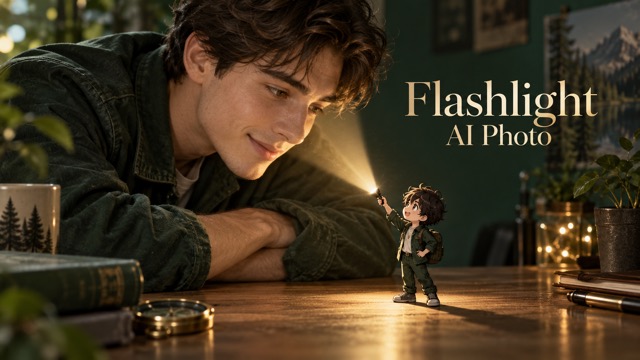
How To Create A Flashlight AI Photo
Create your Flashlight AI Photo in four steps with GPT Images 2.5 Sunburst. Guide your anime flashlight ai scene with one miniature, one beam, and a clear focal point.

Upload A Clear Portrait
Start your Flashlight AI Photo with a sharp portrait showing your face, hair, and outfit. Leave an open palm or tabletop for the miniature and space for the beam. Your anime flashlight ai source needs no existing cartoon character. Keep the anime flashlight ai reference simple and clearly framed.

Describe Your Miniature Scene
Give Flashlight AI Photo a short direction for miniature placement, beam color, and mood. Place your double on a palm, beside a mug, or near a book. Match its hair and clothing, then add one personal detail to your anime flashlight ai scene.

Generate With GPT Images 2.5
Generate your Flashlight AI Photo with GPT Images 2.5 Sunburst in image to image mode. The built-in prompt adds a miniature double and flashlight while retaining your portrait reference. Keep your anime flashlight ai beam coherent and your anime flashlight ai companion distinct from the real person.

Review And Refine The Result
Review your Flashlight AI Photo for recognizable features, natural hands, miniature scale, and coherent lighting. Check that the character stands on a surface and the beam starts at its torch. Refine one anime flashlight ai detail at a time, such as placement or brightness.
Best AI Image Tools for Creative Projects
Explore creative tools for image, learn tips and tricks, and see how AI can be your assistant in turning concepts into finished projects.








Shape Your Flashlight AI Photo Around Four Visual Ideas
Flashlight AI Photo combines recognizable portraits, charming miniatures, coherent lighting, and balanced framing. Explore four anime flashlight ai ideas below. Artwork illustrates the effect concept rather than model benchmarks.
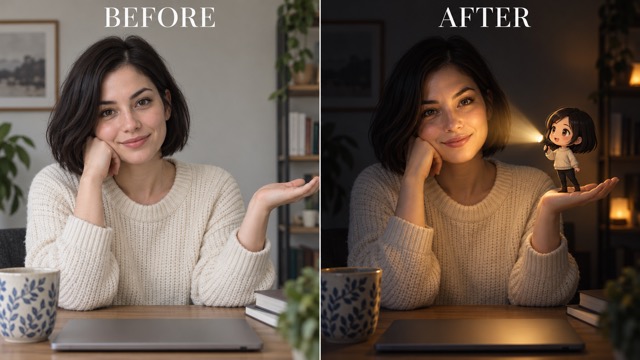
Keep Your Real Identity In A Flashlight AI Photo
Flashlight AI Photo keeps your real portrait as the visual anchor while adding a matching miniature. Preserve recognizable facial features, hair, clothing, and pose so your Flashlight AI Photo feels personal. For an anime flashlight ai scene, give the character familiar details such as glasses or a distinctive sweater. Keep both figures readable through anime flashlight ai styling, then check the eyes, hairline, and hands. Refine any mismatched identity detail with a focused anime flashlight ai instruction.
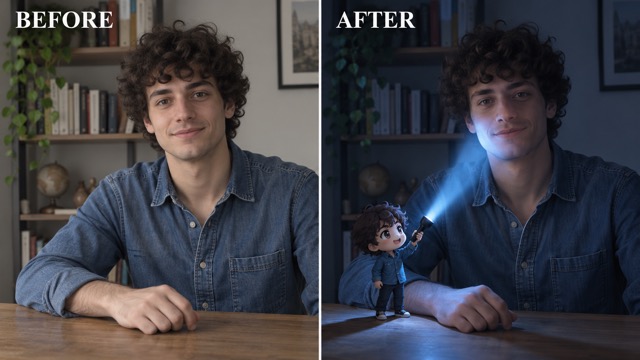
Give Your Flashlight AI Photo A Coherent Beam
Give Flashlight AI Photo one clear beam direction and one illuminated focal point, such as a cheek, hand, or book. Choose warm amber or cool blue for your anime flashlight ai mood. Keep Flashlight AI Photo highlights and shadows balanced, with softer spill on nearby surfaces. Follow the anime flashlight ai beam from torch to destination, then refine misplaced light or missing contact shadows for a more coherent Flashlight AI Photo.
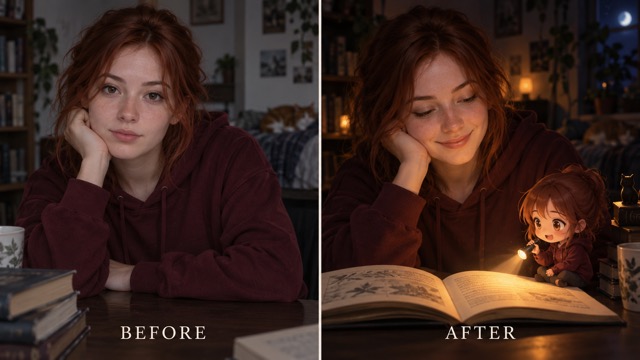
Make Your Flashlight AI Photo Miniature Feel Personal
Give Flashlight AI Photo a miniature with matching hair, clothing, and a familiar accessory. Keep your anime flashlight ai companion small enough for the real person to remain central. Flashlight AI Photo needs a grounded character with visible contact shadows. For a clear anime flashlight ai scene, avoid covering the face and refine oversized figures in your next Flashlight AI Photo.
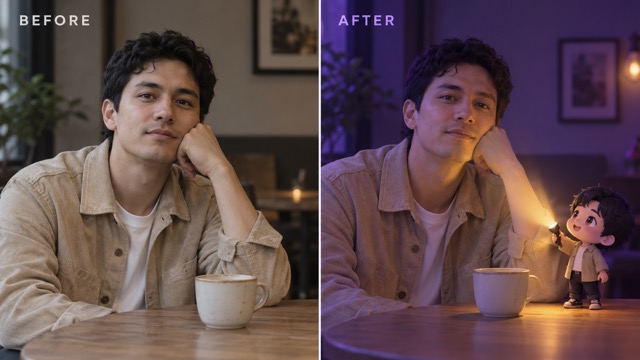
Compose A Flashlight AI Photo With A Clear Mood
Build Flashlight AI Photo around the environment your source suggests, then choose a cozy, curious, or dramatic mood. Leave room for the anime flashlight ai companion and beam; avoid extra glowing props. Keep your Flashlight AI Photo focal point readable at smaller sizes. Check the planned anime flashlight ai crop before sharing, and request more breathing room if your Flashlight AI Photo loses its miniature story.
Creative Uses For Flashlight AI Photo
Use Flashlight AI Photo for profiles, social posts, keepsakes, and mood boards. Match your anime flashlight ai scene to the person and purpose.

Personal Portraits With A Miniature Twist
Give your portrait a playful companion with Flashlight AI Photo. Keep your anime flashlight ai double beside a palm or shoulder and test the profile crop. A simple anime flashlight ai layout helps Flashlight AI Photo preserve a readable miniature story.

Social Posts That Tell A Small Story
Build a Flashlight AI Photo around reading or a coffee break. Choose a warm or cool anime flashlight ai palette, then let Flashlight AI Photo tell the story against a quiet background.

Personal Keepsakes And Creative Gifts
Create a personal keepsake with Flashlight AI Photo and a miniature wearing a familiar outfit. Keep your anime flashlight ai details recognizable, then review the face and hands. Flashlight AI Photo gives the original memory a playful interpretation.

Character And Lighting Mood Boards
Explore photography and miniature styling with Flashlight AI Photo. Compare warm and cool anime flashlight ai lighting or palm and tabletop placement. Keep your Flashlight AI Photo focused on one person, double, and beam.
Creative Reactions To The Miniature Portrait Idea
These fictional names and illustrative reactions describe the intended visual appeal, not verified customer testimonials. They highlight the personal details, playful scale, and focused lighting that can make a miniature portrait memorable.
The tiny matching sweater makes the scene feel personal. I love the contrast between a natural portrait and a curious miniature companion.
The flashlight gives the little character a reason to be there. That small gesture makes the whole portrait feel like a story.
A quiet background and one warm beam feel more engaging to me than a crowded scene full of unrelated effects.
Matching hair and clothing create a clear connection. The miniature can stay expressive while the real person remains the focus.
The open book idea feels cozy and specific. It gives the portrait a personal mood without overwhelming the original expression.
I like having a clear way to compare scale and light direction. A simpler composition makes the miniature easier to notice.






Flashlight AI Photo Questions And Answers
Explore Flashlight AI Photo basics, portrait tips, and lighting guidance for a clear anime flashlight ai starting point.
Flashlight AI Photo combines a real portrait, miniature anime double, and expressive torch lighting. The anime flashlight ai contrast makes the scene playful. Review your Flashlight AI Photo for recognizable identity and coherent light.
Upload a portrait and generate your Flashlight AI Photo with GPT Images 2.5 Sunburst in image to image mode. The built-in prompt adds a matching miniature and coherent flashlight beam. Start your anime flashlight ai scene simply, then inspect your Flashlight AI Photo for natural hands, clear features, and grounded miniature feet.
A sharp portrait with visible facial features, hair, and clothing gives Flashlight AI Photo a clear reference. Choose a simple anime flashlight ai background with room for the miniature and beam. Ask Flashlight AI Photo to preserve your recognizable identity.
Yes. Add optional directions to Flashlight AI Photo for light color, mood, or miniature placement. Keep your anime flashlight ai instruction specific, such as placing the companion beside a mug. Review your Flashlight AI Photo after each focused adjustment.
Flashlight AI Photo aims to preserve recognizable features, hair, clothing, and pose, but generated edits may reinterpret details. Inspect hands and accessories. Name any identity detail in your anime flashlight ai refinement, then choose the Flashlight AI Photo with the strongest resemblance.
Simplify Flashlight AI Photo to one person, one miniature, one torch, and one illuminated focal point. Keep the background quiet and the character grounded. For a confusing anime flashlight ai result, adjust only the main issue: scale, brightness, placement, or shadows. A focused Flashlight AI Photo revision makes improvements easier to assess.
Create Your Own Flashlight AI Photo
Start your Flashlight AI Photo with a clear portrait and one miniature scene. Guide your anime flashlight ai lighting, then review the face, hands, and beam. An ordinary picture can inspire a playful anime flashlight ai story. Upload your photo and create yours now!
