
More AI Image Generators
Explore our collection of specialized AI image generators designed for different creative needs and styles














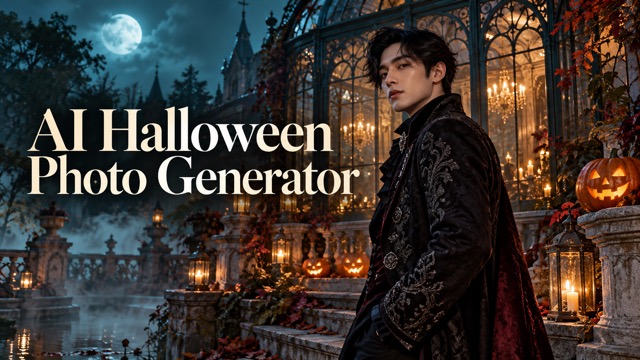
AI Halloween Photo Generator Online for AI Halloween Trend
Turn Your Photo Into A Halloween Scene
AI Halloween Photo Generator turns an uploaded picture into a Halloween-inspired image. Give a familiar portrait, pet, or place a seasonal makeover with atmospheric lighting, festive details, and a little spooky imagination, starting with a photo you already love.
How To Use AI Halloween Photo Generator
AI Halloween Photo Generator starts with your picture, so there is no blank canvas to fill. This AI Halloween image generator applies a built-in seasonal direction. Follow four practical steps to give the AI Halloween Filter a clear starting point and review the result before sharing.

Choose A Clear Source Photo
Pick a well-lit portrait, a pet picture with visible fur, or a scene with a clear focal point. AI Halloween Photo Generator has more useful detail to work with when the subject is sharp and unobstructed. Avoid a heavily compressed screenshot or a face hidden behind sunglasses. A good source helps AI Halloween Photo Generator keep the seasonal idea connected to your original picture.

Upload Your Image
Add your selected picture to AI Halloween Photo Generator using the image upload control. Check the thumbnail to make sure it is the version you intended to use. The AI Halloween Generator works from this visual reference, so crop away distracting clutter beforehand if necessary. Keep enough room around the subject for hats, autumn decorations, or a different background to fit comfortably.

Generate A Halloween Makeover
Start generation and let AI Halloween Photo Generator reinterpret the photo with its built-in Halloween direction. You do not need to write a detailed prompt for this effect. The AI Halloween image generator aims for a coherent seasonal scene, bringing together costume-inspired details, color, and atmosphere.

Review The Details
Look at the face, hands, pet markings, and important background shapes before keeping the result. AI Halloween Photo Generator can introduce changes beyond the seasonal styling. View the AI Halloween Filter result at a larger size, then try another source photo if a detail feels wrong. Use AI Halloween Photo Generator with a different crop when the subject needs more space or a clearer outline.
Best AI Image Tools for Creative Projects
Explore creative tools for image, learn tips and tricks, and see how AI can be your assistant in turning concepts into finished projects.












What You Can Create With AI Halloween Photo Generator
AI Halloween Photo Generator gives familiar subjects a seasonal setting, from a candlelit portrait to a pumpkin-filled porch. The comparisons illustrate creative possibilities for the AI Halloween Generator; they are not promises of identical results from every photo.
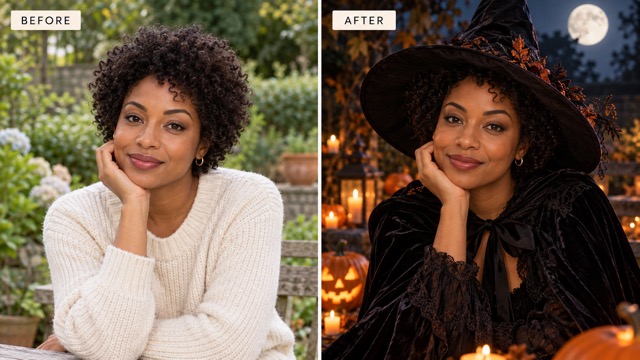
AI Halloween Photo Generator For Witch-Inspired Portraits
A favorite portrait already contains the most valuable part of the picture: a person you recognize. AI Halloween Photo Generator uses that starting point for a Halloween makeover with costume-inspired styling and an autumn setting. The AI Halloween Filter aims to make those details feel part of the photograph rather than a pile of disconnected stickers. AI Halloween Photo Generator may reinterpret hair, clothing, or expression, so inspect the result closely. This AI Halloween image generator is useful for exploring a character concept before choosing a real costume.
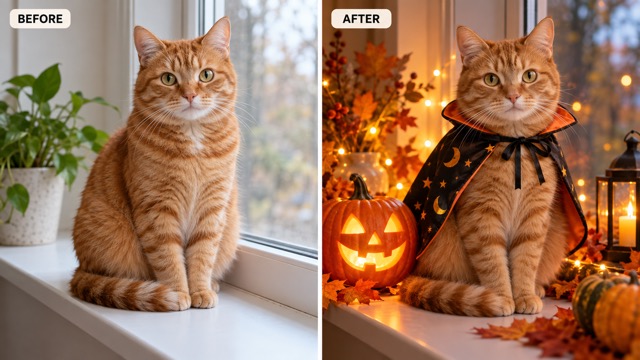
AI Halloween Photo Generator For Playful Pet Pictures
A cat by the window or a dog on the sofa can become the center of a charming seasonal picture. AI Halloween Photo Generator brings Halloween atmosphere to a pet photo without requiring an actual costume session. This AI Halloween Filter direction works best when the eyes, ears, and distinctive markings are easy to see. Use AI Halloween Photo Generator to explore a lighthearted image for a greeting or a personal post. The AI Halloween image generator may change small details, especially paws and fur patterns, so compare the result with your source.
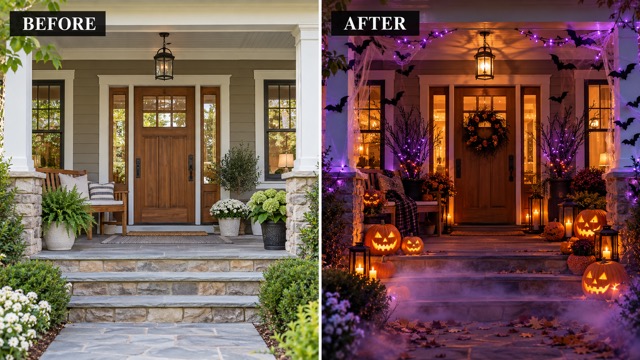
AI Halloween Photo Generator For Haunted Porches And Rooms
Your Halloween photo does not have to start with a face. AI Halloween Photo Generator can use a room, doorway, or porch as the basis for a seasonal scene. The AI Halloween Filter adds a different mood to the space while the source supplies the composition. Use AI Halloween Photo Generator for visual decoration ideas or an atmospheric background for a party concept. This AI Halloween image generator creates an interpretation, so check doors, windows, and furniture rather than treating the result as an exact renovation plan.
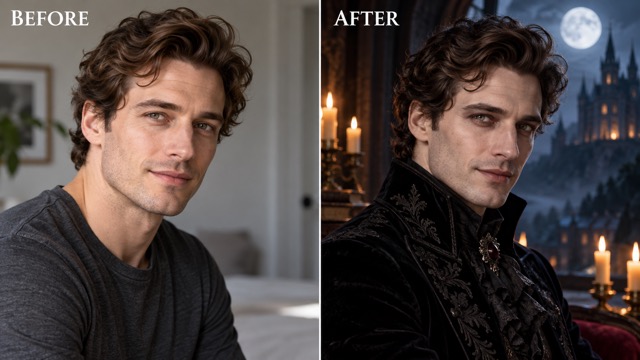
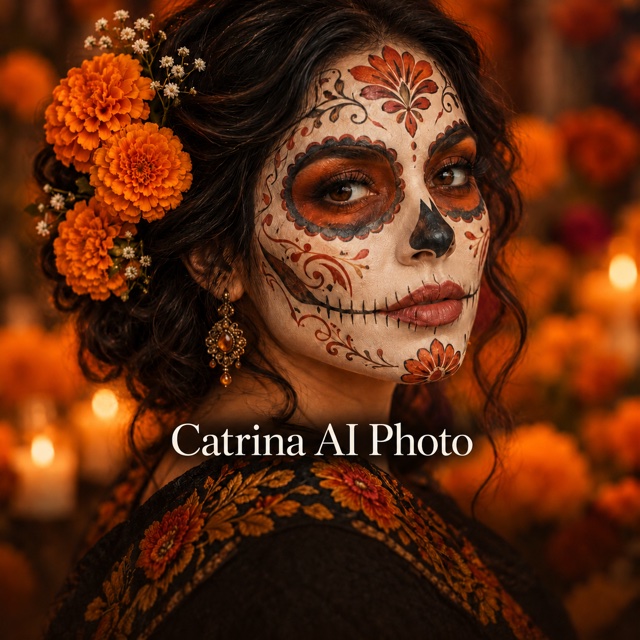
AI Halloween Photo Generator For Gothic Costume Concepts
For a more dramatic direction, start with a portrait that has a strong silhouette and a calm expression. AI Halloween Photo Generator can reinterpret that image with gothic costume cues, rich dark fabric, candlelight, or a moonlit backdrop. Treat the AI Halloween Filter as a way to explore that balance before planning a shoot. AI Halloween Photo Generator cannot guarantee a specific costume or perfect identity preservation.
Ideas For Your AI Halloween Photo Generator Images
Use AI Halloween Photo Generator when you want a seasonal picture with a personal starting point. The AI Halloween Generator can support a profile refresh, a party idea, a pet greeting, or a mood board. Choose a source that already has the subject and framing your project needs.

AI Halloween Photo Generator For Seasonal Profile Pictures
Give your October profile a festive direction with AI Halloween Photo Generator. A close portrait with space above the head leaves room for costume details while keeping the face readable in a small crop. The AI Halloween Filter can inspire a seasonal avatar, but check the result at actual profile size. AI Halloween Photo Generator is a creative starting point; crop carefully so the eyes and expression remain the focus.

AI Halloween Photo Generator For Personal Party Invitations
Build a visual starting point for a Halloween gathering with AI Halloween Photo Generator. A doorway, living room, or host portrait can establish the mood before you add the date and location in your usual design app. The AI Halloween image generator supplies seasonal artwork rather than dependable invitation typography. Leave calm space for your message. Review the AI Halloween Generator image for distracting details before placing it behind text.

AI Halloween Photo Generator For Pet Greetings And Family Posts
Turn a familiar pet photo into a friendly seasonal greeting with AI Halloween Photo Generator. Choose a relaxed pose and visible markings so the image still feels connected to your own companion. A warm AI Halloween Filter look can suit a playful October post without a frightening mood. Compare the AI Halloween image generator result with the source, especially around the eyes, ears, paws, and collar, before sharing it with friends.

AI Halloween Photo Generator For Costume And Decoration Mood Boards
Use AI Halloween Photo Generator to explore an atmosphere before arranging a costume shoot or decorating a room. Start with the actual person or space, then look for colors, lighting ideas, and props worth trying in real life. The AI Halloween Generator output is a visual concept, not a shopping list or an exact preview. AI Halloween Photo Generator helps start the conversation; your final choices bring the idea into the real world.
Small Details That Make A Seasonal Image Work
These fictional reactions illustrate creative preferences, not verified customer reviews or reported product tests.
I like a Halloween portrait that still feels like me. The costume and background can change, but my expression should remain the focus. With AI Halloween Photo Generator, I would choose candlelight, autumn colors, and a few thoughtful details. A little mystery feels more personal than a scene crowded with props.
For a Halloween party image, I want guests to feel invited before they feel frightened. Warm pumpkins and a softly lit doorway create the mood I have in mind. AI Halloween Photo Generator offers an appealing starting point. I would add the event details separately, keeping everything clear and easy to read.
My pet should be the star, even when the Halloween decorations are fun. Recognizable eyes and familiar markings matter more to me than an elaborate costume. My favorite AI Halloween Filter idea is a cozy scene with a pumpkin nearby, giving the picture seasonal charm without a real costume session.
A clear face matters more to me than extra props. I prefer Halloween portraits where lighting and clothing support the person. AI Halloween Photo Generator interests me as a starting point for that balance. Before keeping an image, I would compare the eyes, hands, and expression with the original photograph.




AI Halloween Photo Generator Questions
Find practical answers about source photos, seasonal styling, and reviewing your AI Halloween Photo Generator result. A little preparation helps the AI Halloween Filter begin with a stronger image.
AI Halloween Photo Generator is an upload-based effect that reimagines an existing picture with a Halloween theme. It uses a built-in direction to introduce seasonal atmosphere and costume or decoration cues according to the source. You provide the photo rather than starting from text alone. This AI Halloween image generator is intended for creative experimentation, so results can vary and may change details you expected to keep.
Upload your photo, check that the right image is selected, and start generation. AI Halloween Photo Generator already includes a Halloween instruction, so you can begin without composing a long description. The AI Halloween Generator interprets the subject and builds a seasonal treatment around it. Afterward, review the result carefully. If the picture feels too busy or the subject changes too much, try a clearer photo with simpler framing.
For AI Halloween Photo Generator, start with a sharp image, useful lighting, and an obvious main subject. A portrait should show the face clearly; a pet photo should reveal its markings; a room should have readable shapes and edges. Avoid tiny screenshots and heavy blur. The AI Halloween Filter has a stronger starting point when decorations can fit around the subject without hiding the details that make the source recognizable.
AI Halloween Photo Generator is directed to keep the main subject recognizable, but AI editing can alter facial features, clothing, hands, or background objects. Identity preservation is an aim, not a guarantee. Compare the AI Halloween image generator output with your original at a larger size. A good seasonal picture should still feel connected to the source, and it is worth trying another upload if an important feature looks different.
Check the account and generation options shown on Pixomi before starting. Access to AI Halloween Photo Generator, any trial allowance, and credit requirements depend on the current service terms and your account. This page does not promise unlimited or free generations. Once you understand the displayed requirements, choose your source and use the AI Halloween Generator to explore a seasonal result that suits your idea.
AI Halloween Photo Generator can help create seasonal pictures for a personal post or profile concept. Review the result, crop it for the intended placement, and check that the people pictured are comfortable with the edit. For client work or commercial use, check the applicable terms and rights first. The AI Halloween Filter supplies a visual starting point; add captions, event details, or other text separately for clearer communication.
Give Your Photo A Halloween Makeover
Choose a picture you already love and let AI Halloween Photo Generator introduce a seasonal mood. Start with a clear subject, explore the AI Halloween Generator result, and keep the details that fit your idea. Your next pumpkin-lit portrait or playful pet picture starts with one upload.
