
More AI Image Generators
Explore our collection of specialized AI image generators designed for different creative needs and styles


AI GIF Generator: Make Your Ideas Move
AI GIF Generator And AI GIF Maker For Original Reactions
Turn a written idea or a reference picture into a short animation with AI GIF Generator. Create animated GIFs for a character reaction, a playful mascot, or a simple visual moment. Start with the subject and one movement, then review the loop before sharing. GIF output requires a paid account and sufficient credits.
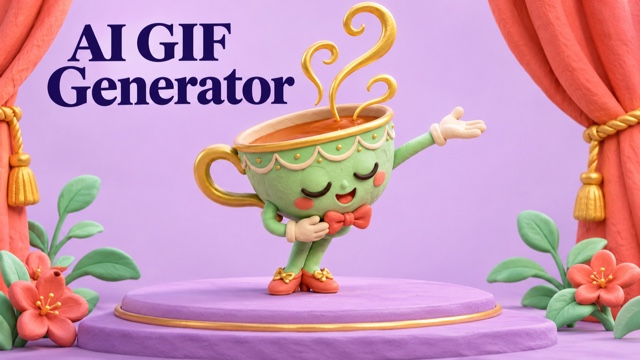
Start A Loop With AI GIF Generator
Give AI GIF Generator a clear movement to work with, then choose the output and review your result. This AI GIF maker supports an idea written from scratch or a picture with motion instructions.

Describe Your Scene
Enter the subject, one action, and the visual style. To use AI GIF Generator from text, explain how the movement returns to its opening pose.

Add A Picture If Needed
Switch to image input and upload one reference picture when you want to animate an existing subject. Tell AI GIF Generator what should move and which details should remain.

Choose GIF Output
Select GIF in Output Format and review the available settings and required credits. GIF output in AI GIF Generator is available to paid users.

Generate And Review
Submit your request, then inspect the movement and the transition between the ending and beginning. Download the result when you are satisfied, or revise the prompt for another attempt.
Best AI Image Tools for Creative Projects
Explore creative tools for image, learn tips and tricks, and see how AI can be your assistant in turning concepts into finished projects.


Create With AI GIF Generator From Words Or Pictures
Explore a text to GIF generator for new scenes, or bring a reference to AI GIF maker when the subject is already yours. These approaches help you create animated GIFs with a specific purpose, from a small character gesture to looping GIFs for social media.
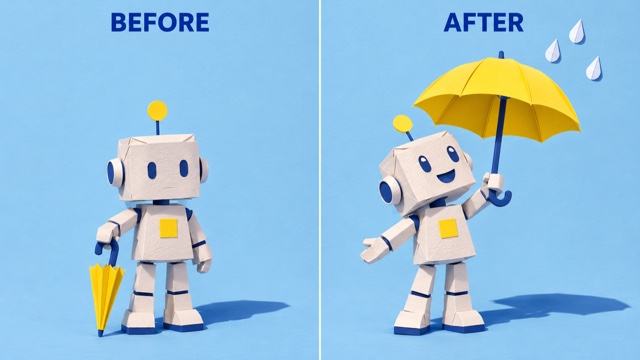
AI GIF Generator For A Written Moment
AI GIF Generator from text starts with an idea you can describe in a sentence. Imagine a small paper robot opening a tiny umbrella, looking up, and returning to its starting pose. A text to GIF generator gives that brief a visual direction without requiring an existing photograph. Name the subject, its surroundings, and the action that makes the moment worth repeating. AI GIF Generator is easier to direct when the movement stays focused.
Use this AI GIF maker to explore a character greeting, a surprised expression, or an object with a playful personality. To create animated GIFs with a clearer rhythm, describe the setup, action, and return. Keep the camera still when the subject carries the joke. With AI GIF Generator, the goal is a readable visual beat that works in a compact space. Review the result for consistent shapes and a convincing transition before choosing it for your project.
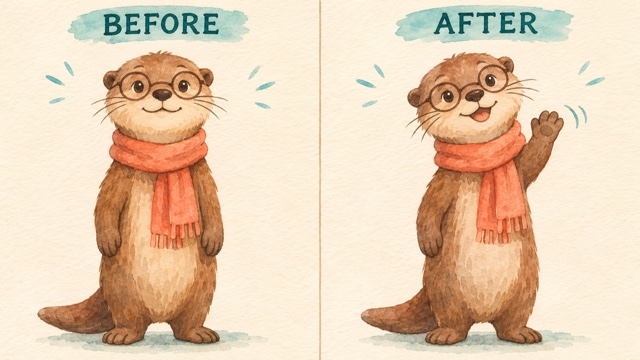
AI GIF Generator For Your Own Picture
Use AI GIF Generator from image when the subject already exists in your artwork or photo. Upload one clear reference and describe a specific movement: a character waves, a pet tilts its head, or a small ornament rocks gently. This AI GIF maker uses the picture as visual direction, so include the details you want to retain in the prompt. AI GIF Generator should receive a clear distinction between moving elements and the still background.
Unlike starting with a text to GIF generator, a reference gives you a composition to build around. Leave room for the action and avoid a source image with a cropped hand if the character needs to wave. AI GIF Generator from image suits a mascot, an illustration, or a personal creative project. Inspect the subject throughout the result; important features can change during generation. Refine the movement rather than adding several unrelated actions to one short loop.
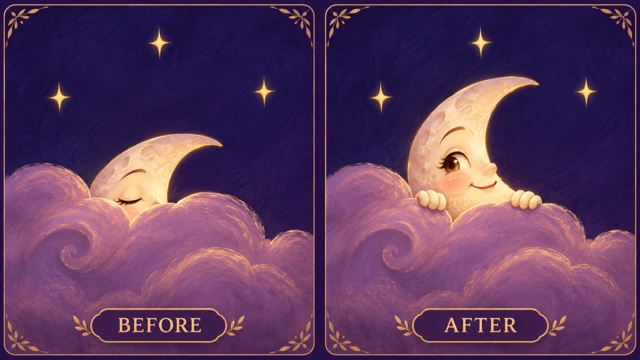
AI GIF Generator For One Clear Action
AI GIF Generator can help you develop looping GIFs for social media around a moment people understand quickly. Start with one action and a visible return: a sleepy character blinks, a desk toy nods, or a painted flower opens and settles. A text to GIF generator benefits from that compact direction because the opening and ending have a shared visual goal. Tell AI GIF Generator which elements should stay steady.
Use this AI GIF maker to test the relationship between timing, expression, and composition. A close view of one character may communicate more clearly than a wide scene full of movement. When you create animated GIFs, review the loop more than once and look for a distracting jump. AI GIF Generator does not replace that editorial choice. Keep the strongest version, simplify an unclear prompt, and adjust only the detail that matters. The result should support your message without making viewers work to understand the action.
Put AI GIF Generator To Work On Your Next Idea
Choose the context before you choose the movement. AI GIF Generator works best with a brief that identifies the audience, the subject, and the one thing the animation needs to communicate. Use AI GIF maker for a personal visual idea or a project draft, then check the destination requirements before sharing. Compare an AI GIF maker reference brief with a text to GIF generator idea to decide where your project should begin.

AI GIF Generator For Community Reactions
Use AI GIF Generator to turn a specific mood into a character reaction. A raised eyebrow, a quiet nod, or a burst of excitement gives a community post a more personal visual voice. AI GIF Generator from text is useful when the character and scene begin as an idea. A text to GIF generator lets you describe the expression and the action together. For looping GIFs for social media, keep the subject prominent and the joke understandable without sound. AI GIF Generator gives you room to try your own interpretation; the final choice should still fit the conversation. Review the loop at the size people will actually see, and keep any added caption brief enough to read.

AI GIF Generator For Character Concepts
Bring a character drawing to AI GIF Generator from image and describe a small gesture that suits its personality. A mascot might offer a greeting, look around curiously, or celebrate a tiny success. With AI GIF maker, the reference is a starting point for your creative direction, so name the silhouette and colors that matter. AI GIF Generator is useful for exploring how that character could behave before you build a longer animation. You can also use a text to GIF generator to sketch a fresh character concept. To create animated GIFs that feel coherent, give each version one clear action and compare the result with the original design. Check hands, facial features, outlines, and background changes before selecting a version.

AI GIF Generator For Campaign Concepts
Plan a product scene with AI GIF Generator before committing to a campaign direction. A ribbon can flutter beside a gift box, or a small decorative element can bounce around a display. AI GIF maker is useful for exploring motion ideas while you decide what the viewer should notice first. Use a text to GIF generator for a fictional concept, or upload a reference when an existing product guides the composition. With AI GIF Generator, keep packaging details and important wording on your review checklist. Looping GIFs for social media need a clear focal point, especially in a busy feed. Compare the draft with your actual product and brand requirements, then choose a suitable version for further design and approval.

AI GIF Generator For Visual Storytelling
Use AI GIF Generator for a small story that returns to its beginning. A curious moon peeks around a cloud, a paper creature unfolds a wing, or a painted teacup gives a polite bow. AI GIF Generator from text lets the story begin with your words, while AI GIF maker can build from a drawing you already like. A text to GIF generator gives you a way to explore the moment before choosing the final treatment. To create animated GIFs for a greeting, presentation, or personal post, connect the motion with the feeling you want to convey. AI GIF Generator benefits from a restrained composition: one subject, an uncluttered setting, and an ending that makes the next repetition feel intentional.
Creative Perspectives On AI GIF Generator
A useful animation begins with a deliberate choice about what should move. These creative perspectives focus on briefing and reviewing an idea with AI GIF Generator, using AI GIF maker for a reference or a text to GIF generator for a new scene. AI GIF maker and text to GIF generator workflows both benefit from that focused approach.
I look for a reaction that says one thing clearly. With AI GIF Generator, my brief starts with an expression and a small action. For looping GIFs for social media, I would keep the background quiet so the gesture does the talking. That gives me a useful standard for deciding which version fits a conversation.
My character sketches already have a personality, so I want the movement to reinforce it. AI GIF Generator from image gives that exploration a visual starting point. I would use AI GIF maker for a simple wave first, then compare the outline and expression with my drawing before trying a more elaborate idea.
For a concept presentation, I need to explain why a movement belongs in the scene. AI GIF Generator helps frame that question around a small visual beat. A text to GIF generator is useful when the scene begins on a blank page. I would review the subject, the timing, and the message together.
I enjoy a loop with a small surprise and a clear return. AI GIF Generator from text suits the way I write a short scene: set it up, let something happen, and return to the opening. To create animated GIFs, I would keep that structure simple enough to understand on a second viewing.


AI GIF Generator Questions Answered
Find practical guidance for choosing an input, writing a prompt, and reviewing a short animation with AI GIF Generator. Check the current output options and account requirements before you submit your request. Choose AI GIF maker for a reference-led idea or a text to GIF generator for a fresh scene.
AI GIF Generator creates a short animation from a written prompt or a reference picture with motion instructions. Use AI GIF maker to develop a reaction, a mascot gesture, or a simple repeating scene. Describe one action clearly and review the output before choosing where to use it.
Describe the subject, setting, movement, and return to the opening pose. AI GIF Generator from text needs a concrete visual idea rather than a list of unrelated effects. A text to GIF generator is a good starting point when you have no reference picture and want to explore an original scene.
Yes. Upload one reference picture in image mode and describe what should move. In AI GIF Generator, also identify the colors, shapes, or facial details you want to retain. AI GIF maker can use your picture as direction, but you should inspect the result for changes to important features.
GIF output requires a paid account on this page. Check your account access and the required credits shown before generating with AI GIF Generator. Free registration or a credit balance alone does not establish access to GIF output. Review the current plan details before deciding to create.
Choose a simple movement that returns to its starting position and keep the camera steady. Tell AI GIF Generator which parts of the scene should remain still. When you create animated GIFs, watch several repetitions and revise an obvious jump. A focused prompt is easier to assess than several actions happening together.
Check the destination before preparing looping GIFs for social media. Platforms can handle animated files differently, and upload requirements can change. AI GIF maker helps you develop the visual idea; confirm file acceptance, display size, and playback behavior where you intend to post. GIF files do not carry audio.
Make A Small Moment With AI GIF Generator
Give AI GIF Generator one subject and one movement worth repeating. Bring a picture to AI GIF maker or open a text to GIF generator with a scene in mind. Create animated GIFs around a clear visual beat, review the loop, and choose the version that fits your project. Check paid GIF access and required credits before generating. Keep your AI GIF maker brief specific enough to evaluate, and use a text to GIF generator to explore a second idea only after reviewing the first.
